# Welcome

You've reached the official Thales Markets documentation.  This guide contains all the resources you'll need to understand Thales Markets, a digital options trading platform built on Thales Protocol.

### Shortcuts:

* [<mark style="color:blue;">**->**</mark><mark style="color:blue;">**&#x20;**</mark>*<mark style="color:blue;">**Use the**</mark>**&#x20;****Thales Markets dApp****&#x20;**<mark style="color:blue;">**<-**</mark>*](https://thalesmarket.io/markets)
* Learn about our inspiration, the great philosopher [***Thales of Miletus***](/thales-of-miletus)
* What is a ***Digital Option*** ?
* Understand how to [***trade on Thales Markets***](/using-thales/trading-guide)
* Information about [***Positional Markets***](/thales-parimutuel-markets/tokenized-positional-markets) and [***Ranged Markets***](/thales-parimutuel-markets/tokenized-ranged-markets)
* How to take part in the [***Referral Program***](/using-thales/thales-referrals-program)
* View a list of [***Resources***](/resources/whitepaper)

<table data-view="cards"><thead><tr><th></th><th></th><th></th><th data-hidden data-card-target data-type="content-ref"></th><th data-hidden data-card-cover data-type="files"></th></tr></thead><tbody><tr><td>Use the Thales Markets dapp</td><td></td><td></td><td><a href="https://thalesmarket.io/markets">https://thalesmarket.io/markets</a></td><td><a href="https://288840232-files.gitbook.io/~/files/v0/b/gitbook-x-prod.appspot.com/o/spaces%2FKSZyDhrhMxBqaXew1MHD%2Fuploads%2FJYjfhUpVLNKudTLtwcNI%2FUntitled.png?alt=media&amp;token=88b6e711-462b-4b2d-82ec-5919bcf30d77">Untitled.png</a></td></tr><tr><td>What is a Parimutuel Market?</td><td></td><td></td><td><a href="https://docs.thalesmarket.io/thales-parimutuel-markets/parimutuel-markets-introduction">https://docs.thalesmarket.io/thales-parimutuel-markets/parimutuel-markets-introduction</a></td><td><a href="https://288840232-files.gitbook.io/~/files/v0/b/gitbook-x-prod.appspot.com/o/spaces%2FKSZyDhrhMxBqaXew1MHD%2Fuploads%2FisB17aTix1tZbmQZkw7M%2Ftropical-indoor-pool.jpg?alt=media&amp;token=90491ce6-f9d3-4738-bce5-8d8b5403b963">tropical-indoor-pool.jpg</a></td></tr><tr><td>Everything about the THALES token</td><td></td><td></td><td><a href="/thales-token/thales-tokenomics">THALES TOKEN</a></td><td><a href="https://288840232-files.gitbook.io/~/files/v0/b/gitbook-x-prod.appspot.com/o/spaces%2FKSZyDhrhMxBqaXew1MHD%2Fuploads%2FynOtiwJnGD0eqxA7GbVv%2Fwp6%20token.png?alt=media&amp;token=daabf4b0-6860-41ab-bd25-375c9350460e">wp6 token.png</a></td></tr></tbody></table>

### What is Thales?

Thales Protocol provides an oracle-based automated liquidity solution that is used to create various types of on-chain Positional Markets limited only by the amount of data that is available to the blockchain.&#x20;

The simple but powerful smart contracts that serve as the foundation of Thales Market allow you to participate in markets for different crypto assets, but this format is not limited to simple up/down positions.  Thales protocol continues to innovate by developing more advanced trading products like **Ranged Markets AMM**, offering community based games like **Thales Royale** and leveraging on-chain sports data by developing the worlds first **SportsAMM** and **ParlayAMM** solution.

Every distinct market is a dedicated smart contract that uses an oracle to establish outcome conditions. Each of these market contracts mint positions in the form of ERC-20 Positional Tokens using USD as collateral. Traders can purchase these tokens for a fraction of a USD, and when the market resolves winning Positional Tokens are redeemable for one dollar while the losing Positional Tokens expire worthless. Thales' novel AMM architecture coordinates market-making with prices derived from live oracle data feeds while a market is in the trading phase, and at the time of maturity it resolves the market so traders can redeem their winning positions.

#### Thales Market Navigation Guide

{% embed url="<https://www.youtube.com/watch?t=34s&v=e8EKlUeQGLA>" %}


# FAQ

Commonly asked questions and answers.

<figure><img src="https://288840232-files.gitbook.io/~/files/v0/b/gitbook-x-prod.appspot.com/o/spaces%2FKSZyDhrhMxBqaXew1MHD%2Fuploads%2FAwWDr5qdZUQInwqVBZfw%2Ffaq%20cover.png?alt=media&amp;token=e845e548-f17d-430c-b79b-e495361f2c92" alt=""><figcaption></figcaption></figure>

### Where can I acquire THALES tokens?

THALES tokens can be acquired on decentralized exchanges like [Uniswap](https://app.uniswap.org/#/swap?outputCurrency=0x217d47011b23bb961eb6d93ca9945b7501a5bb11\&chain=optimism) and [1inch](https://app.1inch.io/#/10/unified/swap/ETH/THALES).  You can bridge THALES and ETH to Optimism with the [Celer cBRIDGE](https://cbridge.celer.network/1/10/DF).

### Which networks host Thales protocol?

Thales protocol is currently operating on [Optimism](https://www.optimism.io/apps/defi), [Arbitrum](https://arbitrum.io/), [Polygon](https://polygon.technology/) and [Base](https://base.org/) networks.

&#x20;                                           ![:optimism:](https://cdn.discordapp.com/emojis/885397024051179520.webp?size=56\&quality=lossless)  ![:polygon:](https://cdn.discordapp.com/emojis/963036781878595594.webp?size=56\&quality=lossless)![](https://288840232-files.gitbook.io/~/files/v0/b/gitbook-x-prod.appspot.com/o/spaces%2FKSZyDhrhMxBqaXew1MHD%2Fuploads%2FvHpXOwMBnqanTs43NNPe%2Farbi%20logo2.png?alt=media\&token=6d70d737-674b-4696-98e6-fd08952617a8)![](https://288840232-files.gitbook.io/~/files/v0/b/gitbook-x-prod.appspot.com/o/spaces%2FKSZyDhrhMxBqaXew1MHD%2Fuploads%2F9ZNFXeYNywvXn4zct7Rg%2Fimage.png?alt=media\&token=cc5f0117-cef8-451d-bf94-751c71c86d56)

### Which forms of collateral does Thales support?

Thales currently supports sUSD (Synthetic USD) as the main collateral across all products hosted on Optimism, with USDC supported on Arbitrum.  [Positional Markets](/thales-parimutuel-markets/tokenized-positional-markets) and [Ranged Markets](/thales-parimutuel-markets/tokenized-ranged-markets)

&#x20;                                   **sUSD** ![:sUSD:](https://cdn.discordapp.com/emojis/795704605513220107.webp?size=56\&quality=lossless) **USDT** ![:USDT:](https://cdn.discordapp.com/emojis/795705563727265803.webp?size=56\&quality=lossless) **USDC** ![:USDC:](https://cdn.discordapp.com/emojis/795704608332054538.webp?size=56\&quality=lossless) **DAI** ![:DAI:](https://cdn.discordapp.com/emojis/795704607502368808.webp?size=56\&quality=lossless)&#x20;

Thales also supports Multi-collateral offramping for Speed Markets on Optimism, Arbitrum and Base.  This means you pay for a Speed Market position or collect winnings in any of the following: sUSD, USDC(.e), DAI, USDT, ABR, OP, ETH, WETH.

### Where can I purchase sUSD on Optimism?

sUSD can be purchased from many decentralized exchanges such as [Curve](https://curve.fi/susdv2/), [Uniswap](https://app.uniswap.org/) and [Sushiswap](https://app.sushi.com/swap), or you can mint sUSD by staking SNX at <https://staking.synthetix.io/>.&#x20;

### What kind of Parimutuel markets will be supported?

[Thalesmarket.io](https://thalesmarket.io/) Marketplace provides users with the ability to purchase positions on Crypto Prices with a specific strike price at a predetermined expiry date for any integrated asset with available ChainLink data feeds. The following assets are currently available for trading:

* **Optimism:** BTC, ETH, OP, SNX, LINK, XRP, BCH, LTC, SOL, PEPE, XAG (Silver) and XAU (Gold)
* **Arbitrum**: BTC, ETH, ARB, DPX, GMX, MAGIC, XRP, SOL, PEPE, XAG, XAU
* **Polygon**: BTC

### What is the THALES token's utility?

THALES is a governance token that can be staked.  All other use cases for the token will be decided by community governance.

### How do I participate in Thales Governance?

THALES stakers are given voting power based on their proportion of the total staked amount of THALES.  Once you've staked THALES you can use the [Governance page](https://thalesmarket.io/governance) to vote for nominees of the Thales Council Election for each 6-month epoch.

### How do I submit a Thales Improvement Proposal (TIP)?

You can check out the [Thales Governance Structure](/governance/thales-governance-structure) page for an explanation of how Thales is governed, as well as the [Thales Improvement Proposals (TIPs)](/governance/thales-improvement-proposals-tips) page for steps to submit them. &#x20;

As per [TIP-154](https://github.com/thales-markets/thales-improvement-proposals/blob/main/TIPs/TIP-154.md), submitters are incentivized with THALES tokens for successfully implemented TIPs.  See the [Thales Improvement Proposals (TIPs)](/governance/thales-improvement-proposals-tips) for more information on incentivized TIPs.

### When is the next trading competition?

Follow Thales on [Twitter](https://twitter.com/thalesmarket) for info on upcoming competitions!


# Thales of Miletus

The story of Thales, the first known person to exercise an options contract.

<figure><img src="https://288840232-files.gitbook.io/~/files/v0/b/gitbook-x-prod.appspot.com/o/spaces%2FKSZyDhrhMxBqaXew1MHD%2Fuploads%2FSlLpoujXtValUzjkDAAm%2Fthales.png?alt=media&amp;token=2a768959-2b64-4229-8eb4-6138f781ebdf" alt=""><figcaption><p>Θαλῆς ὁ Μιλ�?σιος</p></figcaption></figure>

The search for alpha is not exclusive to our time. The Ancient Greeks prized creativity and critical thinking just as we do today, but even then few could harness these skills to create tangible gains. The great thinker Thales of Miletus possessed these abilities and used them to demonstrate the everyday value of philosophy while simultaneously profiting from his brilliance.

Born in 640 BC to noble Miletians, Thales was motivated by astronomy, geometry and philosophy much more than the pursuit of wealth. Despite the doubters who mocked his poverty and useless philosophy, Thales wished to spend his time pondering natural phenomena. One day, Thales drew upon his knowledge of the heavens to speculate that the upcoming olive harvest would be particularly bountiful. He believed that the highly desirable commodity could provide him the financial freedom he desired if he had control over the most efficient method of olive oil production, the olive press.

This opportunity provided very little downside and a huge potential for upside. He quickly summoned his meager savings to rent all the presses in the region prior to the harvest season, betting against his fellow citizens who had no interest in bidding up these rights. When harvest season came and every olive farmer needed to produce oil for the hungry markets, Thales made a fortune renting out his presses at favorable terms, becoming the first person to exercise an option contract. He became wealthy but also demonstrated how philosophy could be valuable in practice.&#x20;

As Aristotle once said: “Thales proved that it is easy for philosophers to be rich if they choose, but this is not what they care about”.

<figure><img src="https://288840232-files.gitbook.io/~/files/v0/b/gitbook-x-prod.appspot.com/o/spaces%2FKSZyDhrhMxBqaXew1MHD%2Fuploads%2FMFFetqAGLoQtqTIBhxmn%2F1_x8_mhHukxX5JKmemo30TQw.png?alt=media&amp;token=91fd74d2-b63a-4403-b4d6-b784dc847c97" alt=""><figcaption><p>Do you see it now?</p></figcaption></figure>

In an act of tribute, the Thales team has adopted the oil press as the inspiration for our logo. The round stone reflects the shape of the crescent moon while a drip of oil represents the flow of profits available to those clever enough to capture them. Thales provides access to permissionless parimutuel options markets that operate completely on-chain. We believe the future of finance requires this level of transparency, decentralization and censorship resistance and the Thales protocol offers this to any user willing to seize the opportunity.

{% hint style="info" %}
To read more about Thales history and branding, visit this link from our official blog:

[***Thales - Olive oil, a cornered market, and our logo.*** ](https://thalesmarket.medium.com/olive-oil-a-cornered-market-and-our-logo-421be0f2fc93)
{% endhint %}


# Parimutuel Markets Introduction

Thales' main breakthrough is the ability to offer **Parimutuel Markets** on the blockchain. In Parimutuel Markets, collateral is placed in a single shared pool, and that pool is awarded to winning participants after a market-settling event has occurred.  A Market-settling event can be one of the two mutually exclusive outcomes (e.g. Thales Positional Markets), or it can be one of many mutually exclusive outcomes (e.g. Overtime Sports Markets). **The payoff for these types of markets can be easily understood as the total pool (minus the house fee) shared across all winning positions.**

<figure><img src="https://288840232-files.gitbook.io/~/files/v0/b/gitbook-x-prod.appspot.com/o/spaces%2FKSZyDhrhMxBqaXew1MHD%2Fuploads%2F5UY9ciXoJRK6vcaAOVrG%2Ftropical-indoor-pool.jpg?alt=media&amp;token=02a40df7-9ce6-4f34-bd69-5b8578cafd0a" alt=""><figcaption><p>Come on in to the pool, the water's fine.</p></figcaption></figure>

### Custom Markets

The Parimutuel format is great for creating markets that focus on the price movement of crypto assets, but this is nowhere near the extent of Thales’ power. Thanks to a network of data authenticators known as "Oracles" that publish information to the blockchain, any off-chain event can theoretically form the basis of a custom market or competition.

<figure><img src="https://288840232-files.gitbook.io/~/files/v0/b/gitbook-x-prod.appspot.com/o/spaces%2FKSZyDhrhMxBqaXew1MHD%2Fuploads%2F4W5hcoWCGHxVC24ssWZ8%2FBu1W7fiCIAAvEfpf%20sdgsg.png?alt=media&amp;token=d14fed97-2ea8-4a7a-ba3c-8b2fce5c21a0" alt=""><figcaption></figcaption></figure>

If the data is available to an oracle and a clear outcome can be defined, then a market can be created with immutability on the blockchain. This outcome can be the arrival of a time based deadline, the winner of a particular competition or a crypto asset reaching a certain strike price to name just a few examples.  And this flexibility doesn’t come with exorbitant risk. Since it’s easy to comprehend the limited downside and potential upside of a Parimutuel Market, participation is simple enough to master quickly while remaining unpredictable and fun.&#x20;

<table data-view="cards"><thead><tr><th></th><th></th><th></th><th data-hidden data-card-cover data-type="files"></th><th data-hidden data-card-target data-type="content-ref"></th></tr></thead><tbody><tr><td>Positional Markets</td><td></td><td></td><td><a href="https://288840232-files.gitbook.io/~/files/v0/b/gitbook-x-prod.appspot.com/o/spaces%2FKSZyDhrhMxBqaXew1MHD%2Fuploads%2FDGichJuVwVaQBMU48oar%2Fsdfsfa.png?alt=media&amp;token=d8eda019-fa26-4c3f-801c-02e436156d01">sdfsfa.png</a></td><td><a href="https://thalesmarket.io/markets">https://thalesmarket.io/markets</a></td></tr><tr><td>Ranged Markets</td><td></td><td></td><td><a href="https://288840232-files.gitbook.io/~/files/v0/b/gitbook-x-prod.appspot.com/o/spaces%2FKSZyDhrhMxBqaXew1MHD%2Fuploads%2FNfltisUnMNVUd6KouG0x%2Fsdfsfa.png?alt=media&amp;token=31875803-4472-4f6c-b68d-cc3cb393b63b">sdfsfa.png</a></td><td><a href="https://thalesmarket.io/ranged-markets">https://thalesmarket.io/ranged-markets</a></td></tr><tr><td>Trading Profile</td><td></td><td></td><td><a href="https://288840232-files.gitbook.io/~/files/v0/b/gitbook-x-prod.appspot.com/o/spaces%2FKSZyDhrhMxBqaXew1MHD%2Fuploads%2FHShSm0JP8p48UIhEB031%2Fsdfsfa.png?alt=media&amp;token=1063f069-3c5f-43e2-b54b-19d13acbed34">sdfsfa.png</a></td><td><a href="https://thalesmarket.io/profile">https://thalesmarket.io/profile</a></td></tr></tbody></table>


# Tokenized Positional Markets

![](https://288840232-files.gitbook.io/~/files/v0/b/gitbook-x-prod.appspot.com/o/spaces%2FKSZyDhrhMxBqaXew1MHD%2Fuploads%2FetdeuwEFSnp09GjdDxCA%2Fpm%20flow.jpg?alt=media\&token=a310347a-3b03-40b7-a018-d35367dbcea8)

When you use Thales to participate in a Parimutuel Market that can only result in two possible outcomes around a single Strike Price of some asset, this is referred to as a **“Positional Market”**.&#x20;

Thales Positional Markets are defined by the following variables:

* Asset - Choice of asset (price feed) around which the Positional Market is revolving around
* Strike Price - Goal price of chosen asset around which market participants choose UP or DOWN
* Maturity Date - Time and date at which it's determined if the asset price is above or below the Strike Price variable

![](https://288840232-files.gitbook.io/~/files/v0/b/gitbook-x-prod.appspot.com/o/spaces%2FKSZyDhrhMxBqaXew1MHD%2Fuploads%2FFzAFxcyL05UukAJLnsjs%2Fscales.png?alt=media\&token=6a71de13-531c-4dfb-afa7-b64987a34e49)

### **Positional Tokens**

Each Positional Market's UP and DOWN positions are represented by ERC20 tokens:

* **UP** tokens ensure your payout if an outcome resolves **positively**&#x20;
* **DOWN** tokens ensure your payout if an outcome resolves **negatively**

Each Positional Market on Thales is a dedicated market Smart Contract and is 100% collateralized by USD.  Once this collateral is locked into the market’s smart contract, Positional Tokens are minted and made available for interested traders via the Automated Market Maker (AMM). **Every 1 USD locked into a Market Smart Contract mints 1 of each Positional Tokens (e.g. 1 USD -> 1 UP token + 1 DOWN token).**

See the [Using the Thales AMM](/using-thales/thales-amm-design) page for more info.

**Each USD collateralizes one UP token and one DOWN token.** The winning side of the market will have the ability to redeem their Positional Tokens in a 1:1 ratio for the USD collateral added to the pool, while the Positional Tokens of the losing side will become worthless and cannot be redeemed.

![Some losing tokens still in my wallet, mocking me](https://288840232-files.gitbook.io/~/files/v0/b/gitbook-x-prod.appspot.com/o/spaces%2FKSZyDhrhMxBqaXew1MHD%2Fuploads%2FGKlAMLHDrDJ1blNAGwtF%2Floser%20pUP.png?alt=media\&token=99827357-4ecf-4c11-b1f5-1e1299ec5b63)

### Potential Payout Example

For the sake of demonstrating a profitable trade using Thales Positional Markets, let's take the following Positional Market:

* **Asset:** ETH
* **Strike Price:** $1,500
* **Time until Maturity:** 11 weeks
* **Current ETH Price:** $1,172.58

With these variables, the Thales AMM prices the **IN** and **OUT** tokens of this market at:

**UP = 0.383 USD**

**DOWN = 0.682 USD**

{% hint style="warning" %}
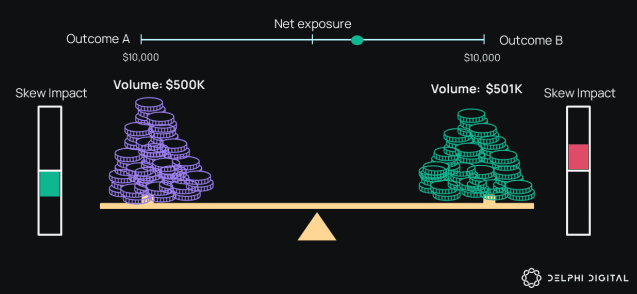
The sum cost of UP and DOWN tokens is not exactly 1 USD because of the presence of a Skew Impact mechanism that keeps a slight premium on the Positional Tokens depending on the amount of current underlying risk to the Thales AMM.
{% endhint %}

Let's say a trader has 1000 USD and wants to acquire a position on that the price of ETH will be above $1,500 in 11 weeks from now.&#x20;

Said traders uses the **1000 USD** to purchase exactly **2604 UP tokens** from the Positional Markets AMM, since the AMM algorithm offers the UP tokens to buyers at 0.383 USD per token.

If in 11 weeks (at the Maturity Date) the price of ETH is indeed above $1,500, our trader will be able to exercise (redeem) his **UP** tokens he acquired for 0.383 USD per token, for 1 USD per UP token. Which means his 2604 UP tokens will be worth exactly 2604 USD, raking him a **profit of 1604 USD on his 1000 USD investment.**

If the ETH price is below $1,500 11 weeks from now, the DOWN tokens (that were priced at 0.682 USD) for this Ranged Market will be worth 1 USD each, and the UP tokens will be worth 0.


# Tokenized Ranged Markets

{% embed url="<https://www.youtube.com/watch?v=8oIgCT8GTd0>" %}

Ranged Markets is a product built on top of the Thales protocol that allows users to participate in markets around the following question:

#### **Will a specific Asset Price be INSIDE or OUTSIDE of the specified Price Range at the specified Maturity Date?**

![](https://288840232-files.gitbook.io/~/files/v0/b/gitbook-x-prod.appspot.com/o/spaces%2FKSZyDhrhMxBqaXew1MHD%2Fuploads%2Ff0UF902PdXcPoxETuIon%2Franged%20markets.PNG?alt=media\&token=ec9a77d0-e0ba-401c-a7c6-7bc832cf6e54)

Ranged Markets use the same framework as Positional Markets, but they use a **Price Range** instead of a single Strike Price, to resolve the market.&#x20;

Variables that define a Ranged Market:

* **Asset**- The specific asset used to resolve a market based on it's price (e.g. BTC, ETH, etc.).
* **Maturity Date**- The date and time at which the current price of the asset is compared to the market's Price Range to determine if the Ranged Market resolved IN or OUT.
* **Strike Range**- The range between two price points that traders use to position INSIDE or OUTSIDE of for that market.

<figure><img src="https://288840232-files.gitbook.io/~/files/v0/b/gitbook-x-prod.appspot.com/o/spaces%2FKSZyDhrhMxBqaXew1MHD%2Fuploads%2FxwYUyU5OwIGdc5d0JVOV%2Fimage.png?alt=media&amp;token=53572b20-1de8-4512-9500-2a4adad8dd5b" alt=""><figcaption><p>Ranged Market example</p></figcaption></figure>

### IN and OUT Tokens

Instead of having a single Strike Price with accompanying UP and DOWN tokens, **Ranged Markets have two Strike Prices that construct a Price Range and are accompanied with IN and OUT ERC20 tokens that represent the two exclusive outcomes of that Ranged Market.**

Ranged Markets use the Thales AMM contract to offer on-demand liquidity for **IN** and **OUT** tokens. It uses the already existing adapted Black Scholes algorithm to calculate the probability between 0% and 100% of a certain Ranged Market finishing INSIDE or OUTSIDE of a specified Price Range at the specified Maturity Date, and then uses that calculated probability to price the IN and OUT tokens.

For example, if the AMM calculates the probability of the specific Ranged Market finishing OUTSIDE of the specified Price Range to be **`25%`**, the AMM will sell the **OUT** tokens representing that position for **`$0.25`**, reflecting the probability percentage. On the other side, the probability that the market will resolve INSIDE the specified Price Range will be equal to **`100% - XX%`,** where XX% represents the probability of the market resolving OUTSIDE. This means that the **IN** token representing that INSIDE position, will be priced by the AMM as **`$1.00 - $0.25 = $0.75`**

If a specific Ranged Market resolves **INSIDE** the specified Price Range at the specified Maturity Date, the **IN** tokens will be **redeemable for USD in a 1:1 ratio** while the OUT tokens will be worthless.&#x20;

If a specific Ranged Market resolves **OUTSIDE** the specified Price Range at the specified Maturity Date, the **OUT** tokens will be **redeemable for USD in a 1:1 ratio** while the IN tokens will be worthless.&#x20;

### Ranged Markets Creation

Thales Ranged Markets use the available Positional Markets to form Price Ranges around their individual Strike Prices. That means that every two Positional Markets with the same Asset and Maturity Date will also create a Ranged Market around their respective individual Strike Prices.&#x20;

The collateralization of Ranged Markets comes from underlying Positional Markets that create the Ranged Market. T**his implies that the volume driven by Ranged Markets will subsequently also drive volume of the underlying Positional Markets that the Ranged Markets are created around.**

{% hint style="info" %}
**The Ranged Markets AMM does not have a dedicated Skew Impact mechanism. They actually inherit the Skew Impact from the underlying Positional Markets that create it.**
{% endhint %}

### Potential Payout Example

For the sake of demonstrating a profitable trade using Ranged Markets, let's take the following Ranged Market:

* **Asset:** BTC
* **Strike Range:** $25,000< --- >$35,000
* **Time until Maturity:** 11 weeks
* **Current BTC Price:** $29,081.47

With these variables, the Thales AMM prices the **IN** and **OUT** tokens of this market at:

**IN = 0.417 USD**

**OUT = 0.720 USD**

{% hint style="warning" %}
Ranged Market Tokens have a slightly higher premium because of the fact they are created by two individual Positional Markets.

Skew Impact of each of the two Positional Market that create a Ranged Market is compounded in the respective Ranged Market they create.
{% endhint %}

Let's say a trader has 1000 USD and wants to acquire a position stating that the price of BTC will remain between $25,000 and $35,000 in 11 weeks from now.&#x20;

This trader then uses the **1000 USD** to purchase exactly **2398 IN tokens** from the Ranged Markets AMM, since the AMM algorithm offers the IN tokens to buyers at 0.417 USD per token.

If in 11 weeks (at the Maturity Date) the price of BTC remains between $25,000 and $35,000, our trader will be able to exercise (redeem) his **IN** tokens (that they acquired for 0.417 USD per token) for 1 USD per IN token. Which means his 2398 IN tokens will be worth exactly 2398 USD, providing them with a **profit of 1398 USD on the initial 1000 USD investment.**

If BTC does not remain between $25,000 and $35,000, the **OUT** tokens (that were priced at 0.720 USD) for this Ranged Markets will be worth 1 USD each, and the **IN** tokens would be worth 0.


# Speed Markets

Positional Markets get kicked into overdrive with the **fast-paced excitement of Speed Markets!**  Speed Markets allow users to purchase UP or DOWN positions in **positional markets built on short time frames** and **strike prices based on a snapshot of the current price**.  This new product under the Thales umbrella is the result of [TIP-149](https://github.com/thales-markets/thales-improvement-proposals/blob/main/TIPs/TIP-149.md) and the communities' need for speed!

<figure><img src="https://288840232-files.gitbook.io/~/files/v0/b/gitbook-x-prod.appspot.com/o/spaces%2FKSZyDhrhMxBqaXew1MHD%2Fuploads%2F2OmOJWCOlakA8UfWRksk%2Fimage.png?alt=media&amp;token=51e6f1fa-c11f-4a18-85a6-8a6995112bc0" alt="" width="375"><figcaption></figcaption></figure>

{% hint style="info" %}
Speed Markets are currently available on the following networks:

**Optimism** ![:optimism:](https://cdn.discordapp.com/emojis/885397024051179520.webp?size=56\&quality=lossless)     **Arbitrum**![](https://288840232-files.gitbook.io/~/files/v0/b/gitbook-x-prod.appspot.com/o/spaces%2FKSZyDhrhMxBqaXew1MHD%2Fuploads%2FiFoNmjrmOkM629CxKehy%2Fimage.png?alt=media\&token=13f0fc64-a3b6-4a99-b982-c3b789a58ef9)    **Polygon** ![:polygon:](https://cdn.discordapp.com/emojis/963036781878595594.webp?size=56\&quality=lossless)     **Base**  ![](https://288840232-files.gitbook.io/~/files/v0/b/gitbook-x-prod.appspot.com/o/spaces%2FKSZyDhrhMxBqaXew1MHD%2Fuploads%2FS1mrYI4Dm8kntk5zfs3w%2Fimage.png?alt=media\&token=2df8523e-f31f-45eb-bec9-bed7cf19d56f)
{% endhint %}

### How Speed Markets work

Typical Positional and Ranged Markets close for positioning when the maturity date/time is less than 24 hours away due to protocol risk management, but some traders couldn't wait on the sidelines for that long.  To satisfy the community Thales developed Speed Markets to **work with nearly instantaneous pricing data**, made possible with the use of [Pyth Benchmarks](https://pyth.network/blog/introducing-the-pyth-benchmarks).&#x20;

Traders choose an asset, direction (UP or DOWN) and strike time for that asset based on the trader's predicted price movement from the asset's current price.  Once a trader submits a transaction to purchase a position, a snapshot of the asset's current price is taken to define the strike price. Because the strike price is always taken from the current price of an asset at the time of a buy, **all positions will have 50:50 implied probabilities**. This means that **a winning trader will see a 2x payout** (minus the quoted LP fee and a fixed 2% Safebox fee) on a single winning position.&#x20;

{% hint style="info" %}
Since every position has equal **50:50 odds** regardless of any variable, there is no need for algorithmic pricing based on Implied Volatility index.  This makes Speed Markets product more immutable, decentralized and lightweight.
{% endhint %}

&#x20;                                                  <img src="https://288840232-files.gitbook.io/~/files/v0/b/gitbook-x-prod.appspot.com/o/spaces%2FKSZyDhrhMxBqaXew1MHD%2Fuploads%2FRaSWWdJwbhQeaoGrW6uG%2F1_yAsLfNWNKfoZSWy2SpSWtg.gif?alt=media&amp;token=56953512-174f-495e-8ff8-1670dae608c4" alt="" data-size="original">

Pyth Benchmark on-demand oracles provide historically queryable prices that can be used to validate trades in near real-time, an important factor for risk management of intraday markets such as Speed Markets.  **Every second, Pyth Benchmark price feeds are updated** using source data from reputable third-party data publishers that can be easily verified from the Pythnet blockchain. &#x20;

In the future, Thales plans to further develop this product and to couple it with the [consecutive round format of Thales Royale](https://thalesmarket.medium.com/thales-royale-a-predictions-game-where-the-winner-s-takes-all-a268f9ec6ec8) to facilitate sequential epochs. Once this feature is deployed it will give traders the ability to **compound a winning position into the next epoch(s) automatically.**

<figure><img src="https://288840232-files.gitbook.io/~/files/v0/b/gitbook-x-prod.appspot.com/o/spaces%2FKSZyDhrhMxBqaXew1MHD%2Fuploads%2FRaBCHJhdsJqzX3kRoZQm%2Fimage.png?alt=media&amp;token=206b0a2c-1a6e-4139-a871-bc1d1a2d704d" alt=""><figcaption></figcaption></figure>

### Parameters for Speed Markets&#x20;

The parameters for Speed Markets will be maintained via the Governance process. Configuration TIPs for considerations like opening the SpeedMarketAMM up for LPing will need to be submitted by the community and voted in by the Thales Council.  Initial funding will be provided by the TreasuryDAO, but future LPing could take it's place to provide liquidity for Speed Markets. &#x20;

* Speed Markets offer a **minimum epoch of 5 minutes**
* The maximum time to maturity will be 24 hours. &#x20;
* ETH and BTC will be the supported assets, with expansion to more assets planned in the future.
* Speed Markets will include an LP fee that changes depending of a Strike Time and a SafeBox fee of 2%.
* The minimum buy-in will be 5 USD, with a maximum of 200 USD (but both can be changed).
* The AMM Risk Cap per Asset per Day will begin at 5000 USD.

Positions can be purchased using the several forms of collateral, with the minimum amount of each adjusted to equal 5 USDC.  The following forms of collateral are accepted:

<figure><img src="https://288840232-files.gitbook.io/~/files/v0/b/gitbook-x-prod.appspot.com/o/spaces%2FKSZyDhrhMxBqaXew1MHD%2Fuploads%2FBumbqmPN4BNJ9rxleI2T%2Fimage.png?alt=media&amp;token=ad4ff1f7-c68b-46d1-8836-32f8d035318c" alt=""><figcaption></figcaption></figure>

{% hint style="info" %}
Speed Markets on Optimism, Arbitrum and Base also support Multicollateral offramping, meaning you can choose the form of collateral you'd like to receive when claiming a winning position.
{% endhint %}

Eventually, Speed Markets will allow traders to string together several speed markets (like a parlay) for a leveraged payout.  For example, if a trader is able to select the correct direction for 5 epochs in a row, their winnings would approach 32x (2x + 2x + 2x + 2x + 2x) of their initial buy-in.&#x20;

Other features, such as supporting referral bonuses or multi-collateral purchasing can also be added via future TIPs. &#x20;

## How to Trade Speed Markets

You can jump into the action from the "Speed Markets" menu item or by navigating directly to <https://thalesmarket.io/speedmarkets.&#x20>;

<figure><img src="https://288840232-files.gitbook.io/~/files/v0/b/gitbook-x-prod.appspot.com/o/spaces%2FKSZyDhrhMxBqaXew1MHD%2Fuploads%2FKjuXkkmA79hkrVYHwlD1%2Fimage.png?alt=media&amp;token=8e78f0eb-415d-4ac3-a44f-0f28a867f95a" alt=""><figcaption></figcaption></figure>

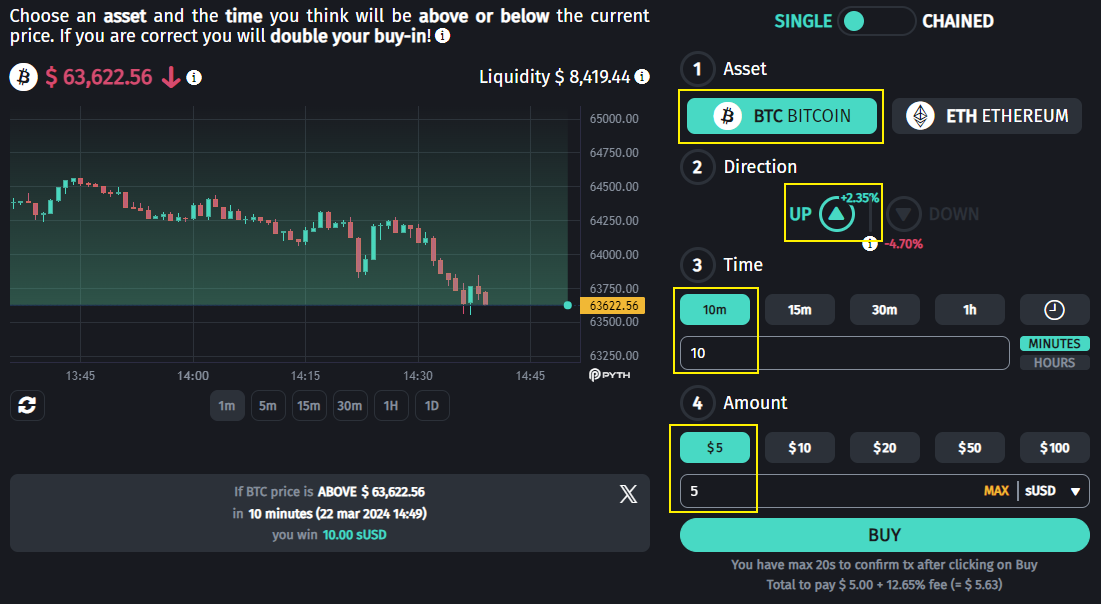
You'll see the price chart with a constantly-updating asset price, based on a data feed from Pyth Oracles.  In the other corner of the chart you'll see the liquidity available for the chosen asset.  Below the chart are different time frames and a summary of your position once the variables are selected.

<figure><img src="https://288840232-files.gitbook.io/~/files/v0/b/gitbook-x-prod.appspot.com/o/spaces%2FKSZyDhrhMxBqaXew1MHD%2Fuploads%2FauMSMTAuWUJFyatA3caF%2Fimage.png?alt=media&amp;token=8cc48378-d311-4bfb-829a-47d6f49d30d7" alt=""><figcaption></figcaption></figure>

### Purchasing a Position

To create a position, first choose an asset and a direction.  This is the direction you think the price will have moved at the end of your selected time frame based on the current price **(at the time the purchase transaction is submitted).**

{% hint style="info" %}
You can purchase positions with **sUSD, ETH, USDC, OP** (on Optimism), **ARB** (on Arbitrum), **DAI, USDT** and **WETH.** You can also use **USDC** on Polygon and Base.
{% endhint %}

Next, choose the time, selecting either hours or minutes (minimum is 60 minutes/1 hour, maximum is 24 hours), and then enter the amount you'd like to purchase.  You can either select one of the dollar amount buttons, or enter your own amount.

<figure><img src="https://288840232-files.gitbook.io/~/files/v0/b/gitbook-x-prod.appspot.com/o/spaces%2FKSZyDhrhMxBqaXew1MHD%2Fuploads%2F8v3JGuwEZxFUnn3DZqp8%2Fimage.png?alt=media&amp;token=70ea82c2-13d1-4163-bc2c-aee405f5cde8" alt=""><figcaption><p>You'll see the position summary update once you've made a selection for each variable.</p></figcaption></figure>

Once you are holding a position it will appear under the "Your Open Positions" section with the amount of time until the results are in shown in <mark style="color:orange;">orange</mark>.

<figure><img src="https://288840232-files.gitbook.io/~/files/v0/b/gitbook-x-prod.appspot.com/o/spaces%2FKSZyDhrhMxBqaXew1MHD%2Fuploads%2FAAxNNXG11DE2iUH8RHQq%2Fimage.png?alt=media&amp;token=9e107524-7be8-4d3d-9bef-f169927bdcfa" alt=""><figcaption></figcaption></figure>

### Claiming a Winning Position

You'll see the yellow "Claim Win $XX.XX" button when you have a winning position.  Click on the button to complete the transaction and claim your 2x payout!

<figure><img src="https://288840232-files.gitbook.io/~/files/v0/b/gitbook-x-prod.appspot.com/o/spaces%2FKSZyDhrhMxBqaXew1MHD%2Fuploads%2FIEEE8GBGeOCCKYgXvX0j%2Fimage.png?alt=media&amp;token=1bbe15c5-f4e6-44ec-80a2-ad10f7a97aaf" alt=""><figcaption></figcaption></figure>


# Chained Speed Markets

Speed Markets Leverage!

### What are Chained Speed Markets

Chained Speed Markets are the next evolution of classic [Speed Markets](/thales-parimutuel-markets/speed-markets), allowing you to predict multiple sequential price movements in one go for explosive leveraged payouts up to **47x** !

Chained Speed Markets allow you to create a series of **2** to **6 sequential price predictions** with a fixed Strike Time each and with an increasing payout multiplier per each added market. This product has also been voted in by the Thales Governance, under the [TIP-174 Chained Speed Markets](https://github.com/thales-markets/thales-improvement-proposals/blob/main/TIPs/TIP-174.md)

<div data-full-width="false"><figure><img src="https://288840232-files.gitbook.io/~/files/v0/b/gitbook-x-prod.appspot.com/o/spaces%2FKSZyDhrhMxBqaXew1MHD%2Fuploads%2FEFyDaKNJzBcFW9izzw17%2Fimage.png?alt=media&amp;token=06367dc6-fced-4c8c-8c6c-70f594067c6e" alt="" width="504"><figcaption><p>Don't break these chains, anon</p></figcaption></figure></div>

### How Chained Markets work

#### Deposit and Engage

With [Speed Markets](/thales-parimutuel-markets/speed-markets), we allowed the users to bypass the limitations of the classic crypto trading markets. They could now trade short term markets, and not really worry about maturity dates. However, the Speed markets had a different limitation - in one trade, you could at most double your position. In order to accommodate the needs of users looking for a **more leveraged exposure**, we created Chained Speed Markets.

Users can initiate their Chain Speed Markets journey by depositing a modest $5, unlocking a world of strategic trading possibilities. The player then selects the number of rounds, ranging from **2 to 6**, with each round swiftly lasting 10 minutes.

#### Precision

At the deposit stage, traders can show their **strategic thinking and analytical skills**, predicting whether the price of the chosen asset will be above or below its initial value at the **conclusion of each 5 or 10-minute round**. The users are required to submit **all predictions** for the selected rounds at the time of deposit. Once set, these **predictions are immutable and cannot be altered.**

Success in each round means advancement to the next, with the potential for multiplied returns. However, an **incorrect prediction at any stage** results in the loss of the initial $10 deposit. The challenge lies in maintaining accuracy across **all selected rounds.**

<figure><img src="https://288840232-files.gitbook.io/~/files/v0/b/gitbook-x-prod.appspot.com/o/spaces%2FKSZyDhrhMxBqaXew1MHD%2Fuploads%2F1mCPWHn2UWDL4WYS9QLa%2Fimage.png?alt=media&amp;token=514b2b50-f0fe-43ea-942d-8308b05dfacd" alt="" width="479"><figcaption><p>6/6</p></figcaption></figure>

With an increasing multiplier for each correctly predicted round, ranging from 1.7 for  the second round, up to 1.9 for 6 rounds, the excitement intensifies as traders witness their potential returns grow. For instance, a 2-round chained market boasts a thrilling 2.89x payoff if both rounds are picked successfully (up to 47x for 6 rounds )

#### Powered by Pyth Network

Chained Speed Markets leverage the power of [Pyth Benchmark](https://pyth.network/benchmarks) on-demand oracles, offering historically queryable prices that validate trades in **near real-time**. These oracles play a crucial role in risk management for intraday markets like Speed (and Chained) Markets. Pyth Benchmark price feeds are updated every second using source data from reputable third-party publishers, providing **verifiable transparency** through the Pythnet blockchain.

<figure><img src="https://288840232-files.gitbook.io/~/files/v0/b/gitbook-x-prod.appspot.com/o/spaces%2FKSZyDhrhMxBqaXew1MHD%2Fuploads%2Ff2j3Y4HONFAgkdRdB9cG%2F1_nCi0HfWWX9qVBBXLuNRciQ.png?alt=media&amp;token=f1ec173f-0449-4196-9fc9-7427296aac26" alt=""><figcaption><p>Pyth Network</p></figcaption></figure>

Chained Speed Markets represent a fusion of **speed, strategy, and multiplied** returns, offering traders an exhilarating platform to navigate the dynamic landscape of financial markets.&#x20;

### Chained Markets parameters

The parameters for  **Chained Speed Markets** will be maintained via the Governance process. Configuration TIPs for considerations like opening the **ChainedSpeedMarketAMM** up for LPing will need to be submitted by the community and voted in by the Thales Council.  Initial funding will be provided by the TreasuryDAO, but future LPing could take it's place to provide liquidity for Speed Markets. &#x20;

* **Volume generated on  Chained Speed Markets will count towards gamified staking rewards**.
* Chained Speed Markets currently offer **5 and** **10 minute rounds**, but there might be other options in the future
* **ETH and BTC** will be the supported assets, with expansion to more assets planned in the future.
* Speed Markets will include a **SafeBox** fee of **2%**.
* The number of round can be between **2 and 6**
* The multiplier starts from **2.89x** for two markets, with a max **47x for 6 rounds**
* The minimum buy-in will be **5 USD,** with a maximum of **10 USD** (but both can be changed).
* The AMM Risk Cap per Day will begin at 10.000 USD.

Positions can be purchased using the several forms of collateral, with the minimum amount of each adjusted to equal 5 USDC.  The following forms of collateral are accepted:

<figure><img src="https://288840232-files.gitbook.io/~/files/v0/b/gitbook-x-prod.appspot.com/o/spaces%2FKSZyDhrhMxBqaXew1MHD%2Fuploads%2FD9Hoe5Vcu6NiwwiHsijg%2Fimage.png?alt=media&amp;token=808cdde6-b67c-46fb-932b-12976c00c338" alt=""><figcaption><p>Collaterals</p></figcaption></figure>

{% hint style="info" %}
Speed Markets on **Optimism**, **Arbitrum** and Base also support **Multicollateral** **offramping**, meaning you can choose the form of collateral you'd like to receive when claiming a winning position.
{% endhint %}

### How to trade Chained Speed Markets

You can jump into the action from the **"Speed Markets"** menu item or by navigating directly to <https://thalesmarket.io/speedmarkets>.&#x20;

<figure><img src="https://288840232-files.gitbook.io/~/files/v0/b/gitbook-x-prod.appspot.com/o/spaces%2FKSZyDhrhMxBqaXew1MHD%2Fuploads%2FJGgmCo3OjrWwwhmcIXMC%2Fimage.png?alt=media&amp;token=e6563388-1bbd-4580-ba38-a5b4180d6dfa" alt="" width="563"><figcaption></figcaption></figure>

When on the [Speed Markets](https://thalesmarket.io/speedmarkets) page, you can switch to the **Chained markets** using the **toggle** in the top right side of the page<br>

<figure><img src="https://288840232-files.gitbook.io/~/files/v0/b/gitbook-x-prod.appspot.com/o/spaces%2FKSZyDhrhMxBqaXew1MHD%2Fuploads%2FehiEpDYppU1zGneWqQit%2Fimage.png?alt=media&amp;token=6d83bc9a-896e-43de-92c8-317aadc7fd46" alt="" width="563"><figcaption><p>Chained Markets toggle</p></figcaption></figure>

You'll see the **price chart** with a constantly-updating asset price, based on a data feed from Pyth Oracles. In the other corner of the chart you'll see the **liquidity** available for the chosen asset. Below the chart are different **time frames** and a **summary** of your positions once the variables are selected.

<figure><img src="https://288840232-files.gitbook.io/~/files/v0/b/gitbook-x-prod.appspot.com/o/spaces%2FKSZyDhrhMxBqaXew1MHD%2Fuploads%2FyTZYrjM36xR9diZCtBeY%2Fimage.png?alt=media&amp;token=17a6ade7-3400-4a4e-831b-e786190d55bd" alt="" width="563"><figcaption><p>Chart info</p></figcaption></figure>

### Purchasing a position

To create a position, first choose an asset and **directions** for the rounds.  This is the direction you think the price will have moved at the end of the round, based on the price at the start of the round. The first round starts **at the time the purchase transaction is submitted.** You need to choose the direction for all of the round that are shown in the picker. Rounds can be added or removed using the **-** (minus) and + (plus) symbols under the 2nd step.

{% hint style="info" %}
You can purchase positions with **sUSD, ETH, USDC, OP** (on Optimism), **ARB** (on Arbitrum), **DAI, USDT** and **WETH.** You can also use **USDC** on Polygon and Base.
{% endhint %}

Next, enter or pick the amount of USD you would like to deposit (or pick a different collateral) and click **BUY**.<br>

<figure><img src="https://288840232-files.gitbook.io/~/files/v0/b/gitbook-x-prod.appspot.com/o/spaces%2FKSZyDhrhMxBqaXew1MHD%2Fuploads%2FzDaUfRXE9l3tHUfPmqOL%2Fimage.png?alt=media&amp;token=8d1119ef-d571-4c3a-8182-14b6030cd7a6" alt="" width="563"><figcaption><p>Buy</p></figcaption></figure>

Once you are holding a position it will appear under the "**Your Open Positions**" section with the amount of time until the results are in shown in <mark style="color:orange;">orange</mark>. For Chained markets, the Open positions section will show all the positions you have chosen for each round, and the current status of each round.

<figure><img src="https://288840232-files.gitbook.io/~/files/v0/b/gitbook-x-prod.appspot.com/o/spaces%2FKSZyDhrhMxBqaXew1MHD%2Fuploads%2Fqmg4qpt2JfcOUA3KnDsp%2Fimage.png?alt=media&amp;token=ac498afd-8795-4a30-baff-92a33abb9f8f" alt="" width="563"><figcaption></figcaption></figure>

### Claiming a winning position

You'll see the yellow "**Claim Win $XX.XX**" button when you have a winning position. Next to the claim button you can see a **dropdown** you can use if you want to claim your winnings using a **different collateral**.  Click on the yellow button to complete the transaction and claim your deserved payout!

<figure><img src="https://288840232-files.gitbook.io/~/files/v0/b/gitbook-x-prod.appspot.com/o/spaces%2FKSZyDhrhMxBqaXew1MHD%2Fuploads%2Ft1gFScvDMN5pqBZXfJUp%2Fimage.png?alt=media&amp;token=0bb3323c-14ad-420f-806e-c1ae329e5cad" alt=""><figcaption></figcaption></figure>


# Odds in Positional Markets

{% embed url="<https://www.youtube.com/watch?ab_channel=Thales&t=2s&v=Zbff61Zuok4>" %}

Thales Positional Markets use odds data to price positional tokens.  These odds can change as a market moves closer to maturity and this price movement affects these prices.  As odds and therefore prices changes, so too does the potential payout for successful positions.&#x20;

### **Positional Tokens are Priced According to Odds**

Data for the odds used as the basis for positional token prices is transmitted to the blockchain via Chainlink.  Thales then uses multiple factors such as the Black Scholes pricing model and [price skew](/using-thales/thales-amm-design) to arrive at a price for each position.&#x20;

{% hint style="info" %}
The Black Scholes pricing model is a formula that analyzes data like historical price action and volatility to arrive at a price for a position.
{% endhint %}

**Traders participate in Positional Markets by purchasing tokenized positions**.  Each positional token is purchased for a fraction of a USD. Prices range from 0.08 to 0.95 based on the odds that that position will end up successful.  Thales uses Normalized Implied Odds to display the chance a position will be successful.  You can look at a token priced at 0.43 USD as a 43% chance of success (roughly). &#x20;

Each market position is made available to traders as an individual token.  A Positional Market will offer 1 token for UP and 1 for DOWN, each with different prices.  If your position is successful when the market matures you can redeem each positional token (for which you paid a fraction of a USD) for 1 whole USD.   **Once a market matures a winning token, no matter the price paid, is worth 1 USD, while a losing token is worthless**.

<figure><img src="https://288840232-files.gitbook.io/~/files/v0/b/gitbook-x-prod.appspot.com/o/spaces%2FKSZyDhrhMxBqaXew1MHD%2Fuploads%2F5WS1rrVEV4MdRxIeBgBs%2Fthales%20coin.png?alt=media&amp;token=b63ce530-5ac6-4acf-bcec-fbbd0cd270d4" alt=""><figcaption></figcaption></figure>

### **How Pricing Translates to Payout**

Once you’ve purchased a position, you can either hold on to your positional tokens until the market resolves, or you can sell your position back to the AMM if the market is still open.  If you choose to hold, you either:

* Win and redeem 1 USD per token you purchased. If you bought 1 UP token for 0.43 USD and UP wins you can swap it for 1 USD at a profit of 0.57 USD
* Lose and your tokenized position is worthless

If you choose to sell your position back to the AMM before market maturity, you will most likely **receive a different amount then you initially paid**.  This is because odds for different market outcomes are always changing, and this affects the value of positional tokens.

&#x20;                                                             ![](https://288840232-files.gitbook.io/~/files/v0/b/gitbook-x-prod.appspot.com/o/spaces%2FKSZyDhrhMxBqaXew1MHD%2Fuploads%2FX995xT5HQHXRoY9kHyWe%2Fone-million-dollar-bill-USA.jpg?alt=media\&token=b7c457b0-7711-405c-890a-bcb0da63d6ff)

### **How Odds and Prices Change**

Odds are not fixed for Positional Markets, but instead change with market activity. The Odds at the moment positioning ends determines the final price per position.

An asset's price movement changes the odds of reaching a certain strike price.  A market's maturity date is always moving closer and this also affects the odds. The value of your position will change as these odds change.  These changes will halt once the positioning phase is complete (24 hours before a market reaches maturity). &#x20;

{% hint style="info" %}
**Projected winnings are displayed as if positioning was to end at that moment**, but this will likely fluctuate until the positioning phase ends, so your actual potential winnings will change as odds change and as more positions are purchased by other users.&#x20;
{% endhint %}

In addition to odds data changing with market conditions, prices for positions will also change based on trader activity.  As more traders buy tokens from either side of a market, prices will move in response. Keep this in mind when participating in Positional Markets.  Once positioning closes, risk/reward is locked in and won’t change anymore.

### **Example of Changing Odds and Prices**

This screenshot was taken of an ETH market on May 22nd 2023.  The strike price is $2,000 with a maturity date of June 2nd 2023:

<figure><img src="https://288840232-files.gitbook.io/~/files/v0/b/gitbook-x-prod.appspot.com/o/spaces%2FKSZyDhrhMxBqaXew1MHD%2Fuploads%2FGTjPbR7uXBNysMJeoFEq%2Fimage.png?alt=media&amp;token=25aa8b7d-a476-4af5-bbe8-dca28ad1a66b" alt=""><figcaption></figcaption></figure>

The price for an UP token at the time of the screenshot was 0.0908 USD. &#x20;

&#x20;                                               ![](https://288840232-files.gitbook.io/~/files/v0/b/gitbook-x-prod.appspot.com/o/spaces%2FKSZyDhrhMxBqaXew1MHD%2Fuploads%2FG72VlzJHtksPazRtjfA2%2Fimage.png?alt=media\&token=8ba999fd-6a1f-43ff-a95d-9343e72ff23c)

Returning to this market a few days later on May 28th 2023, you can see market conditions have changed and that has affected position pricing:

<figure><img src="https://288840232-files.gitbook.io/~/files/v0/b/gitbook-x-prod.appspot.com/o/spaces%2FKSZyDhrhMxBqaXew1MHD%2Fuploads%2FqLZb4Vk5GlLXaDMAmHru%2Fimage.png?alt=media&amp;token=99d7d469-0d38-4e2f-aa6a-9428641356a9" alt=""><figcaption></figcaption></figure>

Thanks to some positive price movement from ETH ($1811.23 to $1913.94) the AMM has updated the price of an UP token for this market from 0.0908 to 0.1611.  This is because the price of ETH is closer to the market's strike price, making an UP token more likely to succeed and therefore more expensive, and the date is much closer to the maturity date for this market (5/22 vs 5/28) meaning there is less time for significant price movement. &#x20;

&#x20;                                              ![](https://288840232-files.gitbook.io/~/files/v0/b/gitbook-x-prod.appspot.com/o/spaces%2FKSZyDhrhMxBqaXew1MHD%2Fuploads%2Fz13cAM4pi3R7XVdqa22d%2Fimage.png?alt=media\&token=49152a31-58a8-40df-80a4-c0f09b17079f)


# sUSD as Main Collateral

![](https://288840232-files.gitbook.io/~/files/v0/b/gitbook-x-prod.appspot.com/o/spaces%2FKSZyDhrhMxBqaXew1MHD%2Fuploads%2FuAs0Z8MLnzVrg0N7t6pA%2Fsusd3.png?alt=media\&token=bf2bdb37-e95c-44a6-a78e-8e2d46200d2a)

Thales Markets accept **sUSD**, the native stablecoin of the Synthetix ecosystem, as the main form of collateral on the Optimism Network. Synthetix is a decentralized finance pioneer known for being innovative, open-sourced and governed by the community. This makes sUSD fully decentralized.&#x20;

Synthetix stakers deposit the ERC-20 token **SNX** to "mint" sUSD. By minting sUSD a staker enters a debt position against the changing market value of their SNX collateral. To ensure the stability of the Synthetix platform and the value of sUSD, stakers are required to overcollateralize their SNX deposit by several times the value of the sUSD that they've minted.&#x20;

{% hint style="info" %}
There is commonly **three to five times** the value of SNX staked against minted sUSD.
{% endhint %}

![You'll never get my sUSD.](https://288840232-files.gitbook.io/~/files/v0/b/gitbook-x-prod.appspot.com/o/spaces%2FKSZyDhrhMxBqaXew1MHD%2Fuploads%2Fb4UF1joCbhrPRPwjV0ug%2Fa81969b00e0f425f8de5edaa054f0bf4.jpg?alt=media\&token=e51a63a0-7065-4cf9-a600-1e9d65afdebd)

### **sUSD cannot be stopped**

Synthetix makes sUSD resistant to censorship so that restrictions such as blacklisting won’t affect your ability to access Thales markets. Leveraging the power of a truly distributed network means there’s no way to stop someone from sending sUSD to someone else.  This also means that there is no way to stop someone from participating in markets and exercising their winning position by exchanging Positional Tokens for sUSD.  Even if [Thalesmarket.io](https://thalesmarket.io/) is taken down or blocked for any reason users can still interact directly with the [Thales smart contracts](/resources/contract-addresses) using a blockchain explorer such as [Optimistic Etherscan](https://optimistic.etherscan.io/).                               &#x20;

### Additional forms of Collateral

Thales also support the use of USDC, USDT, DAI (and BUSD on BNBChain) as forms of collateral for trading Positional Tokens, thanks to [Curve's sUSD+3CRV pool](https://optimism.curve.fi/factory/0).                                                     &#x20;


# Safebox

Thales utilizes AMMs (Automated Market Makers) to facilitate several products across all chains, including single asset UP/DOWN markets and Ranged Markets as well as Overtime’s Sports AMM and Parlay AMM, and while this system works well there is always the risk of a major market event that puts the AMM’s liquidity at risk.

To mitigate this risk, Thales has implemented a “Safebox” strategy where a small percentage of the fees collected from positional token AMM trades and other Thales products will be stored in a separate contract to be used as a safeguard against potentially detrimental market developments.

![](https://288840232-files.gitbook.io/~/files/v0/b/gitbook-x-prod.appspot.com/o/spaces%2FKSZyDhrhMxBqaXew1MHD%2Fuploads%2FFNEJqofho11Cpg0BKtCt%2Fthales%20banker.png?alt=media\&token=ae199f8e-1c9d-4f0e-bb65-5934b9cec57d)

The following TIPs, as well as other TIPs that are currently in progress, have been submitted and reviewed by the community to establish this Safebox strategy:&#x20;

* [TIP-19 Changes to the AMM after First round ](https://github.com/thales-markets/thales-improvement-proposals/blob/main/TIPs/TIP-19.md)
* [TIP-44 Increase AMM Liquidity](https://github.com/thales-markets/thales-improvement-proposals/blob/main/TIPs/TIP-44.md)&#x20;
* [TIP-50 Utilize Safe Box](https://github.com/thales-markets/thales-improvement-proposals/blob/main/TIPs/TIP-50.md)&#x20;
* [TIP-59 Increase THALES Token Buyback Frequency](https://github.com/thales-markets/thales-improvement-proposals/blob/main/TIPs/TIP-59.md)
* [TIP-71 Increase THALES Token Buyback Frequency ](https://github.com/thales-markets/thales-improvement-proposals/blob/main/TIPs/TIP-71.md)
* [TIP-78 Increase THALES Token Buyback Frequency](https://github.com/thales-markets/thales-improvement-proposals/blob/main/TIPs/TIP-78.md)
* [TIP-87 Increase SafeBox fee of ThalesAMM.sol contract by +1%](https://github.com/thales-markets/thales-improvement-proposals/blob/main/TIPs/TIP-87.md)
* [TIP-106 Increase THALES Token Buyback Frequency](https://github.com/thales-markets/thales-improvement-proposals/blob/main/TIPs/TIP-106.md)
* [TIP-124 Pause Buyback and Burn Program for Thales Token](https://github.com/thales-markets/thales-improvement-proposals/blob/main/TIPs/TIP-124.md)
* [TIP-126 Reduce SafeBox fee parameter by fixed -1% across all products](https://github.com/thales-markets/thales-improvement-proposals/blob/main/TIPs/TIP-126.md)

You can view the Safebox Contracts here:&#x20;

* <https://contracts.thalesmarket.io/mainnet-ovm/SafeBox>
* <https://contracts.thalesmarket.io/mainnet-ovm/SafeBoxBuyback>

## Safebox Fees

The following fees are collected from different Thales Market products across all chains:

#### **Thales AMM Positional Tokens**

[TIP-19](https://github.com/thales-markets/thales-improvement-proposals/blob/main/TIPs/TIP-19.md) proposed a way for the AMM to mitigate risk by introducing a SafeBox fee pool which will collect 2% of USD value from each trade to act as a backstop in the event of AMM insolvency. The SafeBox will be shared among other Thales products and will be used at the discretion of the Thales Council, with possible uses including incentives to stakers once collected fees reach a point that it is economically viable to justify gas costs.

[TIP-44](https://github.com/thales-markets/thales-improvement-proposals/blob/main/TIPs/TIP-44.md) increases the SafeBox fee to 2%

[TIP-87](https://github.com/thales-markets/thales-improvement-proposals/blob/main/TIPs/TIP-87.md) increases the SafeBox fee to 3%

[TIP-126](https://github.com/thales-markets/thales-improvement-proposals/blob/main/TIPs/TIP-126.md) reduced SafeBox fees to 2% for Thales AMM contracts on all networks&#x20;

[TIP-144](https://github.com/thales-markets/thales-improvement-proposals/blob/main/TIPs/TIP-144.md) reduced SafeBox fees to 1% for Thales AMM contracts on all networks&#x20;

[TIP-163](https://github.com/thales-markets/thales-improvement-proposals/blob/main/TIPs/TIP-163.md) increased SafeBox fee to 2% across all Thales products

#### Overtime Sports AMM and Parlay AMM

[TIP-60](https://github.com/thales-markets/thales-improvement-proposals/blob/main/TIPs/TIP-60.md) introduced the Sports AMM and established initial SafeBox fee

[TIP-72](https://github.com/thales-markets/thales-improvement-proposals/blob/main/TIPs/TIP-72.md) introduced the Parlay AMM and established initial SafeBox fee

[TIP-126](https://github.com/thales-markets/thales-improvement-proposals/blob/main/TIPs/TIP-126.md) reduced SafeBox fees to 2% for Overtime AMM contracts on all networks&#x20;

## Uses for Safebox funds&#x20;

The funds collected in the Safebox contract are controlled by the Thales Council. While these funds are used to secure AMM from insolvency, once the contract contains a certain threshold, these funds will be used to benefit stakers.

Current strategy for Safebox funds:&#x20;

**Buy Back and Burn** (see [TIP-50](https://github.com/thales-markets/thales-improvement-proposals/blob/main/TIPs/TIP-50.md), implemented 5/30/22): TIP-50 calls for the use of fees collected in the SafeBox contract to begin the buyback and burn program for THALES tokens. At the time of writing the TIP, the SafeBox was holding about 22k of USD on both Optimism and Polygon. TIP-50 also calls for the Thales Treasury DAO to move 20k of the 100k USD in profits captured by the AMM to the Safebox contract. TIP-50 proposes that buying and burning THALES at current prices will provide more benefit to stakers than simply returning USD to them. The initial proposal is to spend 300 USD per 24hr.  At time of implementation, 1100 THALES was burned daily, allowing the program to operate for 150 days.

* [TIP-59](https://github.com/thales-markets/thales-improvement-proposals/blob/main/TIPs/TIP-59.md) increases the buyback frequency from every 24 hours to every 18 hours
* [TIP-71](https://github.com/thales-markets/thales-improvement-proposals/blob/main/TIPs/TIP-71.md) increases the buyback frequency from every 18 hours to every 12 hours
* [TIP-78](https://github.com/thales-markets/thales-improvement-proposals/blob/main/TIPs/TIP-78.md) increases the buyback frequency from every 12 hours to every 6 hours
* [TIP-106](https://github.com/thales-markets/thales-improvement-proposals/blob/main/TIPs/TIP-106.md) increases the buyback frequency from every 6 hours to every 4.8 hours
* [TIP-124](https://github.com/thales-markets/thales-improvement-proposals/blob/main/TIPs/TIP-124.md) paused Buyback and Burn as market conditions favor a more conservative approach
* [TIP-141](https://github.com/thales-markets/thales-improvement-proposals/blob/main/TIPs/TIP-141.md) resumed Buyback and Burn

![](https://288840232-files.gitbook.io/~/files/v0/b/gitbook-x-prod.appspot.com/o/spaces%2FKSZyDhrhMxBqaXew1MHD%2Fuploads%2F5HEtzm1Ps574lDAnGXXW%2Fone-million-dollar-bill-USA.jpg?alt=media\&token=c2fec421-b19d-4961-9958-2587e95161f6)


# Why Use Thales?

![](https://288840232-files.gitbook.io/~/files/v0/b/gitbook-x-prod.appspot.com/o/spaces%2FKSZyDhrhMxBqaXew1MHD%2Fuploads%2FzRSeikvhpoWVfYGqeEDd%2F1500x500.jfif?alt=media\&token=036ef12a-9e6e-40f8-9afa-ce06b11e54a3)

There's no shortage of alternative derivatives platforms available to traders looking to escape the restrictions of TradFi - so what makes Thales different?

Thales introduces a unique combination of custom market making on the most secure and decentralized blockchain around while still providing a trading experience that's easy to understand and actually fun.  No other protocol is this flexible and accessible.

### What are the benefits of using Thales?

* **Simplicity**: First and foremost, the straightforward process of participating in markets makes the platform stand out.  The simple structure of Parimutuel markets makes it easy to understand the risk and reward of a particular strategy while keeping user experience light and fun.
* **Flexibility**: Other options platforms restrict users to standardized expiry periods and a limited choice of assets.  Why rely on a centralized entity to decide what markets you can participate in when you can take part in custom markets based around any data that's available on-chain? &#x20;

{% hint style="info" %}
And you can still trade against standard crypto-assets or hedge your existing portfolio without worrying about complicated pricing models or risks to your collateral.
{% endhint %}

* **Ethereum and Layer 2 Networks like Optimism, Arbitrum and Polygon**: No other blockchain has achieved a network effect as powerful while maintaining the highest level of security and decentralization as the Ethereum Network. And now that Thales has deployed to several Layer 2 networks, transactions are cheap and fast while maintaining the benefits of Ethereum.

![](https://288840232-files.gitbook.io/~/files/v0/b/gitbook-x-prod.appspot.com/o/spaces%2FKSZyDhrhMxBqaXew1MHD%2Fuploads%2FhUgbFMe2rt5VG2XjdFER%2Fnetwork_h1_sp.jpg?alt=media\&token=0a39a03a-edf6-4766-9994-4e38051a0921)

### OK fine, so what makes Thales different from other pooled crypto markets?

* **Usability**:  Ease of use is not a common feature of Defi.  Parimutuel Markets just make sense and Thales has created an intuitive front-end that doesn't overwhelm users with superfluous data.  Buying positions on some crypto platforms, lets be honest, feels like work.
* **Unrivaled access to on-chain data**: Thales has built a close relationship with Chainlink, the top Oracle network on Ethereum and Optimism, to continuously capture important off-chain information and make it available on-chain.
* **Fully Decentralized Collateral:** By using sUSD as collateral Thales can guarantee full decentralization. Other protocols rely on stablecoins that are backed by centralized assets which can be censored or taken offline.
* **Community Governance inherited from Synthetix**: The Thales protocol was [spun out](https://blog.synthetix.io/synthetixdao-incubator-binary-options/) from the Binary Options feature released by Synthetix in mid-2020. Thales has learned from Synthetix and applies these lessons to the protocol's governance framework.  The active community is passionate about developing and refining the protocol.

So why use Thales? So you can **participate, predict** and most importantly, **have fun with positional markets**.

![](https://288840232-files.gitbook.io/~/files/v0/b/gitbook-x-prod.appspot.com/o/spaces%2FKSZyDhrhMxBqaXew1MHD%2Fuploads%2F0ajBKDlLZfeIVO6tvlNL%2F1_Lq7WadHuZd6Ahbug8CTegw.gif?alt=media\&token=44a3b209-2fd7-4f99-b029-c3cce40e23da)


# Trading Guide

#### **To start trading Parimutuel positions on the Thales marketplace all you need is a Web3 wallet with some** [**sUSD**](https://docs.thales.market/binary-options/susd)**, USDC (or USDC.e), DAI or USDT stablecoins (depending on the network!)**

{% embed url="<https://www.youtube.com/watch?t=151s&v=sWiOiW5VTdE>" %}

## Step 1: Find a Market

After launching the [Thales dapp](https://thales.market/markets) and connecting your wallet, you can select an **asset, date and direction** to view markets for different strike prices.

<figure><img src="https://288840232-files.gitbook.io/~/files/v0/b/gitbook-x-prod.appspot.com/o/spaces%2FKSZyDhrhMxBqaXew1MHD%2Fuploads%2Fb0OhKWXNmeR73BCOXMMM%2Fimage.png?alt=media&amp;token=7b6856f2-4de6-4da5-bf8a-38dc28f08cee" alt=""><figcaption></figcaption></figure>

Different markets can be viewed using a combination of these parameters and **selecting a strike price**.  The chart will update according to these parameters, with the green area representing prices that will lead to a successful position for the chose market.

## Step 2: Analyze the Market

<figure><img src="https://288840232-files.gitbook.io/~/files/v0/b/gitbook-x-prod.appspot.com/o/spaces%2FKSZyDhrhMxBqaXew1MHD%2Fuploads%2FjRn5ZFWKXMF267ROaeEO%2Fimage.png?alt=media&amp;token=5100dfe5-a4a3-4651-8671-6ddd75e2b48d" alt=""><figcaption></figcaption></figure>

You'll see the following information (listed below moving clockwise from asset name) for the selected market:

* **The symbol and name of the chosen asset** as well as the **current price.** Current price is also show in orange on the chart and within strike prices.
* **Maturity Date** shows the date at which the market is resolved. You can also see the exact time of maturity underneath the time frame selections.
* **Price difference** is the percentage of how far away the Current asset price is from the market's Strike Price.
* **Position Direction** shows the chosen market direction; either **UP, DOWN, IN** or **OUT.**
* **Strike price** of the chosen market is the price point around which the market is traded (UP or DOWN from that price), or a range to trade (either IN or OUT).
* **ROI** is the potential return on investment for the selected strike price.
* **Discount** (if available) shows the discount for the underbought side of the market, up to 10%.  This incentivizes traders to balance the AMM's exposure in the market.
* **Buy-in amount** is the amount and type of collateral entered by the user, followed by the "BUY" button.
* **Gear** shows more detailed information about the selected market.
* **Pay-out** displays the amount you'd be able to claim if the selected market conditions are met.
* **Time Frames** change the displayed time frame for the chart.

<figure><img src="https://288840232-files.gitbook.io/~/files/v0/b/gitbook-x-prod.appspot.com/o/spaces%2FKSZyDhrhMxBqaXew1MHD%2Fuploads%2FTCtkV2zDihd1EPQ9WnTl%2Fimage.png?alt=media&amp;token=17551ac6-d6ac-451c-94b6-e0ecbd75e4ef" alt=""><figcaption><p>Once you've entered a buy-in amount, the "Gear" button will displaying additional information such as price per position.</p></figcaption></figure>

## Step 3: Execute a Trade

Once you've selected **an asset, date, direction** and **strike price**, and you've entered the desired **Buy-in amount**, use the "APPROVE" button to provide the dapp with expenditure approval. &#x20;

You can then use the "BUY" button to execute the transaction and purchase the respective positional tokens. &#x20;

Once you are holding positional tokens for a market, you'll see that position included in the "Your Open Positions" section underneath the chart

<figure><img src="https://288840232-files.gitbook.io/~/files/v0/b/gitbook-x-prod.appspot.com/o/spaces%2FKSZyDhrhMxBqaXew1MHD%2Fuploads%2FchwgVUTWf9eWb6mP1XeW%2Fimage.png?alt=media&amp;token=797f43cf-05cb-4248-8c4a-42b127f5b2bd" alt=""><figcaption></figcaption></figure>

You can cash out early as long as the market is still in the positioning phase using the "Cash Out $X.XX" button.  This allows you to sell your positional tokens back to the AMM without needing to wait for the maturity date.

**Steps for claiming a winning position** can be found in [Exercising a Winning Position.](/using-thales/exercising-a-winning-position)


# Thales AMM Design

To offer guaranteed liquidity and negate the shortcomings of the Constant Function Market Maker (CFMM) model, Thales has built a completely novel AMM (Automated Market Maker) contract tailored specifically to offer users on-demand liquidity of Positional Tokens from Positional Markets in the trading phase.

**For crypto markets, Thales AMM uses a Black–Scholes pricing algorithm in combination with spread and price impact logic to derive an accurate price for each UP, DOWN, IN and OUT     ERC-20 token which is ultimately based on the odds of success for each outcome.**

{% hint style="info" %}

#### ***Orderbook trading-> Peer versus Peer***

#### ***CFMM trading -> Peer versus Market Maker pool***

#### ***THALES AMM -> Peer versus Market Maker** until someone takes the other side, then it becomes **Peer versus Peer** where the AMM delegates risk to competing peers.*

{% endhint %}

### Thales AMM Mechanism

Thales' AMM uses the [Black–Scholes algorithm](https://en.wikipedia.org/wiki/Black%E2%80%93Scholes_model) to derive a realistic price for each Positional Token available within a Positional Market.&#x20;

The Thales AMM algorithm uses the following data inputs to price Positional Tokens:

* Current Asset Price - Chainlink provided price feeds
* Distance to Strike Price - Current distance to Strike Price precondition set on Market Creation
* Distance to Strike Date - Current distance to Strike Date precondition set on Market Creation
* Implied Market Volatility - Current Implied Volatility of an asset is manually updated for each contract on a daily basis until Chainlink Implied Volatility feeds are available on-chain. BTC and ETH Implied Volatility numbers are derived from Deribit's Orderbook `Ask IV` metrics for the nearest Friday expiries. Any other offering's Implied Volatility is derived by superimposing the Implied Volatility of ETH on a difference of 15 Day Historical Volatility between ETH and the asset in question.

In addition to these inputs, the Thales AMM also uses novel inputs to offset the risk the AMM takes on when offering on-demand liquidity on both ends of a Positional Market. These inputs are:&#x20;

* `min_spread` - Minimum price impact possible on a derived price for a trade using Thales AMM
* `max_spread` - Maximum price impact possible on a derived price for a trade using Thales AMM (in case a trade depletes all liquidity for a certain side of the AMM)

These last two parameters introduce a **Skew** mechanism that serves as an incentive to keep the AMM liquidity balanced between UP and DOWN sides of a market. The Skew makes "overbought" Positional Tokens more expensive than the opposite side of the market, keeping the AMM in balance and unexposed to the risk of a market maturing in an unfavorable direction for the AMM.

Additional safety mechanisms that are introduced are **Cap per Market** and **Price Range Limits.**

* **Risk Cap per Market** is introduced for the first iteration of the AMM to keep the AMM's exposure to individual markets limited. It is denominated in how much USD per market the AMM is risking.
* **Price Range Limits** are set to a range between **0.08 USD <-> 0.95** USD per Positional Token to avoid potential edge cases in large market swings and front-running instances.&#x20;

{% hint style="danger" %}
**Important disclaimer:** AMM trading is disabled 24 hours before a Market matures since the pricing algorithm cannot provide optimal results in such short timeframes up until Market Maturity. This could lead to potential front-running opportunities and edge-case exploits.
{% endhint %}

The Thales AMM uses a single liquidity pool to support multiple individual markets with on-demand liquidity. The risk cap and skew impact allows the AMM to **market-make in units of risk** rather than token prices. This means that the AMM has theoretically **unlimited capital efficiency** so long as the risk exposure of a pool remains within the risk cap.

<figure><img src="https://288840232-files.gitbook.io/~/files/v0/b/gitbook-x-prod.appspot.com/o/spaces%2FKSZyDhrhMxBqaXew1MHD%2Fuploads%2FmdI8L7q11ZpMmOy5LjHd%2Fskew1.PNG?alt=media&amp;token=acd1d262-ada8-4ee4-85ff-1cbfaf3bc65a" alt=""><figcaption></figcaption></figure>

<figure><img src="https://288840232-files.gitbook.io/~/files/v0/b/gitbook-x-prod.appspot.com/o/spaces%2FKSZyDhrhMxBqaXew1MHD%2Fuploads%2FnIGhFOlyyRQt7nV9xSqY%2Fskew2.PNG?alt=media&amp;token=e56de6fb-059e-4437-a657-d335d35c4a3d" alt=""><figcaption></figcaption></figure>

### Discounted Positions

[Tip-51](https://github.com/thales-markets/thales-improvement-proposals/blob/main/TIPs/TIP-51.md) introduced discounted positions on skewed markets.  Discounted positions incentivize traders to balance the AMM's exposure to overbought positions by offering a discount to the calculated price for a position that is underbought.  **These discounts are available for markets on all supported chains**, including Optimism, Arbitrum, Polygon and BNB Chain.

<figure><img src="https://288840232-files.gitbook.io/~/files/v0/b/gitbook-x-prod.appspot.com/o/spaces%2FKSZyDhrhMxBqaXew1MHD%2Fuploads%2FaBl79bJT5oE4J1PMEnff%2Fimage.png?alt=media&amp;token=5870e426-87ff-4ce0-a4ba-52fd4142205a" alt=""><figcaption><p>Discount (if available) is included next to ROI for each strike price</p></figcaption></figure>

Discounted positions provide a maximum discount of up to 10% for underbought positions.  For example, if UP is overbought then the DOWN side of the market is discounted.&#x20;


# Understand The Trading Risks

{% hint style="danger" %}
If your purchased Positional Tokens **do not win** on Market Maturity, **they are deemed worthless** (your losing positions are worth 0)**.**
{% endhint %}

{% hint style="warning" %}
The Thales AMM accepts BUYS and SELLS at all times for individual markets, **with exceptions when certain configurable limits have been reached.**

There might be instances where your Positions you've purchased can’t be sold back to the AMM and **you have to wait for Market Maturity to finalize your positions.**
{% endhint %}

### Thales AMM on-demand liquidity limits:

1. **Odds pricing limit:** The AMM only offers liquidity if the Implied Odds of a position are between 8% and 95%, or in other words if UP and DOWN token prices are between $0.08 and $0.95 (see [TIP-107](https://github.com/thales-markets/thales-improvement-proposals/blob/main/TIPs/TIP-107.md) for specifications). If the market movement takes these metrics outside of the specified range, the AMM stops offering liquidity for the respective market.
2. **Time limit:** The AMM only offers liquidity for a specific market until 24 hours before Market Maturity. After the market crosses the 24rth hour before maturity, the AMM stops offering liquidity for that market.
3. **Cap limit:** The AMM only offers liquidity for a limited amount of UP, DOWN, IN and OUT tokens for specific markets based on the amount of risk the AMM takes on from a specific market.

{% hint style="warning" %}
**Exercising your winnings is not influenced by the current AMM liquidity in any way!**
{% endhint %}

### Your winning Positional Tokens will always be redeemable for USD winnings on Market Maturity!


# Exercising a Winning Position

#### T0 "*exercise"* a Parimutuel option means to convert your positional tokens to  USD in a 1:1 ratio during the maturity phase of the specific market.

After launching the [Thales dapp](https://thalesmarket.io/markets) and connecting your wallet, navigate to the **`PROFILE`** page on the left sidebar.

<figure><img src="https://288840232-files.gitbook.io/~/files/v0/b/gitbook-x-prod.appspot.com/o/spaces%2FKSZyDhrhMxBqaXew1MHD%2Fuploads%2Fy96jhZ2ejqWcXjSUudW1%2Fimage.png?alt=media&amp;token=32085ba2-cc2e-4c80-b7bb-4096522eb396" alt=""><figcaption></figcaption></figure>

After you are on the profile page, go to the second tab that says **`MATURED POSITIONS:`**

<figure><img src="https://288840232-files.gitbook.io/~/files/v0/b/gitbook-x-prod.appspot.com/o/spaces%2FKSZyDhrhMxBqaXew1MHD%2Fuploads%2Fq2JhfdhA9NQuN8hfhNnM%2Fimage.png?alt=media&amp;token=7364b786-6163-43e0-a927-0289714ebd23" alt=""><figcaption></figcaption></figure>

The matured markets where your positional tokens have won will be shown with the status: **`CLAIM`**.

Click on the matured position to reach the **`Exercise`** page:

<figure><img src="https://288840232-files.gitbook.io/~/files/v0/b/gitbook-x-prod.appspot.com/o/spaces%2FKSZyDhrhMxBqaXew1MHD%2Fuploads%2FbTOsjNRt38AwaUkknTSt%2Fimage.png?alt=media&amp;token=69e7f252-e4bc-4985-a397-e70330df8fd2" alt=""><figcaption></figcaption></figure>

On the **`Exercise`** page you can see:

* The type of positional tokens that are available for you to exercise
* Your `Payout amount` in [USD](https://docs.thales.market/binary-options/susd)
* How much time you have left until expiration to exercise your options tokens
* The current `Network fee (gas)` price to exercise the transaction, denominated to USD
* The **`Exercise`** button

After clicking the **`Exercise options`** button you will get a request from your wallet to confirm the transaction. After the transaction is confirmed, all the Positional Tokens you own from that market get burned and the **USD** quoted in the **`Payout amount`** field will get deposited into your wallet from the market contract.

{% hint style="danger" %}
[Currently, there is a claim window of 12 weeks to claim your winnings. After that, claiming will not be possible.](#user-content-fn-1)[^1]
{% endhint %}

[^1]:


# Thales Vaults

<figure><img src="https://miro.medium.com/max/640/1*FV0Nn27YwU91mtvtl04rXQ.webp" alt=""><figcaption></figcaption></figure>

[**Thales Vaults**](https://thalesmarket.io/vaults) **are products that accepts user deposits and uses those deposits on automated trading strategies on the Thales Marketplace.**&#x20;

Vaults are currently available using **sUSD** <img src="https://288840232-files.gitbook.io/~/files/v0/b/gitbook-x-prod.appspot.com/o/spaces%2FKSZyDhrhMxBqaXew1MHD%2Fuploads%2FKp4o6C39rw3qYQ3WaDMt%2Fimage.png?alt=media&amp;token=6f6022d3-8e3e-461e-9d70-b6e2cd82571a" alt="" data-size="line"> **on Optimism** <img src="https://cdn.discordapp.com/emojis/885397024051179520.webp?size=56&#x26;quality=lossless" alt=":optimism:" data-size="line"> and **USDC** <img src="https://cdn.discordapp.com/emojis/795704608332054538.webp?size=56&#x26;quality=lossless" alt=":USDC:" data-size="line"> **on Arbitrum** <img src="https://288840232-files.gitbook.io/~/files/v0/b/gitbook-x-prod.appspot.com/o/spaces%2FKSZyDhrhMxBqaXew1MHD%2Fuploads%2FRwyIjFu772GxamuoDq0m%2Fimage.png?alt=media&amp;token=d6f9933c-05b8-4d85-9c51-a7d2f32aac88" alt="" data-size="line">**.**

The Thales vaults work by allowing anyone to deposit USD in a certain vault which is then utilized in cycles of **1-week trading rounds** that execute specific trading strategies.&#x20;

{% hint style="warning" %}
USD can be deposited by the user at any time, but it **will only start getting utilized at the start of the subsequent trading round.** \
\
A depositor can request a withdrawal of his share at any time, but his share **will be unlocked and withdrawable only when the current trading round ends.**
{% endhint %}

Thales Vaults can be found in the sidebar menu of the dapp, or by using this direct link: \
\
[**thalesmarket.io/vaults**](https://thalesmarket.io/vaults)<br>

<figure><img src="https://288840232-files.gitbook.io/~/files/v0/b/gitbook-x-prod.appspot.com/o/spaces%2FKSZyDhrhMxBqaXew1MHD%2Fuploads%2FMVsdqhuIOV08RIPabNNA%2Fimage.png?alt=media&amp;token=1589e5d6-4453-404c-8f48-750ec6083831" alt=""><figcaption></figcaption></figure>

Depositors can choose from different strategies  with detailed descriptions of parameters such as utilization rate and maximum risk.  Select a vault to view the specifics of that strategy and deposit USD to participate.

<figure><img src="https://288840232-files.gitbook.io/~/files/v0/b/gitbook-x-prod.appspot.com/o/spaces%2FKSZyDhrhMxBqaXew1MHD%2Fuploads%2FuMuDYpQ85JLmHDKQ7HfJ%2Fimage.png?alt=media&amp;token=997acf21-ffd4-4de9-b253-f5680178496c" alt=""><figcaption></figcaption></figure>

### **Vault Strategies**

Strategies vary from targeting positions with odds above or below a certain threshold, or by including positions available at a certain discount.

1. [**Discounts vault**](https://thalesmarket.io/vaults/discount-vault)**:** Buys positions that have **more than 50% calculated probability** and are available at a **discount larger than 3%**.
2. [**Degen Discount vault**](https://thalesmarket.io/vaults/degen-discount-vault)**:** Buys positions that are available for **more than a 2% discount,** without taking into account the probability of the position.
3. [**Safu Discount vault**](https://thalesmarket.io/vaults/safu-discount-vault)**:** Buys positions that have **more than 75% calculated probability** and are available at **any discount** (1% or higher).

Vaults are defined by trading strategy as well as the following variables:

* Utilization rate
* Price lower limit and upper limit
* Max Skew impact
* Max allocation on a single market
* Minimum amount on a single trade and minimum deposit
* Max total deposit and max users in the vault (Vault Caps)

{% hint style="info" %}
Vault will be capped initially, with increases subject to community governance. &#x20;

Currently Vault Caps on **Optimism** <img src="https://cdn.discordapp.com/emojis/885397024051179520.webp?size=56&#x26;quality=lossless" alt=":optimism:" data-size="line">  are **100 users** and **100,000 sUSD** total. &#x20;

On **Arbitrum** <img src="https://288840232-files.gitbook.io/~/files/v0/b/gitbook-x-prod.appspot.com/o/spaces%2FKSZyDhrhMxBqaXew1MHD%2Fuploads%2FRwyIjFu772GxamuoDq0m%2Fimage.png?alt=media&amp;token=d6f9933c-05b8-4d85-9c51-a7d2f32aac88" alt="" data-size="line"> vaults are capped at **100 users** and **50,000 USDC** total.
{% endhint %}

### Main value propositions of Thales Vaults

1. **Passive trading**. There’s no need to withdraw and/or deposit for every round. If you keep your collateral inside a vault, it will automatically roll over (plus the winnings or minus the losses of the previous round) to the next round.
2. **Vaults have lower Trading Fees (from 3% to 0.5%).** Trader's benefit from [TIP-105](https://github.com/thales-markets/thales-improvement-proposals/blob/main/TIPs/TIP-105.md), which effectively gives more edge to Thales Vaults and their strategies, compared to a user manually executing the same trades.
3. The full amount deposited into the vaults *(be it* [*Overtime*](https://overtimemarkets.xyz/#/vaults) *or* [*Thales*](https://thalesmarket.io/vaults)*)* by users counts toward the [**gamified staking “Protocol volume” bonus**](https://thalesmarket.io/token?activeButtonId=rewards).


# Thales Referrals Program

{% hint style="info" %}
Thales Referral Program is supported on the **Optimism and Arbitrum networks** only.
{% endhint %}

{% embed url="<https://www.youtube.com/watch?v=oHSSOnXqLwU&ab_channel=Thales>" %}

**Thales Referrals Program is an on-chain incentivized user acquisition and onboarding tool.**&#x20;

This program allows Thales users to generate Referral Links and share them with potential traders that they'd like to introduce to the platform. If someone uses your Referral Link to start trading on Thales, then you get a percentage from each trade they make paid in USD directly to your wallet. This way, everyone has a direct incentive to onboard new users to Thales and benefit from their trading volume!

### By sharing your personal Referral Link you'll earn 0.5% of the total volume from any trades made by the new user you onboarded!

<figure><img src="https://288840232-files.gitbook.io/~/files/v0/b/gitbook-x-prod.appspot.com/o/spaces%2FKSZyDhrhMxBqaXew1MHD%2Fuploads%2FwNayOOCiXoq9NS3QOT3u%2Fimage.png?alt=media&amp;token=2cbdf24a-dcda-45f7-b2a3-3406a78b0eca" alt=""><figcaption></figcaption></figure>

You can reach the Referral Page from the menu or at [**https://thalesmarket.io/referral**](https://thalesmarket.io/referral)**.**

## How does it work?

The Thales Referral Program works by taking 50% of the `Minimal Skew Impact`  traders pay for AMM balancing purposes on the Thales marketplace (1% of the entire trade), and routing it to the referrer.  If a trader that you onboarded uses your referral link to trade, then you'll receive that 1%. &#x20;

If you want to refer someone to Thales and take advantage of this program you must first generate your unique referral link.&#x20;

Before generating the link, you have the option to choose if you want to onboard the user to the **Landing Page, Markets page or Ranged Markets page**. This is done by selecting from the "Choose landing page" dropdown. &#x20;

You can then **enter your referral ID**.  This can be anything you'd like to you to identify yourself in the referral link. &#x20;

<figure><img src="https://288840232-files.gitbook.io/~/files/v0/b/gitbook-x-prod.appspot.com/o/spaces%2FKSZyDhrhMxBqaXew1MHD%2Fuploads%2FB89Gzpfs8L9mrlgWbrJS%2Fimage.png?alt=media&amp;token=fec9755a-904f-4fac-bdb3-0853ec36bf92" alt=""><figcaption><p>Now anyone who visits <a href="https://thalesmarket.io/markets?referrerId=Heisenberg"><strong>https://thalesmarket.io/markets?referrerId=Heisenberg</strong></a> will know who referred them!</p></figcaption></figure>

Navigate to [thalesmarket.io/referral](https://thalesmarket.io/referral), connect your wallet and select a landing page and enter your referral ID, and then click on the **`GENERATE LINK`** button. Sign the transaction and then once you click on the Generate Link button, you should be able to see your own personal referral link URL below the button.  Copy this link to share with others.

Every new user that uses your Referral Link to onboard to Thales will be **tied to your wallet address**, which means that your wallet used to generate the Referral Link will **receive 0.5% of the total trading volume** that the referred user generates on Thales marketplace.

On bottom of the page you can track the performance of your referral link by seeing the total number of trades your referred addresses have executed, total volume they've driven and the amount of USD you've earned so far from referrals.


# Current Incentives

Thales is all about making the trading experience more fun, and what better way to spice it up than to incentivize traders for taking part in our newest and most exciting products.  This is where you can keep up on all the current incentive programs, competitions and rewards for Thales Markets.

###


# Grants and Proposals

Thales truly believes in the principles of DeFi: decentralization, transparency and community governance.  We want to help develop push the Web3 ecosystem and develop lasting relationships with like-minded protocols and networks.  Part of this involves participating in grants and incentive programs.  This page will contain information on current grant applications and steps to support Thales.  You can help shape the discourse directly with your input!

<figure><img src="https://288840232-files.gitbook.io/~/files/v0/b/gitbook-x-prod.appspot.com/o/spaces%2FKSZyDhrhMxBqaXew1MHD%2Fuploads%2FzpN5ebM17yaCihG9VCia%2Fimage.png?alt=media&amp;token=451b0098-e8d6-48c6-9076-1e0145a76c0d" alt=""><figcaption><p>The origins of Community Governance</p></figcaption></figure>

***

## Current Grants

### Arbitrum Foundation Short-Term Incentives Program <img src="https://288840232-files.gitbook.io/~/files/v0/b/gitbook-x-prod.appspot.com/o/spaces%2FKSZyDhrhMxBqaXew1MHD%2Fuploads%2FnnEkGOGoKkUK9KhX5dQG%2Fimage.png?alt=media&amp;token=bface754-9747-4e4e-9a04-ed283f21e4e9" alt="" data-size="line">

Thales has applied for a **500,000 ARB** token grant from the Arbitrum Short-Term Incentives Program (STIP). Any distribution of these tokens will be used to encourage engagement with Thales on Arbitrum by providing trader's with **incentives, fee rebates, and competitions.**  We'll also **match this grant with another 200,000 THALES** for those same programs.

<figure><img src="https://288840232-files.gitbook.io/~/files/v0/b/gitbook-x-prod.appspot.com/o/spaces%2FKSZyDhrhMxBqaXew1MHD%2Fuploads%2FteMt1bT7DMy8BH1tXAdA%2Fimage.png?alt=media&amp;token=ce193889-0ba0-4f0b-8547-5b87e4f0df84" alt=""><figcaption></figcaption></figure>

Here's a quick breakdown of our proposal for the **500,000 ARB**:

* **10,000 ARB** per week for Direct Usage Incentives (global trading volume incentives and incentives for discount buyers)
* **20,000 ARB** per week for Fee Rebates (giving protocol and event fees back to traders)
* **160,000 ARB** for Focused Event Incentives (community competitions, leaderboards and more, across Thales and Overtime Markets)

You can keep an eye on our proposal at <https://forum.arbitrum.foundation/t/thales-final-stip-round-1/16836/11>. &#x20;

If you hold ARB tokens you can **vote now** on the  Snapshot Proposal: <https://snapshot.org/#/arbitrumfoundation.eth/proposal/0xd7c38a5af10a30d35b7f63564969097019aeb59e70a48d4364739ef8594f8f6c>

<figure><img src="https://288840232-files.gitbook.io/~/files/v0/b/gitbook-x-prod.appspot.com/o/spaces%2FKSZyDhrhMxBqaXew1MHD%2Fuploads%2FiVy0M6boV6NYC0B8esBF%2Fimage.png?alt=media&amp;token=8cb19b7d-30be-47ea-b7c3-f560eb779591" alt=""><figcaption></figcaption></figure>

***

## Past Grants and Proposals

### Optimism's OP Token Distribution

When the Optimism protocol launched it's OP token, it included an OP token distribution program  as part of its [decentralized governance initiative](https://app.optimism.io/announcement).

<figure><img src="https://288840232-files.gitbook.io/~/files/v0/b/gitbook-x-prod.appspot.com/o/spaces%2FKSZyDhrhMxBqaXew1MHD%2Fuploads%2FJkggIlIfSihmZ9tg07BK%2Fimage.png?alt=media&amp;token=595e5531-ff90-4a18-ac71-f3739842e26f" alt=""><figcaption></figcaption></figure>

Thales worked with the community to craft a series of TIPs to distribute **900,000 OP** tokens:

* [**TIP-53**](https://github.com/thales-markets/thales-improvement-proposals/blob/main/TIPs/TIP-53.md) proposed to distribute **135,000 OP** tokens via weekly emissions for THALES staking rewards.
* [**TIP-55**](https://github.com/thales-markets/thales-improvement-proposals/blob/main/TIPs/TIP-55.md) introduced OP rewards for liquidity providers, with **315,000 OP** and **900,000** THALES tokens distributed across weekly rounds.
* [**TIP-56**](https://github.com/thales-markets/thales-improvement-proposals/blob/main/TIPs/TIP-56.md) suggested the use of both OP and THALES tokens to incentivize traders to generate protocol volume by participating in [UP and DOWN markets](https://thalesmarket.io/markets) and [ranged markets](https://thalesmarket.io/ranged-markets), with **11,000 OP** and **20,000 THALES** distributed each 14 day epoch for UP markets and another **11,000 OP** and **20,000 THALES** for DOWN markets, as well as **6,000 OP** and **10,000 THALES** for ranged markets. &#x20;
  * This was adjusted for Round 7 in [**TIP-97**](https://github.com/thales-markets/thales-improvement-proposals/blob/main/TIPs/TIP-97.md) to **5,000 OP** and **7,000 THALES** for each of the following: In the money (ITM) markets, Out of the money (OTM) markets and Discounted Markets.

Of the **900,000 OP** token grant, that left **250,000 OP** for other growth-related initiatives that were developed by the community and approved by the Thales Council.

You can review Optimism's **Reward Impact Analysis** for more details on Thales' grant [here](https://gov.optimism.io/t/op-reward-impact-analysis-thales-phase-0/6865), or a shortened version in [this tweet](https://twitter.com/thalesmarket/status/1707100306742317168?s=20).

<figure><img src="https://288840232-files.gitbook.io/~/files/v0/b/gitbook-x-prod.appspot.com/o/spaces%2FKSZyDhrhMxBqaXew1MHD%2Fuploads%2Fvp9rAjRre5BQCn5tLB2Y%2FOE%20thales%20token%202.png?alt=media&amp;token=89c9bc84-19d9-4d3c-940d-49cb08053b88" alt=""><figcaption></figcaption></figure>

**Overtime also received 300,000 OP** as part of Optimism's Governance Fund Grants Phase 1.  You can review the proposal [here](https://gov.optimism.io/t/review-gf-phase-1-voting-cycle-7-overtime-markets/3579).


# Thales Academy

Thales Academy is an initiative with the goal of educating the Defi community about how simple and fun it is to participate on Thales Marketplace with the help of explainer articles, tutorials and blog posts.  Check out [all the articles on Medium](https://medium.com/@Thales.Academy).

## Thales Academy Articles:

#### &#x20;-> [Thales Markets now offer AMM options!](https://medium.com/@Thales.Academy/thales-markets-now-offer-amm-options-ccab8ac7bb8a)

#### &#x20;-> [Intro to Hedging with Thales Markets](https://medium.com/@Thales.Academy/intro-to-hedging-with-thales-markets-8e2030a02b9d)

#### &#x20;-> [How to use GitHub to submit a TIP](https://medium.com/@Thales.Academy/how-to-use-github-to-submit-a-tip-e7d0047b54fd)

![](https://288840232-files.gitbook.io/~/files/v0/b/gitbook-x-prod.appspot.com/o/spaces%2FKSZyDhrhMxBqaXew1MHD%2Fuploads%2FCD4lmLScb63lVmU59k1v%2F_The_School_of_Athens__by_Raffaello_Sanzio_da_Urbino.jpg?alt=media\&token=73a6eafc-1ddd-44bc-a120-66c30d4b38b1)


# Video Tutorials

Welcome to our video library of **How-To Tutorials!** Each video is embedded below, or you can view all of our YouTube Video Tutorials at: <https://www.youtube.com/@thalesmarket/featured>

### Thales Onboarding Wizard for new users

In this brief video we'll explain how the onboarding wizard works and how to follow the steps associated with it.  New users can follow this video to have everything they need to start using Web dapps and begin trading on Thales Markets.

{% embed url="<https://www.youtube.com/watch?v=MXqt3itSCgw&t=192s&ab_channel=Thales>" %}

### Thales Market Walk through

In this video we'll explain how to navigate and use both Thales website and its platform for Parimutuel markets.  We'll take you through the main functionality of the dapp and explain how to trade Thales positional markets.

{% embed url="<https://www.youtube.com/watch?v=e8EKlUeQGLA&ab_channel=Thales>" %}

### How to use the Thales AMM (Automated Market Maker)

In this tutorial we'll explain how to use the AMM (Automated Market Maker) on Thales platform.  The AAM facilitates quick and easy trading for positional markets without the need for a counter-party to trade against.&#x20;

{% embed url="<https://www.youtube.com/watch?v=sWiOiW5VTdE&ab_channel=Thales>" %}

### What are Ranged Markets?

This tutorial will explain what Ranged Markets are and how to use the AMM on Thales Ranged Markets platform.  This approach to trading positional markets opens up many possiblities for traders beyond simple single strike-price positions.

{% embed url="<https://www.youtube.com/watch?v=8oIgCT8GTd0&ab_channel=Thales>" %}

### How odds and pricing work for the Thales AMM and Overtime Sports AMM

In this brief presentation we'll explain how the odds and pricing mechanism works on Thales and Overtime AMMs, going over some examples at the end.  You'll walk away understanding how to evaluate positions and how to calculate potential winnings.

{% embed url="<https://www.youtube.com/watch?v=Zbff61Zuok4&ab_channel=Thales>" %}

### Thales token (THALES) staking walk through- How to stake THALES

In this video we'll show you how to stake THALES on the Thales platform. The THALES token is a standard ERC-20 token used by the community for governance of the Thales protocol.

{% embed url="<https://www.youtube.com/watch?v=7NI6FqULrOo&ab_channel=Thales>" %}

### Thales Governance Walk through- How to vote with staked THALES

This video will explain how Thales Governance works, how to navigate the governance page, and how to vote with your staked THALES for candidates when it's election time. Many aspects of the platform rely on the governance process so it's important to know how elections work.

{% embed url="<https://www.youtube.com/watch?v=r7Ng8tPB8xA&ab_channel=Thales>" %}

### Thales Referral Program Walk through

In this brief video we'll explain how the Thales Referral Program works, how to create referral links to share, and how to track the trades made by people you've referred.

{% embed url="<https://www.youtube.com/watch?v=oHSSOnXqLwU&ab_channel=Thales>" %}


# Providing Liquidity for Thales AMM

The Thales AMM has proven it's reliability by handling thousands of transactions that have generated millions in volume, so it's finally time to allow THALES stakers to take part in liquidity provisioning for the Thales AMM. &#x20;

Stakers of the THALES token are eligible to provide liquidity for the Thales AMM and gain exposure to the AMM's performance. Liquidity Provisioning is available on the **Optimism Network** <img src="https://cdn.discordapp.com/emojis/885397024051179520.webp?size=56&#x26;quality=lossless" alt=":optimism:" data-size="line"> **with sUSD** used as collateral, with **USDC used on Arbitrum** ![](https://288840232-files.gitbook.io/~/files/v0/b/gitbook-x-prod.appspot.com/o/spaces%2FKSZyDhrhMxBqaXew1MHD%2Fuploads%2Fw4KJiGaNl7qbO57XHhlJ%2Fimage.png?alt=media\&token=f00d8aa8-eaa7-4b83-9d4d-1bfe064a1905)**.**

<figure><img src="https://288840232-files.gitbook.io/~/files/v0/b/gitbook-x-prod.appspot.com/o/spaces%2FKSZyDhrhMxBqaXew1MHD%2Fuploads%2F2ZuBg8ZHkk69e6LbxOcn%2Fimage.png?alt=media&amp;token=be748d68-bed9-4d67-a7fa-07e6b28e4bae" alt=""><figcaption></figcaption></figure>

You can take part by visiting [**https://thalesmarket.io/liquidity-pool**](<https://thalesmarket.io/liquidity-pool  >)

## How does Providing Liquidity for the Thales AMM work?

Liquidity Provisioning is the process of providing collateral to a protocol that can then use this collateral to execute trades. This is done by acting as a counterparty to traders by providing collateral to back these trades and is then used to payout successful traders.&#x20;

You can see all the details for providing liquidity for the AMM in [TIP-139](https://github.com/thales-markets/thales-improvement-proposals/blob/main/TIPs/TIP-139.md).

#### Allowance is Based on THALES Staked

Every THALES token staker will have a capped allowance on how much they can LP based on the amount of THALES token they are staking.  The ratio between this allowance and amount of THALES staked will be controlled by a variable called:

### [**`StakedThalesMultiplier`**](https://optimistic.etherscan.io/address/0x6C2e0015b431f8c5F6b40138aF803504E601D91c#readContract)

This multiplier represents how much USD **you are allowed to deposit into the AMM for each 1 THALES token staked.**

{% hint style="info" %}
Current `stakedThalesMultiplier` value = <mark style="color:red;">**`1`**</mark>
{% endhint %}

<figure><img src="https://288840232-files.gitbook.io/~/files/v0/b/gitbook-x-prod.appspot.com/o/spaces%2FKSZyDhrhMxBqaXew1MHD%2Fuploads%2FvdiGAxtqnkei1mFeAB1S%2Fimage.png?alt=media&amp;token=c105b0fc-688d-4192-87d8-f94acb2890aa" alt=""><figcaption></figcaption></figure>

This means the **number of THALES you have staked** is the number of USD you can provide in liquidity.  More THALES can always be staked to increase one's USD deposit allowance. You can follow [this guide for steps to stake THALES on Optimism](https://docs.thalesmarket.io/thales-token/staking-thales-on-optimism-guide)

{% hint style="danger" %}
You are not able to unstake your THALES while you are providing liquidity into the AMM. If you wish to unstake your THALES you have to withdraw funds from the AMM first.
{% endhint %}

LP deposits count towards your wallet’s gamified THALES staking rewards as protocol generated volume.  Since gamified THALES staking counts volume over a running 4 week timeframe, 100 USD deposited (assuming no change in the AMM’s performance) would equate to 100 USD per week or a total of 400 USD of protocol volume towards gamified staking.

#### Deposit and Withdrawal Mechanics

Deposits are entered in 1 week long rounds so Profit and Loss (PnL) can be calculated.  Traders can make a deposit and their collateral will be queued up to enter the upcoming round. Deposits and withdrawals need to be signaled on the UI and will be performed at the start of the next round.&#x20;

When a round ends, the AMM's performance from all markets in that round is summed up, and allocated to all liquidity providers proportional to their share of the pool.&#x20;

* Each LP-ing round lasts **7 days**.
* Users can deposit at any time during any round. The deposited funds will be utilized as collateral in the AMM starting with the next round from time of depositing.
* The minimum deposit is **100 USD.**
* A maximum of **100 users** can enter the pool at one time.
* The maximum amount of USD you can deposit is the number of your **staked THALES divided by 5.**
* Funds roll over to the next round automatically until a withdrawal is signaled.
* User can signal a withdrawal at any time during any round. **Withdrawals are limited to no less than 10% of your total deposit.**
* The funds that are signaled for withdrawal will be unlocked at the start of the next round from time of signaling.&#x20;

{% hint style="danger" %}
**If you signal a withdrawal, your funds will still be exposed as collateral for the duration of the ongoing round and will only be removed as AMM collateral when the round ends.**
{% endhint %}

#### Risks of Providing Liquidity to the Thales AMM

Providing liquidity exposes you to various risks including potential losses due to users winning in trading as well as smart contract security risks. Please make sure you understand these risks before depositing.

Liquidity Provisioning is capped to limit exposure for depositors.  In the event that the AMM performs in an unexpected way these caps limit the potential downside experienced by depositors. &#x20;

Caps are updated via the governance process, where stakers can vote to elect council members every 6 months.  These council members then vote on community submitted TIPs (Thales Improvement Proposals that act as changes to the protocol) and once approved the Protocol DAO can execute these changes.

{% hint style="info" %}
20% of each profitable round will be sent to the SafeBox and leveraged for buybacks and burning, via [TIP-163](https://github.com/thales-markets/thales-improvement-proposals/blob/main/TIPs/TIP-163.md).
{% endhint %}

## Guide for Providing Liquidity for the Thales AMM

If you wish to start providing liquidity for the AMM, make sure you have [sufficient THALES staked](https://thalesmarket.io/token?activeButtonId=staking) so you can provide the desired amount of collateral to LP.&#x20;

Navigate to the [Liquidity Pool page on the Thales Market dapp](https://thalesmarket.io/liquidity-pool):&#x20;

&#x20;                                           ![](https://288840232-files.gitbook.io/~/files/v0/b/gitbook-x-prod.appspot.com/o/spaces%2FKSZyDhrhMxBqaXew1MHD%2Fuploads%2FN8dFddzaPYT1ir7YxjGH%2Fimage.png?alt=media\&token=717522cf-545a-41c2-a5a3-8146a227ae81)

:arrow\_right: [**https://thalesmarket.io/liquidity-pool**](<https://thalesmarket.io/liquidity-pool  >)

### Depositing USD to provide liquidity for the Thales AMM

**Step 1:** Connect your wallet to the Thales Market dapp on the top right corner of the page.

**Step 2:** Enter the amount of USD you wish to DEPOSIT

Your **`Max allowance`** of how much USD you can deposit is visible in the **Total LP info** card on the left of the page. Your allowance is calculated as following:

$$MaxAllowance \[USD] = ThalesStaked \*stakedThalesMultiplier$$

**Step 3:** Approve USD by clicking APPROVE

**Step 4:** Click on Deposit toggle, enter the amount of USD you'd like to deposit and confirm the transaction&#x20;

<figure><img src="https://288840232-files.gitbook.io/~/files/v0/b/gitbook-x-prod.appspot.com/o/spaces%2FKSZyDhrhMxBqaXew1MHD%2Fuploads%2F5JCa395tM9txJnEqjvMr%2Fimage.png?alt=media&amp;token=3397d5de-c3b4-423f-bc90-7286ddcde977" alt=""><figcaption></figcaption></figure>

The time until the current round ends is listed on the left. Once the round ends any deposits made during the previous round will be added to the AMM.

You can use the [GET THALES](https://app.uniswap.org/#/swap?outputCurrency=0x217d47011b23bb961eb6d93ca9945b7501a5bb11\&chain=optimism) button to purchase THALES from Uniswap, and the [STAKE THALES](https://thalesmarket.io/token) button to stake them.

&#x20;                                              ![](https://288840232-files.gitbook.io/~/files/v0/b/gitbook-x-prod.appspot.com/o/spaces%2FKSZyDhrhMxBqaXew1MHD%2Fuploads%2FGzO46ooyZ76E3SqUPpyt%2Fimage.png?alt=media\&token=0819fb62-981f-4ce8-9584-18f81148c17d)

Once you've made a pending deposit for the next round, the amount to deposit will be listed as "Next round balance". &#x20;

### Withdrawing USD from the AMM

To withdraw, you must have USD deposited in the current round.

<figure><img src="https://288840232-files.gitbook.io/~/files/v0/b/gitbook-x-prod.appspot.com/o/spaces%2FKSZyDhrhMxBqaXew1MHD%2Fuploads%2FGNobAEAATMeG1VGe68RW%2Fimage.png?alt=media&amp;token=2ba92cc7-e6b8-4e76-bca2-42fcbc94d6cc" alt=""><figcaption><p>My deposit has not entered the next round yet so I can't request withdrawal the next round begins</p></figcaption></figure>

**Step 1:** Connect your wallet to the Thales dapp on the top right corner of the page.

**Step 2:** Click on the REQUEST WITHDRAWAL button and select either "Full Withdrawal" or "Partial Withdrawal".

**Step 3:** If you've selected Partial Withdrawal, enter the amount you'd like to withdrawal (minimum of 10%, maximum 90% of your total collateral held by the AMM).

**Step 4:** Wait for current round to end to receive your funds directly to your wallet.      &#x20;

&#x20;                                                ![](https://288840232-files.gitbook.io/~/files/v0/b/gitbook-x-prod.appspot.com/o/spaces%2FKSZyDhrhMxBqaXew1MHD%2Fuploads%2F614Fi1plmZoYjEw51NaK%2Fimage.png?alt=media\&token=ee33bcca-9ee6-428b-8804-7d2e61e8f93e)

Once you've successfully requested a withdraw, you'll see the estimated amount you'll receive at the end of the current round.  **The actual amount you'll receive will be calculated once the current round closes and is based on the PnL of the round.**    &#x20;

Your stats will update to include your requested withdrawal amount as well as your expected balance for the next round.

&#x20;                                                ![](https://288840232-files.gitbook.io/~/files/v0/b/gitbook-x-prod.appspot.com/o/spaces%2FKSZyDhrhMxBqaXew1MHD%2Fuploads%2FqlsjjItk8LOW2uGYaTEW%2Fimage.png?alt=media\&token=2236c966-d400-40c8-92b3-d9f97bf04edf)

{% hint style="info" %}
You cannot deposit when you have a pending withdrawal until the round has ended and you've received your deposit.  Once the current rounds ends your deposit will be automatically sent to you.
{% endhint %}


# Thales integration

## Thales API

In order to ensure easy integration with external partners Thales API is created. API returns all main data available on Thales. Using Thales API endpoints someone can get data about:

* Thales collaterals
* Thales markets
* Thales market
* User Thales positions
* User Thales transactions
* Buy quote
* Sell quote

More details about each API endpoint with request/response examples can be found under [Postman documentation](https://documenter.getpostman.com/view/1435701/2s9YRDzqmS).

## Contract integration

Once all data are fetched from API, the next step is integration with Thales contracts. Depending on whether someone wants to buy a position on [Tokenized Positional Markets](/thales-parimutuel-markets/tokenized-positional-markets) or [Tokenized Ranged Markets](/thales-parimutuel-markets/tokenized-ranged-markets) integration should be done with ThalesAMM or RangedAMM contract.&#x20;

The next sections describe integration with Thales API and Thales contracts together with JS code examples.

### Buy a UP/DOWN position&#x20;

Let's say someone wants to buy **UP** positional tokens on the **BTC** market with a strike price of **35000** on **7th November 2023** with a buy-in amount of **100 sUSD:**

<figure><img src="https://288840232-files.gitbook.io/~/files/v0/b/gitbook-x-prod.appspot.com/o/spaces%2FKSZyDhrhMxBqaXew1MHD%2Fuploads%2FbcEiaJPdm4YUgrJh62LF%2Fbuy-up.png?alt=media&amp;token=dd5d4f88-1f2b-4b29-b5ed-8e69484f1bc5" alt=""><figcaption><p>Buy UP tokens for 100 sUSD on BTC-35000@2023-11-07</p></figcaption></figure>

Integration with Thales API and Thales AMM contract should include the following steps:

1. Get a buy quote for the market from Thales API&#x20;
2. Get a Thales AMM contract address for a specific network from [Thales contracts](https://contracts.thalesmarket.io/)
3. Get a Thales AMM contract ABI from Thales contract repository [contract repository](https://github.com/thales-markets/contracts/blob/main/scripts/abi/ThalesAMM.json)
4. Create Thales AMM contract instance
5. Call `buyFromAmm` method on Thales AMM contract with input parameters fetched from Thales API in step #1

The JS code snippet below implements these steps:

```javascript
import { ethers } from "ethers";
import w3utils from "web3-utils";
import axios from "axios";
import dotenv from "dotenv";
import ammContractAbi from "./ammContractAbi.js"; // ThalesAMM contract ABI

dotenv.config();

const API_URL = "https://overtimemarketsv2.xyz"; // base API URL
const NETWORK_ID = 10; // optimism network ID
const NETWORK = "optimism"; // optimism network
const AMM_CONTRACT_ADDRESS = "0x278B5A44397c9D8E52743fEdec263c4760dc1A1A"; // ThalesAMM contract address on optimism
const MARKET_ADDRESS = "0x150Faf51367770DEfF9e004773B73A9387d9EB58"; // address of BTC market with strike price 35000 at 2023-11-07
const POSITION = 0; // select UP position
const BUY_IN = 100; // 100 sUSD
const SLIPPAGE = 0.02; // slippage 2%

// create instance of Infura provider for optimism network
const provider = new ethers.providers.InfuraProvider(
  { chainId: Number(NETWORK_ID), name: NETWORK },
  process.env.INFURA
);

// create wallet instance for provided private key and provider
const wallet = new ethers.Wallet(process.env.PRIVATE_KEY, provider);

// create instance of Thales AMM contract
const amm = new ethers.Contract(AMM_CONTRACT_ADDRESS, ammContractAbi, wallet);

const buyFromAmm = async () => {
  try {
    // get a buy quote from Thales API for provided market, position and buy-in amount on optimism network
    const quoteResponse = await axios.get(
      `${API_URL}/thales/networks/${NETWORK_ID}/markets/${MARKET_ADDRESS}/buy-quote?position=${POSITION}&buyIn=${BUY_IN}`
    );
    const quoteData = quoteResponse.data;
    console.log("Quote data", quoteData);

    // convert payout got from API to BigNumber
    const parsedPayout = ethers.utils.parseEther(quoteData.payout.toString());
    // convert actual buy-in amount got from API to BigNumber
    // actualBuyInCollateralAmount is different from BUY_IN due to the contract architecture having positions amount as input and not buy-in amount
    const parsedActualBuyInCollateralAmount = ethers.utils.parseEther(
      quoteData.actualBuyInCollateralAmount.toString()
    );
    // convert slippage tolerance to BigNumber
    const parsedSlippage = ethers.utils.parseEther(SLIPPAGE.toString());

    // call buyFromAMM method on Thales AMM contract
    const tx = await amm.buyFromAMM(
      MARKET_ADDRESS,
      POSITION,
      parsedPayout,
      parsedActualBuyInCollateralAmount,
      parsedSlippage,
      {
        type: 2,
        maxPriorityFeePerGas: w3utils.toWei("0.00000000000000001"),
      }
    );
    // wait for the result
    const txResult = await tx.wait();
    console.log(
      `Successfully bought from AMM. Transaction hash: ${txResult.transactionHash}`
    );
  } catch (e) {
    console.log("Failed to buy from AMM", e);
  }
};

buyFromAmm();

```

### Buy a IN/OUT position

Let's say someone wants to buy **IN** positional tokens on the **BTC** market with a range **34000-38000** on **7th November 2023** with a buy-in amount of **100 sUSD:**

<figure><img src="https://288840232-files.gitbook.io/~/files/v0/b/gitbook-x-prod.appspot.com/o/spaces%2FKSZyDhrhMxBqaXew1MHD%2Fuploads%2FUZTnvR8ohvRpXKBASew2%2Fbuy-in.png?alt=media&amp;token=2de159fb-fe81-4db9-a636-fe05b53127ad" alt=""><figcaption><p>Buy IN tokens for 100 sUSD on BTC-34000-38000@2023-11-07</p></figcaption></figure>

Integration with Thales API and Ranged AMM contract should include the following steps:

1. Get a buy quote for the market from Thales API&#x20;
2. Get a Ranged AMM contract address for a specific network from [Thales contracts](https://contracts.thalesmarket.io/)
3. Get a Ranged AMM contract ABI from Thales contract repository [contract repository](https://github.com/thales-markets/contracts/blob/main/scripts/abi/RangedMarketsAMM.json)
4. Create Ranged AMM contract instance
5. Call `buyFromAmm` method on Ranged AMM contract with input parameters fetched from Thales API in step #1

The JS code snippet below implements these steps:

```javascript
import { ethers } from "ethers";
import w3utils from "web3-utils";
import axios from "axios";
import dotenv from "dotenv";
import rangedAmmContractAbi from "./rangedAmmContractAbi.js"; // RangedAMM contract ABI

dotenv.config();

const API_URL = "https://overtimemarketsv2.xyz"; // base API URL
const NETWORK_ID = 10; // optimism network ID
const NETWORK = "optimism"; // optimism network
const RANGED_AMM_CONTRACT_ADDRESS =
  "0x2d356b114cbCA8DEFf2d8783EAc2a5A5324fE1dF"; // RangedAMM contract address on optimism
const MARKET_ADDRESS = "0x5a268e454D7877F73531b54FF81Cd0C329C4b97e"; // address of BTC market with range 34000-38000 at 2023-11-07
const POSITION = 1; // select OUT position
const BUY_IN = 100; // 100 sUSD
const SLIPPAGE = 0.02; // slippage 2%

// create instance of Infura provider for optimism network
const provider = new ethers.providers.InfuraProvider(
  { chainId: Number(NETWORK_ID), name: NETWORK },
  process.env.INFURA
);

// create wallet instance for provided private key and provider
const wallet = new ethers.Wallet(process.env.PRIVATE_KEY, provider);

// create instance of Ranged AMM contract
const rangedAMM = new ethers.Contract(
  RANGED_AMM_CONTRACT_ADDRESS,
  rangedAmmContractAbi,
  wallet
);

const buyFromRangedAmm = async () => {
  try {
    // get a buy quote from Thales API for provided market, position and buy-in amount on optimism network
    const quoteResponse = await axios.get(
      `${API_URL}/thales/networks/${NETWORK_ID}/markets/${MARKET_ADDRESS}/buy-quote?position=${POSITION}&buyIn=${BUY_IN}`
    );
    const quoteData = quoteResponse.data;
    console.log("Quote data", quoteData);

    // convert payout got from API to BigNumber
    const parsedPayout = ethers.utils.parseEther(quoteData.payout.toString());
    // convert actual buy-in amount got from API to BigNumber
    // actualBuyInCollateralAmount is different from BUY_IN due to the contract architecture having positions amount as input and not buy-in amount
    const parsedActualBuyInCollateralAmount = ethers.utils.parseEther(
      quoteData.actualBuyInCollateralAmount.toString()
    );
    // convert slippage tolerance to BigNumber
    const parsedSlippage = ethers.utils.parseEther(SLIPPAGE.toString());

    // call buyFromAMM method on Ranged AMM contract
    const tx = await rangedAMM.buyFromAMM(
      MARKET_ADDRESS,
      POSITION,
      parsedPayout,
      parsedActualBuyInCollateralAmount,
      parsedSlippage,
      {
        type: 2,
        maxPriorityFeePerGas: w3utils.toWei("0.00000000000000001"),
      }
    );
    // wait for the result
    const txResult = await tx.wait();
    console.log(
      `Successfully bought from Ranged AMM. Transaction hash: ${txResult.transactionHash}`
    );
  } catch (e) {
    console.log("Failed to buy from Ranged AMM", e);
  }
};

buyFromRangedAmm();

```


# Speed Markets integration

## Speed Markets API

In order to ensure easy integration with external partners Speed Markets API is created. API returns all required data to interact with Speed Markets AMM contract. Using Speed Markets API endpoints someone can get data about:

* Buy
* User claimable markets
* Resolve markets (single or multiple markets)
* Resolve market with different collateral (single market)

More details about each API endpoint with request/response examples can be found under [Postman documentation](https://documenter.getpostman.com/view/2415538/2sA358e6Hi#d2c04294-f5d5-4afb-a0c8-a3ceb9f07c59).

## Contract integration

Once all data are fetched from API, the next step is integration with Speed Markets contract. Depending on whether someone wants to buy a position or resolve a market (claim win) integration should be done with Speed Markets AMM contract.

The next sections describe integration with Speed Markets API and Speed Markets contract together with JS code examples.

### Buy a UP/DOWN position

Let's say someone wants to buy **UP** position on the **BTC** market with a current strike price ($ 63,622.56) in **10 minutes** from market creation and with a buy-in amount of **5 sUSD:**

<figure><img src="https://288840232-files.gitbook.io/~/files/v0/b/gitbook-x-prod.appspot.com/o/spaces%2FKSZyDhrhMxBqaXew1MHD%2Fuploads%2Ft73JSZxCV7BP6QM2WD3A%2Fbuy.png?alt=media&amp;token=aa214f54-d258-404e-8960-fc847ff0a0aa" alt=""><figcaption><p>Buy UP position for 5 sUSD on BTC in 10 min from creation</p></figcaption></figure>

Integration with Speed Markets API and Speed Markets AMM contract should include the following steps:

1. Get a buy parameters for the market from Speed Markets API
2. Get a Speed Markets AMM contract address for a specific network from [Thales contracts](https://contracts.thalesmarket.io/)
3. Get a Speed Markets AMM contract ABI from Speed Markets AMM [contract repository](https://github.com/thales-markets/contracts/blob/main/scripts/abi/SpeedMarketsAMM.json)
4. Create Speed Markets AMM contract instance
5. Call `createNewMarket` or `createNewMarketWithDifferentCollateral` method on  Speed Markets AMM contract with input parameters fetched from Speed Markets API in step #1

The JS code snippet below implements these steps:

```javascript
const ethers = require('ethers');
const fetch = require('node-fetch');
const dotenv = require('dotenv');

// SpeedMarketsAMM contract ABI
const { speedAMMContract } = require('./speedAmmContractAbi.js');

dotenv.config();

const API_URL = 'https://overtimemarketsv2.xyz'; // base API URL
const NETWORK_ID = 10; // optimism network ID
const NETWORK = 'optimism'; // optimism network
// SpeedMarketsAMM contract address on optimism
const AMM_CONTRACT_ADDRESS = '0xE16B8a01490835EC1e76bAbbB3Cadd8921b32001'; 

const ASSET = 'BTC';
const DIRECTION = 'UP';
const COLLATERAL = 'sUSD';
const BUY_IN = 5; // 5 sUSD
const DELTA_TIME = 600; // 10 min

// create instance of Infura provider for optimism network
const provider = new ethers.providers.InfuraProvider(
    { chainId: Number(NETWORK_ID), name: NETWORK },
    process.env.INFURA
);

// create wallet instance for provided private key and provider
const wallet = new ethers.Wallet(process.env.PRIVATE_KEY, provider);

// create instance of Speed AMM contract
const speedAmm = new ethers.Contract(AMM_CONTRACT_ADDRESS, speedAMMContract.abi, wallet);

const createNewMarket = async () => {
    try {
        // Get contract method (createNewMarket/createNewMarketWithDifferentCollateral) parameters from Speed Markets API
        // for provided asset, direction, buy-in amount, collateral and delta time on optimism network
        const buyResponse = await fetch(
            `${API_URL}/speed-markets/networks/${NETWORK_ID}/buy/?asset=${ASSET}&direction=${DIRECTION}&buyin=${BUY_IN}&collateral=${COLLATERAL}&deltaTimeSec=${DELTA_TIME}`
        );

        const buyData = await buyResponse.json();
        console.log('Buy data', buyData);

        let tx;
        if (buyData.methodName == 'createNewMarketWithDifferentCollateral') {
            // call createNewMarketWithDifferentCollateral method on Speed Markets AMM contract
            tx = await speedAmm.createNewMarketWithDifferentCollateral(
                buyData.asset,
                buyData.strikeTime,
                buyData.delta,
                buyData.direction,
                buyData.priceUpdateData,
                buyData.collateral,
                buyData.collateralAmount,
                buyData.isEth,
                buyData.referrer,
                buyData.skewImpact,
                {
                    value: buyData.value,
                    type: 2,
                    maxPriorityFeePerGas: 10, // 10 wei
                }
            );
        } else {
            // call createNewMarket method on Speed Markets AMM contract
            tx = await speedAmm.createNewMarket(
                buyData.asset,
                buyData.strikeTime,
                buyData.delta,
                buyData.direction,
                buyData.buyinAmount,
                buyData.priceUpdateData,
                buyData.referrer,
                buyData.skewImpact,
                { value: buyData.value, type: 2, maxPriorityFeePerGas: 10 } // 10 wei
            );
        }

        // wait for the result
        const txResult = await tx.wait();
        console.log(`Successfully bought from Speed AMM. Transaction hash: ${txResult.transactionHash}`);
    } catch (e) {
        console.log('Failed to buy from Speed AMM', e);
    }
};

createNewMarket();
```

### Resolve market(s)

Let's say someone wants to **claim** winnings on two markets (resolve markets) in **sUSD**:

<figure><img src="https://288840232-files.gitbook.io/~/files/v0/b/gitbook-x-prod.appspot.com/o/spaces%2FKSZyDhrhMxBqaXew1MHD%2Fuploads%2FI6XsggxzwwH5I9G7k2VP%2Fclaim.png?alt=media&amp;token=39eac6bd-11c2-410a-9a16-b0a6f7edeefa" alt=""><figcaption><p>Resolve (claim) two markets wins</p></figcaption></figure>

Integration with Speed Markets API and Speed Markets AMM contract should include the following steps:

1. Get a resolve parameters for the markets from Speed Markets API
2. Get a Speed Markets AMM contract address for a specific network from [Thales contracts](https://contracts.thalesmarket.io/)
3. Get a Speed Markets AMM contract ABI from Speed Markets AMM [contract repository](https://github.com/thales-markets/contracts/blob/main/scripts/abi/SpeedMarketsAMM.json)
4. Get a user claimable markets from Speed Markets API
5. Create Speed Markets AMM contract instance
6. Call `resolveMarketsBatch` method on  Speed Markets AMM contract with input parameters fetched from Speed Markets API in step #1

The JS code snippet below implements these steps:

```javascript
const ethers = require('ethers');
const fetch = require('node-fetch');
const dotenv = require('dotenv');
// SpeedMarketsAMM contract ABI
const { speedAMMContract } = require('./speedAmmContractAbi.js'); 

dotenv.config();

const API_URL = 'https://overtimemarketsv2.xyz'; // base API URL
const NETWORK_ID = 10; // optimism network ID
const NETWORK = 'optimism'; // optimism network
// SpeedMarketsAMM contract address on optimism
const AMM_CONTRACT_ADDRESS = '0xE16B8a01490835EC1e76bAbbB3Cadd8921b32001'; 

// Speed markets addresses to resolve
const MARKET_1 = '0x5ef786087d122b9056f351Cf3B52E5A7B0d5277D'; 
const MARKET_2 = '0x2542906FE4701A8c930427c2ff6Db1C948B91571';

// create instance of Infura provider for optimism network
const provider = new ethers.providers.InfuraProvider(
    { chainId: Number(NETWORK_ID), name: NETWORK },
    process.env.INFURA
);

// create wallet instance for provided private key and provider
const wallet = new ethers.Wallet(process.env.PRIVATE_KEY, provider);

// create instance of Speed AMM contract
const speedAmm = new ethers.Contract(AMM_CONTRACT_ADDRESS, speedAMMContract.abi, wallet);

const resolveMarkets = async () => {
    try {
        // Get contract method (resolveMarketsBatch) parameters from Speed Markets API
        // for provided market address on optimism network
        const resolveResponse = await fetch(
            `${API_URL}/speed-markets/networks/${NETWORK_ID}/resolve?markets[]=${MARKET_1}&markets[]=${MARKET_2}`
        );

        const resolveData = await resolveResponse.json();
        console.log('Resolve data', resolveData);

        // call resolveMarketsBatch method on Speed Markets AMM contract
        const tx = await speedAmm.resolveMarketsBatch(
            resolveData.markets, 
            resolveData.priceUpdateData, 
            {
                value: resolveData.value,
                type: 2,
                maxPriorityFeePerGas: 10, // 10 wei
            }
        );

        // wait for the result
        const txResult = await tx.wait();
        console.log(`Successfully resolved market on Speed AMM. Transaction hash: ${txResult.transactionHash}`);
    } catch (e) {
        console.log('Failed to resolve market on Speed AMM', e);
    }
};

resolveMarkets();
```

### Resolve market with different collateral

If someone wants to **claim** winning in different collateral than default one for a network (resolve market) process is the same as previous one, just using appropriate API and contract method. Corresponding API is "Resolve market with different collateral" and contract method `resolveMarketWithOfframp.` Currently batch is not available for claim with different collateral.


# Deposit USDC from Coinbase

Depositing directly to Thales Markets from Coinbase is simple and easy.

## **If you don’t have USDC on Coinbase** <a href="#block-0f9873169aa34fb683817303806dc44b" id="block-0f9873169aa34fb683817303806dc44b"></a>

**Step by step guide how to acquire USDC on Coinbase before depositing to Thales Markets**

1\. Click **‘Buy & Sell’** on the Coinbase homepage.

<figure><img src="https://images.spr.so/cdn-cgi/imagedelivery/j42No7y-dcokJuNgXeA0ig/5d978e06-27a2-4cdc-b9fa-5dadc92f03cd/Screenshot_2023-09-14_at_10.23.31_AM/w=3840,quality=80" alt=""><figcaption></figcaption></figure>

2. Click **‘Buy’** then under *Select Asset*, click **USD Coin (USDC).**

<figure><img src="https://288840232-files.gitbook.io/~/files/v0/b/gitbook-x-prod.appspot.com/o/spaces%2FKSZyDhrhMxBqaXew1MHD%2Fuploads%2FDwShBTUtbwrpDMUZvxIc%2Fw%3D640%2Cquality%3D80.avif?alt=media&amp;token=289d4f80-ebb0-4825-91f3-2b547e91272e" alt=""><figcaption></figcaption></figure>

3. **Enter an amount & connect a payment method under ‘*****Pay with’.***

<figure><img src="https://images.spr.so/cdn-cgi/imagedelivery/j42No7y-dcokJuNgXeA0ig/59e3d68f-273f-4b50-98af-ded2247bf412/Screenshot_2023-09-14_at_10.25.28_AM/w=1200,quality=80" alt=""><figcaption></figcaption></figure>

4. Click **‘Preview Buy’**, review the *Order Preview,* then click **Buy Now.**

<figure><img src="https://images.spr.so/cdn-cgi/imagedelivery/j42No7y-dcokJuNgXeA0ig/40a3021d-aff0-4cc5-ba5a-b8144c4a9076/Screenshot_2023-09-14_at_10.45.28_AM/w=1080,quality=80" alt=""><figcaption></figcaption></figure>

5. You’ll see a “*Your order was submitted”* screen, then will receive a confirmation email when your USDC purchase is successful.

<figure><img src="https://images.spr.so/cdn-cgi/imagedelivery/j42No7y-dcokJuNgXeA0ig/749deab0-581e-4834-9631-e3a87b56c0ba/Screenshot_2023-09-14_at_10.46.38_AM/w=1080,quality=80" alt=""><figcaption></figcaption></figure>

## **You have acquired USDC on Coinbase** <a href="#block-3886d7582aa848faa176ee8e9351cc83" id="block-3886d7582aa848faa176ee8e9351cc83"></a>

1\. Click **Send & Receive.**

<figure><img src="https://288840232-files.gitbook.io/~/files/v0/b/gitbook-x-prod.appspot.com/o/spaces%2FKSZyDhrhMxBqaXew1MHD%2Fuploads%2FDhKSUVCp13KA2JI47wZU%2Fw%3D2048%2Cquality%3D80.avif?alt=media&amp;token=114a023e-0032-475b-bc2d-a06f693e5782" alt=""><figcaption></figcaption></figure>

2. Under *Asset*, select **USD Coin.**

<figure><img src="https://288840232-files.gitbook.io/~/files/v0/b/gitbook-x-prod.appspot.com/o/spaces%2FKSZyDhrhMxBqaXew1MHD%2Fuploads%2F94YMdIQrJMH6DrPSYSct%2Fw%3D750%2Cquality%3D80.avif?alt=media&amp;token=1e54fceb-98ee-4e83-a61e-1884890d710b" alt=""><figcaption></figcaption></figure>

3. **Enter the amount** you wish to deposit to Thales Markets.

<figure><img src="https://288840232-files.gitbook.io/~/files/v0/b/gitbook-x-prod.appspot.com/o/spaces%2FKSZyDhrhMxBqaXew1MHD%2Fuploads%2FxfalTw7zlRK29rgq2Gog%2Fw%3D640%2Cquality%3D80.avif?alt=media&amp;token=a8622842-9db6-4694-9cc2-708b8aeaa152" alt=""><figcaption></figcaption></figure>

4. **Under ‘*****to*****’, enter your Thales Markets deposit address.** You can find yours on the [**Thales Markets Deposit Page**](https://thalesmarket.io/deposit). Then **click ‘*****Continue’***.

{% hint style="warning" %}
**Note that the address pictured below is just an example. Please only copy your own address, which is on the deposit page.**
{% endhint %}

<figure><img src="https://288840232-files.gitbook.io/~/files/v0/b/gitbook-x-prod.appspot.com/o/spaces%2FKSZyDhrhMxBqaXew1MHD%2Fuploads%2FuJ2VylWln24vXQmJlFcL%2Fannotely_image%20(5).png?alt=media&amp;token=d1636f16-9742-4e3d-82d9-d7c5b34b00b0" alt=""><figcaption></figcaption></figure>

5. Under ‘*Network*’, select **the network you want to use Thales Markets on.**

{% hint style="danger" %}
**Make sure you are choosing the network that is the same as the one you chose on the top right corner of the Thales Markets webpage:**

<img src="https://288840232-files.gitbook.io/~/files/v0/b/gitbook-x-prod.appspot.com/o/spaces%2FKSZyDhrhMxBqaXew1MHD%2Fuploads%2FXC79jfi3HSkyj3kqW6vg%2Fnetwork.PNG?alt=media&amp;token=d0d4dccd-635d-40e7-9bf6-2ebec0abf907" alt="" data-size="original">  &#x20;
{% endhint %}

<figure><img src="https://288840232-files.gitbook.io/~/files/v0/b/gitbook-x-prod.appspot.com/o/spaces%2FKSZyDhrhMxBqaXew1MHD%2Fuploads%2FgZYkQOiWFpCJ8SfMhpka%2Fannotely_image%20(6).png?alt=media&amp;token=56a7c63d-f7b6-48cd-bd68-2247276090d5" alt=""><figcaption></figcaption></figure>

6. Click **Send Now** and wait for your your deposit to land on Thales Markets Deposit page (usually in a couple minutes).

<figure><img src="https://images.spr.so/cdn-cgi/imagedelivery/j42No7y-dcokJuNgXeA0ig/72494819-be94-431c-acf9-a66eeb834cc8/Screenshot_2023-09-14_at_12.30.44_PM/w=750,quality=80" alt=""><figcaption></figcaption></figure>

7. You are now ready to trade on Thales Markets! <br>

{% hint style="info" %}

### To learn how to trade on Thales Markets, visit this Trading Guide page: <https://docs.thalesmarket.io/using-thales/trading-guide>

{% endhint %}


# Deposit USDC or USDT from Binance

### For Binance users on iOS or Android device:

{% content-ref url="/pages/Li6qtHdSzlRAJlfIsycU" %}
[Deposit from Binance Mobile App](/deposit-guides/deposit-usdc-or-usdt-from-binance/deposit-from-binance-mobile-app)
{% endcontent-ref %}

### For Binance users on PC:

{% content-ref url="/pages/Y81MYqg8w7sXptKHaxHK" %}
[Deposit from Binance Website](/deposit-guides/deposit-usdc-or-usdt-from-binance/deposit-from-binance-website)
{% endcontent-ref %}


# Deposit from Binance Mobile App

How to deposit to Thales Markets from Binance Mobile

1. Log in to your Binance App and tap **\[Wallets]** - **\[Spot]** - **\[Withdraw]**.

<figure><img src="https://288840232-files.gitbook.io/~/files/v0/b/gitbook-x-prod.appspot.com/o/spaces%2FKSZyDhrhMxBqaXew1MHD%2Fuploads%2FHvLsf3zckkBpsVKq3Ear%2F7a5c311ea935a61191640a2efdfdefb9.png?alt=media&amp;token=39360d5c-0744-4827-8775-5b1deb26ce0b" alt=""><figcaption></figcaption></figure>

2. Choose USDC or USDT (whichever of the two you own in your Binance account). Then, tap **\[Send via Crypto Network]**.

<div><figure><img src="https://288840232-files.gitbook.io/~/files/v0/b/gitbook-x-prod.appspot.com/o/spaces%2FKSZyDhrhMxBqaXew1MHD%2Fuploads%2F6i6Hkfa6IgJcetiKddMq%2Fannotely_image%20(7).png?alt=media&amp;token=40d699e0-bf05-49ff-afec-3154fcfe145c" alt=""><figcaption></figcaption></figure> <figure><img src="https://288840232-files.gitbook.io/~/files/v0/b/gitbook-x-prod.appspot.com/o/spaces%2FKSZyDhrhMxBqaXew1MHD%2Fuploads%2FcaHyrrIOZhgsKtVJkFNR%2Fannotely_image%20(8).png?alt=media&amp;token=610081fa-a934-4e3c-8d90-7a0a034d3e3e" alt=""><figcaption></figcaption></figure></div>

3. In the `Address` input field , paste the destination address copied from your Thales Markets Deposit page.

{% hint style="warning" %}
**Note that the address pictured below is just an example. Please only copy your own address, which is on the Thales Markets deposit page.**
{% endhint %}

{% embed url="<https://4774881-files.gitbook.io/~/files/v0/b/gitbook-x-prod.appspot.com/o/spaces%2FKSZyDhrhMxBqaXew1MHD%2Fuploads%2FuJ2VylWln24vXQmJlFcL%2Fannotely_image%20(5).png?alt=media&token=d1636f16-9742-4e3d-82d9-d7c5b34b00b0>" %}

4. &#x20;Select the network

{% hint style="danger" %}
Please choose the network carefully and <mark style="color:red;">**make sure that the selected network is the same as the network chosen in the top right corner of Thales Markets webpage**</mark>**.** If you select the wrong network, your funds might be lost and couldn’t be recovered.

<img src="https://288840232-files.gitbook.io/~/files/v0/b/gitbook-x-prod.appspot.com/o/spaces%2FKSZyDhrhMxBqaXew1MHD%2Fuploads%2FXC79jfi3HSkyj3kqW6vg%2Fnetwork.PNG?alt=media&amp;token=d0d4dccd-635d-40e7-9bf6-2ebec0abf907" alt="" data-size="original"> &#x20;

<mark style="color:red;">DO NOT select by looking for cheapest fee option.</mark> <mark style="color:red;"></mark><mark style="color:red;">**Select the one that is compatible with the external platform.**</mark>
{% endhint %}

<div><figure><img src="https://288840232-files.gitbook.io/~/files/v0/b/gitbook-x-prod.appspot.com/o/spaces%2FKSZyDhrhMxBqaXew1MHD%2Fuploads%2Ft1WBnJbLKcmJTFvO4ptl%2Fviber_image_2023-12-12_13-47-27-762.jpg?alt=media&amp;token=22d0a9df-1041-4961-bc4a-9a122e502a12" alt=""><figcaption><p>Optimism button</p></figcaption></figure> <figure><img src="https://288840232-files.gitbook.io/~/files/v0/b/gitbook-x-prod.appspot.com/o/spaces%2FKSZyDhrhMxBqaXew1MHD%2Fuploads%2FMrzk4rqcZHxD7pA4m1SI%2Fviber_image_2023-12-12_13-47-27-782.jpg?alt=media&amp;token=b01c6c8a-a051-411a-bb1c-446be8a2ff01" alt=""><figcaption><p>Arbitrum button</p></figcaption></figure> <figure><img src="https://288840232-files.gitbook.io/~/files/v0/b/gitbook-x-prod.appspot.com/o/spaces%2FKSZyDhrhMxBqaXew1MHD%2Fuploads%2FN7OwkoGjEmpDl6ZbN1lt%2Fviber_image_2023-12-12_13-47-27-926.jpg?alt=media&amp;token=b84dbaf9-0918-485c-a449-6dcca0c98cfd" alt=""><figcaption><p>Polygon button</p></figcaption></figure></div>

5. Enter the withdrawal amount and you will see the corresponding transaction fee and the final amount you will receive. You can also select which wallet to withdraw from by tapping **\[Spot & Funding Wallet].** Tap **\[Withdraw]** to proceed.
6. You will be prompted to confirm the transaction again. Please check carefully before tapping **\[Confirm]**.If you enter the wrong information or select the wrong network when making a transfer, your assets will be permanently lost. **Please make sure the information is correct before you confirm the transaction.**
7. Verify the transaction with your 2FA devices. After confirming the withdrawal request, please wait patiently for the transfer to be processed.


# Deposit from Binance Website

How to deposit to Thales Markets from the Binance Website on your computer

1. Log into your Binance account and click **\[Wallet]** - **\[Overview]**.

<figure><img src="https://public.bnbstatic.com/image/cms/article/body/202303/9723115f02d62c3f91326738626ab848.png" alt=""><figcaption></figcaption></figure>

2. &#x20;Click **\[Withdraw]**.

<figure><img src="https://public.bnbstatic.com/image/cms/article/body/202303/8ce657dc5127d8f89093161e29fec9a5.png" alt=""><figcaption></figcaption></figure>

3. You will be redirected to the withdrawal page. Click **\[Withdraw Crypto]**.

<figure><img src="https://288840232-files.gitbook.io/~/files/v0/b/gitbook-x-prod.appspot.com/o/spaces%2FKSZyDhrhMxBqaXew1MHD%2Fuploads%2FOhYrCm5gNWPmxmMD9AwL%2F5e9c45de8803fdcfd5aefdfe4212a7fe.png?alt=media&amp;token=15ab7ade-767e-4fd4-8aa5-663041191c9d" alt=""><figcaption></figcaption></figure>

4. Choose USDC or USDT (whichever of the two you own in your Binance account).

<figure><img src="https://288840232-files.gitbook.io/~/files/v0/b/gitbook-x-prod.appspot.com/o/spaces%2FKSZyDhrhMxBqaXew1MHD%2Fuploads%2FpxLymQz92o7Lr7XDeQ3I%2Fannotely_image%20(9).png?alt=media&amp;token=65389c7a-afb0-4aeb-b302-f48b3efd1e7f" alt=""><figcaption></figcaption></figure>

5. Select the network. Depending on the crypto you choose, you will see the corresponding supported networks and network fees for this transaction.&#x20;

{% hint style="danger" %} <mark style="color:red;">**Please make sure that the network matches network chosen in the Thales Markets webpage.**</mark> If you select the wrong network, your funds might be lost and couldn’t be recovered.

<img src="https://288840232-files.gitbook.io/~/files/v0/b/gitbook-x-prod.appspot.com/o/spaces%2FKSZyDhrhMxBqaXew1MHD%2Fuploads%2FXC79jfi3HSkyj3kqW6vg%2Fnetwork.PNG?alt=media&amp;token=d0d4dccd-635d-40e7-9bf6-2ebec0abf907" alt="" data-size="original">
{% endhint %}

<figure><img src="https://288840232-files.gitbook.io/~/files/v0/b/gitbook-x-prod.appspot.com/o/spaces%2FKSZyDhrhMxBqaXew1MHD%2Fuploads%2FKufGQzv5CoacwLG7tCjY%2Fannotely_image%20(10).png?alt=media&amp;token=2677d5ea-18fe-4d31-940f-68a51bd5ac25" alt=""><figcaption></figcaption></figure>

6. In the `Address` input field , paste the destination address copied from your Thales Markets Deposit page.

{% hint style="warning" %}
**Note that the address pictured below is just an example. Please only copy your own address, which is on the Thales Markets deposit page.**
{% endhint %}

{% embed url="<https://4774881-files.gitbook.io/~/files/v0/b/gitbook-x-prod.appspot.com/o/spaces%2FKSZyDhrhMxBqaXew1MHD%2Fuploads%2FuJ2VylWln24vXQmJlFcL%2Fannotely_image%20(5).png?alt=media&token=d1636f16-9742-4e3d-82d9-d7c5b34b00b0>" %}

7. &#x20;Enter the withdrawal amount. You may choose to use the balance from your Spot or Funding Wallet. You will see the transaction fee and the final amount you will receive. Click **\[Withdraw]** to proceed.
8. You will be prompted to confirm the selected network again. Click **\[Confirm]** if the receiving platform supports the network.
9. Check the withdrawal details carefully. Click **\[Continue]** and verify the transaction with your 2FA devices.
10. &#x20;Your withdrawal request has been submitted. After confirming your request on Binance, it takes time for the transaction to be confirmed on the blockchain. The [confirmation time](https://academy.binance.com/en/glossary/confirmation-time) varies depending on the blockchain and its network traffic. Please wait patiently for the transfer to be processed.


# THALES Tokenomics

<figure><img src="https://288840232-files.gitbook.io/~/files/v0/b/gitbook-x-prod.appspot.com/o/spaces%2FKSZyDhrhMxBqaXew1MHD%2Fuploads%2FxjZy6NC8YobdSCn0Kkdl%2Fimage.png?alt=media&amp;token=e2cc0e60-fd05-496c-b07b-2ee5d0006a46" alt=""><figcaption></figcaption></figure>

THALES is a standard ERC-20 used by the community as the governance token of Thales DAO. Token distribution follows the outline below:

### Current Tokenomics Breakdown

<figure><img src="https://288840232-files.gitbook.io/~/files/v0/b/gitbook-x-prod.appspot.com/o/spaces%2FKSZyDhrhMxBqaXew1MHD%2Fuploads%2FZvdj2p18fZx6pShRzudp%2Fimage.png?alt=media&amp;token=9f4bf2a0-a5ea-40b5-90dd-5a4525cc09ec" alt=""><figcaption></figcaption></figure>

**8.75% to SNX stakers**

* 2.25% SNX staking distribution up until implementation of [**TIP-37**](https://github.com/thales-markets/thales-improvement-proposals/blob/main/TIPs/TIP-37.md)  - <mark style="color:blue;">**Distribution Completed**</mark>&#x20;
* 4.5% Retroactive distribution for SNX staking (L1 and OP)  - <mark style="color:blue;">**Distribution Completed**</mark>&#x20;
* 2% Airdropped to every SNX staker (L1 and OP) - <mark style="color:blue;">**Distribution Completed**</mark>&#x20;

**18% Thales Core Contributors** - Vesting for 3 years starting Q2 2022

**15% THALES stakers** - Ongoing 3 year long distribution that started Q4 2021 Includes SNX stakers in ~~gamified~~ staking rewards bonus, along with protocol volume bonus

**58.25% Growth Fund:**

* **9% to Strategic Partners** - 2 year long distribution that started Q4 2021&#x20;
* **2% Crowdpooling event on DODO -&#x20;**<mark style="color:blue;">**Distribution Completed**</mark>&#x20;
* **1% Initial DODO LP reward -&#x20;**<mark style="color:blue;">**Distribution Completed**</mark>**&#x20;**&#x20;
* **46.25% to ThalesDAO treasury**&#x20;
  * 18% Distributed to Treasury on TGE to be used as ad-hoc Growth incentives&#x20;
  * 2% sent back to treasury from disengaged Thales Core Contributor ([**TIP-9**](https://github.com/thales-markets/thales-improvement-proposals/blob/main/TIPs/TIP-9.md))&#x20;
  * 26.25% reallocated to Treasury from termination of SNX rewards ([**TIP-37**](https://github.com/thales-markets/thales-improvement-proposals/blob/main/TIPs/TIP-37.md))

<figure><img src="https://288840232-files.gitbook.io/~/files/v0/b/gitbook-x-prod.appspot.com/o/spaces%2FKSZyDhrhMxBqaXew1MHD%2Fuploads%2FjVME2jJB1QWCkUzz9tqC%2Femissions.PNG?alt=media&amp;token=4b1222ac-8674-4495-82c5-b50a25377077" alt=""><figcaption></figcaption></figure>

{% hint style="info" %}
You can find a more detailed explanation of THALES tokenomics in this [Medium article](https://thalesmarket.medium.com/thales-tokenomics-v2-0-bd4b59c4e74c).
{% endhint %}

<figure><img src="https://288840232-files.gitbook.io/~/files/v0/b/gitbook-x-prod.appspot.com/o/spaces%2FKSZyDhrhMxBqaXew1MHD%2Fuploads%2FDwnuNEUTkftp4d0IszUc%2Fimage.png?alt=media&amp;token=d42c5d44-0d96-4e58-939e-9e93f8d86c14" alt=""><figcaption></figcaption></figure>

### **THALES Tokenomics History**

The Thales governance structure has modified the original distribution plan to improve long-term alignment with the Thales protocol and DAO

The original distribution plan from 2021 was as follows:&#x20;

**35% to SNX stakers**&#x20;

* 18% Ongoing SNX staking distribution&#x20;
* 15% Retroactive distribution for SNX staking (L1 and OP)&#x20;
* 2% Airdropped to every SNX staker (L1 and OP)&#x20;

**30% Growth fund**&#x20;

* 18% ThalesDAO treasury to fund further development&#x20;
* 9% to Strategic Partners&#x20;
* 2% Crowdpooling event on DODO&#x20;
* 1% Distributed over 20 weeks for LPs on DODO THALES/ETH pool 2

**20% Thales Core Contributors**&#x20;

**15% THALES stakers**

This original distribution has gone through 4 major improvements and modifications:

### Updated distribution to Synthetix stakers&#x20;

Part of the initial tokenomics plan included 35% of the THALES total supply to be distributed to SNX stakers to ensure a long-term alignment between Thales and Synthetix communities. Subsequent TIPs (Thales Improvement Proposals) introduced changes to the protocol to amended this distribution.&#x20;

* [**TIP-18**](https://github.com/thales-markets/thales-improvement-proposals/blob/main/TIPs/TIP-18.md) paused the retroactive distribution to SNX stakers as part of the introduction of gamified staking by TIP-17&#x20;
* [**TIP-32**](https://github.com/thales-markets/thales-improvement-proposals/blob/main/TIPs/TIP-32.md) gave a deadline for claiming the one-off airdrop. Unclaimed THALES were returned to the treasury of ThalesDAO.&#x20;
* [**TIP-37**](https://github.com/thales-markets/thales-improvement-proposals/blob/main/TIPs/TIP-37.md), championed by Kain (Synthetix co-founder) effectively stopped the vesting of retroactive distribution for SNX stakers, and forfeited his own allocation as the largest SNX staker for the greater good of Thales protocol.

When TIP-37 was approved by Thales governance, the THALES token was effectively distributed to SNX stakers as follows:&#x20;

* 4,500,000 THALES to retroactive SNX stakers&#x20;
* 2,250,000 THALES to ongoing SNX stakers&#x20;
* 2,000,000 THALES to any SNX staker via one-off airdrop

After TIP-37 was implemented approx. 26,250,000 THALES tokens were returned to ThalesDAO treasury.

###

### Token Buyback and Burn&#x20;

In May 2022, the idea of utilizing [**SafeBox**](https://docs.thalesmarket.io/thales-parimutuel-markets/safebox) funds (a safeguard smart contract that takes a fee from AMM buys and sells) to start a buyback and burn program for the THALES token was specified on [**TIP-50**](https://github.com/thales-markets/thales-improvement-proposals/blob/main/TIPs/TIP-50.md). This program was subsequently modified by [**TIP-59**](https://github.com/thales-markets/thales-improvement-proposals/blob/main/TIPs/TIP-59.md), increasing the buyback frequency, and [**TIP-124**](https://github.com/thales-markets/thales-improvement-proposals/blob/main/TIPs/TIP-124.md) paused Buyback and Burn. Buyback and Burn was resumed thanks to [**TIP-141**](https://github.com/thales-markets/thales-improvement-proposals/blob/main/TIPs/TIP-141.md).

Buyback and Burn was implemented on Arbitrum with [**TIP-163**](https://github.com/thales-markets/thales-improvement-proposals/blob/main/TIPs/TIP-163.md).

### Reduction of Allocation to Thales Core Contributors&#x20;

As explained in [**TIP-9**](https://github.com/thales-markets/thales-improvement-proposals/blob/main/TIPs/TIP-9.md), after a Thales Core Contributor stopped contributing and communicating with the rest of the team, the situation was shared with the community-at-large and it was decided by governance to re-allocate his future THALES tokens, send back 2% to ThalesDAO treasury, and reduce the Thales Core Contributor part of the distribution from 20% to 18%.

<figure><img src="https://288840232-files.gitbook.io/~/files/v0/b/gitbook-x-prod.appspot.com/o/spaces%2FKSZyDhrhMxBqaXew1MHD%2Fuploads%2FHOej5IjsEaCKLUdXQ81P%2Fimage.png?alt=media&amp;token=ba209aaf-de12-4bd5-8330-c9f499f37757" alt=""><figcaption></figcaption></figure>


# Staking THALES on Optimism - Guide

The Thales staking contract allows users to lock THALES tokens to receive voting power in the protocol. THALES staked balances and related voting power can then be used to participate in protocol governance.

{% hint style="info" %}
Any further utility of THALES staking will be decided and voted on by Thales community governance and their chosen representatives, the Thales Council.
{% endhint %}

You can reach the staking page using the "Thales Token" menu item or by navigating directly to [**https://thalesmarket.io/token**](https://thalesmarket.io/token)

Make sure you are connected to the Optimism Network.

<figure><img src="https://288840232-files.gitbook.io/~/files/v0/b/gitbook-x-prod.appspot.com/o/spaces%2FKSZyDhrhMxBqaXew1MHD%2Fuploads%2FhEg2m0trEgrcKyXlsxwn%2Fimage.png?alt=media&amp;token=73e91678-fb8a-42d4-bda5-29c52a17fd5c" alt=""><figcaption></figcaption></figure>

{% hint style="info" %}
Staking rewards are allocated to you once a week, depending on your **`My Staked Share`** percentage value at the time of the weekly snapshot.  You can claim staking rewards weekly.

<mark style="color:red;">**Unclaimed weekly rewards are forfeited!**</mark>
{% endhint %}

### Base Rewards

18,183.13 THALES tokens are distributed as base rewards for staking on Optimism.  To calculate how many base rewards you’ll receive you’ll need to obtain your staked share % in relation to all the THALES tokens staked on Optimism, and then apply that % to the total of base rewards for that chain.

<figure><img src="https://288840232-files.gitbook.io/~/files/v0/b/gitbook-x-prod.appspot.com/o/spaces%2FKSZyDhrhMxBqaXew1MHD%2Fuploads%2FOfWWta1yPspgjVB4gJ98%2Fimage.png?alt=media&amp;token=3e6096bf-37f7-411d-a76e-1e810cd771d0" alt=""><figcaption></figcaption></figure>

So, for example, if you stake 58,337.23 THALES on Optimism (like on the screenshot) and there are 16,426,924.16 THALES tokens staked there, then your staked share is 0.36%, so you’ll be able to claim 0.36% of all Base rewards, giving you a total of 213.08 THALES tokens rewards for that weekly period.

### Automating Weekly Claiming <a href="#step-1-connect-your-wallet" id="step-1-connect-your-wallet"></a>

Since unclaimed rewards are returned to the protocol, Thales wanted to provide an easy way for Stakers to automate the claiming process.  User can now allow a third-party tool, Gelato ([see this page for details](/thales-token/automate-staking-rewards-claiming-with-chainlink-automation-guide)) to automatically claim their weekly rewards. &#x20;

<figure><img src="https://288840232-files.gitbook.io/~/files/v0/b/gitbook-x-prod.appspot.com/o/spaces%2FKSZyDhrhMxBqaXew1MHD%2Fuploads%2F5LucC5m6z1SqZhgo246o%2Fimage.png?alt=media&amp;token=e4db9ef2-4087-409f-9a77-0028ffe769e9" alt=""><figcaption></figcaption></figure>

## How to Stake and Claim Rewards <a href="#step-1-connect-your-wallet" id="step-1-connect-your-wallet"></a>

### Step 1: Connect your wallet <a href="#step-1-connect-your-wallet" id="step-1-connect-your-wallet"></a>

The first step is to connect a Web3 wallet holding THALES tokens to the [Thales dapp](https://thalesmarket.io/markets). Click the button on the top right corner, select your wallet of choice and you will be connected.

<figure><img src="https://288840232-files.gitbook.io/~/files/v0/b/gitbook-x-prod.appspot.com/o/spaces%2FKSZyDhrhMxBqaXew1MHD%2Fuploads%2FXUaWTejzcRQWOcxG13Vq%2Fimage.png?alt=media&amp;token=c1e3f137-9d89-4eae-81b9-a570c480bf65" alt=""><figcaption></figcaption></figure>

### Step 2: Navigate to the THALES Staking tab <a href="#step-2-navigate-to-the-thales-staking-tab" id="step-2-navigate-to-the-thales-staking-tab"></a>

The THALES Staking tab is a part of the [THALES token page](https://thalesmarket.io/token). You can navigate to the [THALES token page](https://thalesmarket.io/token) by using the sidebar on the left side of the [front page](https://thalesmarket.io/markets):&#x20;

<figure><img src="https://288840232-files.gitbook.io/~/files/v0/b/gitbook-x-prod.appspot.com/o/spaces%2FKSZyDhrhMxBqaXew1MHD%2Fuploads%2FhEg2m0trEgrcKyXlsxwn%2Fimage.png?alt=media&amp;token=73e91678-fb8a-42d4-bda5-29c52a17fd5c" alt=""><figcaption></figcaption></figure>

Alternatively, you can reach the token page by using this direct link: <https://thalesmarket.io/token>.&#x20;

​After you open the THALES token page, you can find the **Gamified Staking tab,** and then the **Staking** button, as pictured below:

<figure><img src="https://288840232-files.gitbook.io/~/files/v0/b/gitbook-x-prod.appspot.com/o/spaces%2FKSZyDhrhMxBqaXew1MHD%2Fuploads%2FpXYqZKjrTrJoMyXglK6A%2Fimage.png?alt=media&amp;token=f3dd5a5e-c315-437c-82d3-fe2352b28f57" alt=""><figcaption></figcaption></figure>

### Step 3: Staking THALES

In the lower left corner of the Staking tab you can see the window where you can **Stake or Unstake THALES tokens**:

<figure><img src="https://288840232-files.gitbook.io/~/files/v0/b/gitbook-x-prod.appspot.com/o/spaces%2FKSZyDhrhMxBqaXew1MHD%2Fuploads%2Fa1g5EpMFuEcwztnxBPWo%2Fimage.png?alt=media&amp;token=0122e90b-bf45-4b22-a78d-2242dd829bcc" alt=""><figcaption></figcaption></figure>

This section is used to deposit your THALES into the Staking contract and start staking. Here you can see the amount of THALES tokens you have available for staking next to "Amount to Stake: Balance". &#x20;

You will also see several metrics related to THALES token staking, including:

* **APY**- Annual Percentage Yield in THALES tokens from staking.  The green number is the bonus reward percentage from Gamified Staking
* **My Staked Share**- The percentage of total staked THALES that you've staked using the wallet you are currently connect with
* **My Staked Balance**- The number of THALES tokens you've staked with the currently connected wallet
* **Total THALES Staked**- The total number of THALES Tokens in the staking contract
* **Estimated Rewards for this Period**- The amount of THALES Tokens you will be able to claim at the end of the current staking epoch (estimate)

{% hint style="info" %}
This estimation shows how much THALES rewards from staking you should be getting by the end of the current period **if the total amount of  staked THALES does not change until then**.
{% endhint %}

You can also view a list of activities you've initiated from the connected wallet.

#### Executing a Staking transaction

Before you can stake, you need to **Approve THALES** to allow the Thales dapp to lock your THALES tokens. Click on the **`Approve THALES`** button and confirm the transaction.

After the Approval transaction is confirmed:

1. &#x20;Input the amount of THALES you want to stake into the **`AMOUNT TO STAKE`** input field
2. &#x20;Select the Gas price (gwei)
3. &#x20;Click on the **`Stake <amount> THALES`** button
4. Confirm the transaction

**Congratulations! You are now staking THALES!**

### Step 4: Claiming, Vesting and Unstaking

#### Claiming Staking Rewards

From the **Gamified Staking tab** and next to the **Staking** button, you'll see the **Rewards** button.  Here you can see the base rewards you've earned from staking, as well as the volume you've generated over the last two staking periods for each Thales protocol, including **Thales AMM and Ranged Markets** and **Overtime Sports Markets.**  These volume totals will display under the **Protocol Usage Bucket** and display the staking rewards you've earned from this volume.

You'll also see the amount of SNX tokens you've staked, and the related rewards from this total next to the Protocol Usage Bucket.

The **Staking rewards** section shows the THALES rewards you have available for claiming from the following sources:&#x20;

1. **`Thales staking`** - Base rewards accrued from THALES Staking (60,000 THALES weekly)
2. **`Bonus Rewards`** - Bonus rewards accrued from having sufficient trading volume on Thales Protocols and providing collateral on Optimism (max +50% on base rewards)

<figure><img src="https://288840232-files.gitbook.io/~/files/v0/b/gitbook-x-prod.appspot.com/o/spaces%2FKSZyDhrhMxBqaXew1MHD%2Fuploads%2FAiD2ojnh0bGzNJrUf55J%2Fimage.png?alt=media&amp;token=9bd179c5-ae41-4e3c-a95f-21d188d665e1" alt=""><figcaption></figcaption></figure>

From the Rewards page you'll see the button to claim your staking rewards.  Execute the claim transaction to take custody of your rewards.

1. Click on **Claim REWARDS** button
2. Confirm the transaction

Remember, <mark style="color:red;">**unclaimed weekly rewards are forfeited!**</mark>

After your transaction is confirmed, your claimed THALES tokens are moved to the Escrow contract with 10-week vesting.

<figure><img src="https://288840232-files.gitbook.io/~/files/v0/b/gitbook-x-prod.appspot.com/o/spaces%2FKSZyDhrhMxBqaXew1MHD%2Fuploads%2FX8woTM3AArhwAW7cUTft%2Fimage.png?alt=media&amp;token=67a24e33-30b1-41ec-87b4-7d539fc67da5" alt=""><figcaption></figcaption></figure>

{% hint style="warning" %}
Once THALES staking rewards have been claimed, rewards are then moved to the Escrow contract with 10-week vesting. **The escrowed balance is included in the staked balance for governance voting power and staking rewards.** Escrowed rewards that are redeemed are no longer included in the staked balance unless they are staked through the staking contract.

Staking contracts and Escrow contracts can be found here:

* <https://github.com/thales-markets/contracts/blob/main/contracts/Staking/StakingThales.sol>
* <https://github.com/thales-markets/contracts/blob/main/contracts/Staking/EscrowThales.sol>
  {% endhint %}

#### Vesting Rewards <a href="#id-4.2-vesting-rewards" id="id-4.2-vesting-rewards"></a>

To **Vest** your THALES staking rewards means to finally transfer the THALES rewards into your wallet after the 10-week vesting period has expired. Click on the **Vesting** button to view your Vesting Schedule and claim THALES rewards that are ready to vest.

<figure><img src="https://288840232-files.gitbook.io/~/files/v0/b/gitbook-x-prod.appspot.com/o/spaces%2FKSZyDhrhMxBqaXew1MHD%2Fuploads%2Fxo4oeJFYcaw0bIRGYesm%2Fimage.png?alt=media&amp;token=09280594-4fa1-4f15-bc5f-9032fb4d7e05" alt=""><figcaption></figcaption></figure>

On the **Vesting page** you are shown the THALES you have **Available to vest**. To transfer them to your wallet you just need to click the **VEST "X" THALES** button and confirm the transaction. After you transaction is confirmed you should be able to see THALES rewards in your wallet.

In the **Vesting schedule** table you can see **when** and **how much** THALES rewards you will have available for vesting.

#### Unstaking

{% hint style="danger" %}
**Unstaking is subject to a 7-day unlock period during which no rewards are distributed for the amount being unstaked.** When the unlock period is over, the unlocked THALES amount can be redeemed.
{% endhint %}

You can find the option to **Unstake** using the toggle button on the bottom left of the **Staking** page, as shown in the following screenshot:

<figure><img src="https://288840232-files.gitbook.io/~/files/v0/b/gitbook-x-prod.appspot.com/o/spaces%2FKSZyDhrhMxBqaXew1MHD%2Fuploads%2FMLMFGdbPVCk4oqJbv5sG%2Fimage.png?alt=media&amp;token=eeceeb30-8e65-464c-b54c-78bf0a85538a" alt=""><figcaption></figcaption></figure>

If you wish to unstake your staked THALES:

1. Input the amount of THALES you wish to unstake in the **AMOUNT TO UNSTAKE** input field
2. Click on the **`Start unstaking <amount> THALES`** button and confirm the transaction

After your transaction is confirmed, a cooldown timer will appear during which you can always cancel the unstaking process by clicking the **`Cancel unstaking <amount> THALES`**.

After the cooldown timer reaches zero, the **`Unstake <amount> THALES`** button will appear. When you click on it and confirm the transaction, your unstaked THALES will be withdrawn to your wallet, or if you've changed your mind you can click on the **`Cancel unstaking <amount> THALES`** button to return your THALES to stake.

{% hint style="info" %}
Thales Stakers from L1 were auto-migrated to the new staking contract on :red\_circle: **Optimism**, as per [**TIP-20**](https://github.com/thales-markets/thales-improvement-proposals/blob/main/TIPs/TIP-20.md)**.**
{% endhint %}


# Staking THALES on Arbitrum - Guide

The Thales staking contract allows users to lock THALES tokens to receive voting power in the protocol. THALES staked balances and related voting power can then be used to participate in protocol governance.&#x20;

{% hint style="info" %}
Any further utility of THALES staking will be decided and voted on by Thales community governance and their chosen representatives, the Thales Council.
{% endhint %}

You can reach the staking page using the "Thales Token" menu item or by navigating directly to [**https://thalesmarket.io/token**](https://thalesmarket.io/token)

Make sure you are connected to the Arbitrum Network.

<figure><img src="https://288840232-files.gitbook.io/~/files/v0/b/gitbook-x-prod.appspot.com/o/spaces%2FKSZyDhrhMxBqaXew1MHD%2Fuploads%2F913z1mTzVnmmoaN2WbET%2Fimage.png?alt=media&amp;token=d37c69ee-43cc-43f6-ab97-de085fecba36" alt=""><figcaption></figcaption></figure>

{% hint style="info" %}
Staking rewards are allocated to you once a week, depending on your **`My Staked Share`** percentage value at the time of the weekly snapshot.  You can claim staking rewards weekly.

<mark style="color:red;">**Unclaimed weekly rewards are forfeited!**</mark>
{% endhint %}

##

### Base Rewards

18,183.13 THALES tokens are distributed as base rewards for staking on all networks.  To calculate how many base rewards you’ll receive you’ll need to obtain your staked share % in relation to all the THALES tokens staked on Arbitrum, and then apply that % to the total of base rewards for that chain.

<figure><img src="https://288840232-files.gitbook.io/~/files/v0/b/gitbook-x-prod.appspot.com/o/spaces%2FKSZyDhrhMxBqaXew1MHD%2Fuploads%2FOfWWta1yPspgjVB4gJ98%2Fimage.png?alt=media&amp;token=3e6096bf-37f7-411d-a76e-1e810cd771d0" alt=""><figcaption></figcaption></figure>

So, for example, if you stake 58,337.23 THALES on Arbitrum (like on the screenshot) and there are 16,426,924.16 THALES tokens staked there, then your staked share is 0.36%, so you’ll be able to claim 0.36% of all Base rewards for that chain (20,000 THALES), giving you a total of 213.08 THALES tokens rewards for that weekly period.

### Automating Weekly Claiming <a href="#step-1-connect-your-wallet" id="step-1-connect-your-wallet"></a>

Since unclaimed rewards are returned to the protocol, Thales wanted to provide an easy way for Stakers to automate the claiming process.  User can now allow a third-party tool, Gelato ([see this page for details](#step-1-connect-your-wallet-1)) to automatically claim their weekly rewards. &#x20;

<figure><img src="https://288840232-files.gitbook.io/~/files/v0/b/gitbook-x-prod.appspot.com/o/spaces%2FKSZyDhrhMxBqaXew1MHD%2Fuploads%2F5LucC5m6z1SqZhgo246o%2Fimage.png?alt=media&amp;token=e4db9ef2-4087-409f-9a77-0028ffe769e9" alt=""><figcaption></figcaption></figure>

## How to Stake and Claim Rewards <a href="#step-1-connect-your-wallet" id="step-1-connect-your-wallet"></a>

### Step 1: Connect your wallet <a href="#step-1-connect-your-wallet" id="step-1-connect-your-wallet"></a>

The first step is to connect an Ethereum wallet holding THALES tokens to the [Thales dapp](https://thalesmarket.io/markets). Click the button on the top right corner, select your Ethereum wallet of choice and you should be connected.

<figure><img src="https://288840232-files.gitbook.io/~/files/v0/b/gitbook-x-prod.appspot.com/o/spaces%2FKSZyDhrhMxBqaXew1MHD%2Fuploads%2FWjkBzBJD2uUtmYyvH8Bw%2Fimage.png?alt=media&amp;token=3f231dd8-e3f7-4527-b725-d0dc472bdbec" alt=""><figcaption></figcaption></figure>

### Step 2: Navigate to the THALES Staking tab <a href="#step-2-navigate-to-the-thales-staking-tab" id="step-2-navigate-to-the-thales-staking-tab"></a>

The THALES Staking tab is a part of the [THALES token page](https://thalesmarket.io/token). You can navigate to the [THALES token page](https://thalesmarket.io/token) by using the sidebar on the left side of the [front page](https://thalesmarket.io/markets):&#x20;

<figure><img src="https://288840232-files.gitbook.io/~/files/v0/b/gitbook-x-prod.appspot.com/o/spaces%2FKSZyDhrhMxBqaXew1MHD%2Fuploads%2F3G7SCH3uQoS88npaM0WZ%2Fimage.png?alt=media&amp;token=c14df49b-5572-4d6d-a47b-69ab302e3537" alt=""><figcaption></figcaption></figure>

Alternatively, you can reach the token page by using this direct link: <https://thalesmarket.io/token>.&#x20;

​After you open the THALES token page, you can find the **Gamified Staking tab,** and then the **Staking** button below, as pictured below:

<figure><img src="https://288840232-files.gitbook.io/~/files/v0/b/gitbook-x-prod.appspot.com/o/spaces%2FKSZyDhrhMxBqaXew1MHD%2Fuploads%2FCfxvRDUY7Uqz1gX7mjvR%2Fimage.png?alt=media&amp;token=95b23f0f-132f-42f7-a0bc-d431f1b3a74f" alt=""><figcaption></figcaption></figure>

### Step 3: Staking THALES

In the lower left corner of the Staking tab you can see the window where you can **Stake or Unstake THALES tokens**:

<figure><img src="https://288840232-files.gitbook.io/~/files/v0/b/gitbook-x-prod.appspot.com/o/spaces%2FKSZyDhrhMxBqaXew1MHD%2Fuploads%2FatOmsr0YvR20TEVy1e2c%2Fimage.png?alt=media&amp;token=8bc65ff3-5920-451e-8557-db4834185eb9" alt=""><figcaption></figcaption></figure>

This section is used to deposit your THALES into the Staking contract and start staking. Here you can see the amount of THALES tokens you have available for staking next to "Amount to Stake: Balance". &#x20;

You will also see several metrics related to THALES token staking, including:

* **APY**- Annual Percentage Yield in THALES tokens from staking.  The green number is the bonus reward percentage from Gamified Staking
* **My Staked Share**- The percentage of total staked THALES that you've staked using the wallet you are currently connect with
* **My Staked Balance**- The number of THALES tokens you've staked with the currently connected wallet
* **Total THALES Staked**- The total number of THALES Tokens in the staking contract
* **Estimated Rewards for this Period**- The amount of THALES Tokens you will be able to claim at the end of the current staking epoch (estimate).

{% hint style="info" %}
This estimation shows how much THALES rewards from staking you should be getting by the end of the current period **if the total amount of  staked THALES does not change until then**.
{% endhint %}

You can also view a list of activities you've initiated from the connected wallet.

#### Executing a Staking transaction

Before you can stake, you need to **Approve THALES** to allow the Thales dapp to lock your THALES tokens. Click on the **`Approve THALES`** button and confirm the transaction.

After the Approval transaction is confirmed:

1. &#x20;Input the amount of THALES you want to stake into the **`AMOUNT TO STAKE`** input field
2. &#x20;Select the Gas price (gwei)
3. &#x20;Click on the **`Stake <amount> THALES`** button
4. Confirm the transaction

**Congratulations! You are now staking THALES!**

### Step 4: Claiming, Vesting and Unstaking

#### Claiming Staking Rewards

From the **Gamified Staking tab** and next to the **Staking** button, you'll see the **Rewards** button.  Here you can see the base rewards you've earned from staking, as well as the volume you've generated over the last two staking periods for each Thales protocol, including **Thales AMM and Ranged Markets and** **Overtime Sports Markets.**  These volume totals will display under the **Protocol Usage Bucket** and display the staking rewards you've earned from this volume.

The **Staking rewards** section shows the THALES rewards you have available for claiming from the following sources:&#x20;

1. **`Thales staking`** - Base rewards accrued from THALES Staking (20,000 THALES weekly)
2. **`Bonus Rewards`** - Bonus rewards accrued from having sufficient trading volume on Thales Products and providing collateral on the Arbitrum network (max +50% on base rewards)

<figure><img src="https://288840232-files.gitbook.io/~/files/v0/b/gitbook-x-prod.appspot.com/o/spaces%2FKSZyDhrhMxBqaXew1MHD%2Fuploads%2FmAgkO3XHL6NcJEr6OeW1%2Fimage.png?alt=media&amp;token=b1267609-4004-4881-b69e-9235e43aaa13" alt=""><figcaption></figcaption></figure>

Scroll further down the Rewards page and you'll see the button to claim your staking rewards.  Execute the claim transaction to take custody of your rewards.

1. Click on **Claim THALES REWARDS** button
2. Confirm the transaction

Remember, <mark style="color:red;">**unclaimed weekly rewards are forfeited!**</mark>

After your transaction is confirmed, your claimed THALES tokens are moved to the Escrow contract with 10-week vesting.

<figure><img src="https://288840232-files.gitbook.io/~/files/v0/b/gitbook-x-prod.appspot.com/o/spaces%2FKSZyDhrhMxBqaXew1MHD%2Fuploads%2Fr3mFr8EkV7JKSKt4HJdR%2Fimage.png?alt=media&amp;token=87825b17-52e3-4d9d-ba58-84bda84476e2" alt=""><figcaption></figcaption></figure>

{% hint style="warning" %}
Once THALES staking rewards have been claimed, rewards are then moved to the Escrow contract with 10-week vesting. **The escrowed balance is included in the staked balance for governance voting power and staking rewards.** Escrowed rewards that are redeemed are no longer included in the staked balance unless those are staked through the staking contract.

Staking contracts and Escrow contracts can be found here:

* <https://github.com/thales-markets/contracts/blob/main/contracts/Staking/StakingThales.sol>
* <https://github.com/thales-markets/contracts/blob/main/contracts/Staking/EscrowThales.sol>
  {% endhint %}

#### Vesting Rewards <a href="#id-4.2-vesting-rewards" id="id-4.2-vesting-rewards"></a>

To **Vest** your THALES staking rewards means to finally transfer the THALES rewards into your wallet after the 10-week vesting period has expired. Click on the **Vesting** button to view your Vesting Schedule and claim THALES rewards that are ready to vest.

<figure><img src="https://288840232-files.gitbook.io/~/files/v0/b/gitbook-x-prod.appspot.com/o/spaces%2FKSZyDhrhMxBqaXew1MHD%2Fuploads%2Fxo4oeJFYcaw0bIRGYesm%2Fimage.png?alt=media&amp;token=09280594-4fa1-4f15-bc5f-9032fb4d7e05" alt=""><figcaption></figcaption></figure>

On the **Vesting page** you are shown the THALES you have **Available to vest**. To transfer them to your wallet you just need to click the **VEST "X" THALES** button and confirm the transaction. After you transaction is confirmed you should be able to see THALES rewards in your wallet.

In the **Vesting schedule** table you can see **when** and **how much** THALES rewards you will have available for vesting.

#### Unstaking

{% hint style="danger" %}
**Unstaking is subject to a 7-day unlock period during which no rewards are distributed for the amount being unstaked.** When the unlock period is over, the unlocked THALES amount can be redeemed.
{% endhint %}

You can find the option to **Unstake** using the toggle button on the bottom left of the **Staking** page, as shown in the following screenshot:

<figure><img src="https://288840232-files.gitbook.io/~/files/v0/b/gitbook-x-prod.appspot.com/o/spaces%2FKSZyDhrhMxBqaXew1MHD%2Fuploads%2FMLMFGdbPVCk4oqJbv5sG%2Fimage.png?alt=media&amp;token=eeceeb30-8e65-464c-b54c-78bf0a85538a" alt=""><figcaption></figcaption></figure>

If you wish to unstake your staked THALES:

1. Input the amount of THALES you wish to unstake in the **AMOUNT TO UNSTAKE** input field
2. Click on the **`Start unstaking <amount> THALES`** button and confirm the transaction

After your transaction is confirmed, a cooldown timer will appear during which you can always cancel the unstaking process by clicking the **`Cancel unstaking <amount> THALES`**.

After the cooldown timer reaches zero, the **`Unstake <amount> THALES`** button will appear. When you click on it and confirm the transaction, your unstaked THALES will be withdrawn to your wallet, or if you've changed your mind you can click on the **`Cancel unstaking <amount> THALES`** button to return your THALES to stake.


# Staking THALES on Base - Guide

The Thales staking contract allows users to lock THALES tokens to receive voting power in the protocol. THALES staked balances and related voting power can then be used to participate in protocol governance.&#x20;

{% hint style="info" %}
Any further utility of THALES staking will be decided and voted on by Thales community governance and their chosen representatives, the Thales Council.
{% endhint %}

You can reach the staking page using the "Thales Token" menu item or by navigating directly to [**https://thalesmarket.io/token**](https://thalesmarket.io/token)

Make sure you are connected to the Base Network.

<figure><img src="https://288840232-files.gitbook.io/~/files/v0/b/gitbook-x-prod.appspot.com/o/spaces%2FKSZyDhrhMxBqaXew1MHD%2Fuploads%2FIDBpMiiwKmTdZoiqis50%2Fimage.png?alt=media&amp;token=9f3e318b-cb08-4719-ba85-3a6294490a6b" alt=""><figcaption></figcaption></figure>

{% hint style="info" %}
Staking rewards are allocated to you once a week, depending on your **`My Staked Share`** percentage value at the time of the weekly snapshot.  You can claim staking rewards weekly.

<mark style="color:red;">**Unclaimed weekly rewards are forfeited!**</mark>
{% endhint %}

## Gamified Staking

Thales uses a **Gamified Staking model** to reward protocol users for certain activities, such as **generating volume or depositing collateral into AMMs or Vaults**.  To incentivize staking, total THALES staking rewards for L2 Base stakers are **10,000 THALES tokens weekly**.  7,500 THALES tokens are distributed as base rewards for staking with an additional 2,500 THALES tokens going out as bonus rewards.

<figure><img src="https://288840232-files.gitbook.io/~/files/v0/b/gitbook-x-prod.appspot.com/o/spaces%2FKSZyDhrhMxBqaXew1MHD%2Fuploads%2FWXhloCPvhHhfmrLelskN%2Fimage.png?alt=media&amp;token=85c3b515-100a-47a9-b3db-b4965bae25fb" alt=""><figcaption></figcaption></figure>

### Base Rewards

7,500 THALES tokens are distributed as base rewards for staking on Base.  To calculate how many base rewards you’ll receive you’ll need to obtain your staked share % in relation to all the THALES tokens staked on Base, and then apply that % to the total of base rewards for that chain.

<figure><img src="https://288840232-files.gitbook.io/~/files/v0/b/gitbook-x-prod.appspot.com/o/spaces%2FKSZyDhrhMxBqaXew1MHD%2Fuploads%2FtT4j1CeafEG7BAIXwxQy%2Fimage.png?alt=media&amp;token=a65eb47d-5894-47ba-b975-acf846485816" alt=""><figcaption></figcaption></figure>

So, for example, if you stake 1000 THALES on Base and there are 100,000 THALES tokens staked there, then your staked share is 0.01%, so you’ll be able to claim 0.01% of all Base rewards for that chain (7,500 THALES).

### Bonus Rewards

Every THALES staker has the opportunity to acquire **an additional 50% of their staking rewards** as bonus rewards based on their activity across Thales products.  Stakers become eligible for these bonus rewards from protocol usage by **generating volume** from Thales AMM markets, Ranged Markets and Overtime AMM Markets, as well as **collateral deposited** for Liquidity Provisioning to the ThalesAMM and Overtime's SportsAMM and ParlayAMM and to Vaults for both Thales and Overtime

Bonus rewards are **2,500 THALES weekly** for the Protocol Usage bucket.  This includes USD volume generated from the follow activities on Base:

* Thales Directional Market AMM trading
* Thales Ranged Market AMM trading
* Overtime Sports and Parlay AMM trading
* Thales and Overtime Vault deposits and Liquidity Provisioning

<figure><img src="https://288840232-files.gitbook.io/~/files/v0/b/gitbook-x-prod.appspot.com/o/spaces%2FKSZyDhrhMxBqaXew1MHD%2Fuploads%2FlcMAV9XOBjZYF440Da3H%2Fimage.png?alt=media&amp;token=720f5966-f573-470b-a7b4-b8ccabce771b" alt=""><figcaption></figcaption></figure>

### Points and Staked THALES Multiplier

These activities accrue points that determine your share of the weeks total bonus rewards. Your Gamified Staking Bonus Rewards depend on your percentage of the total global points among all THALES stakers for the week.

{% hint style="info" %}
With the new Staking UI, Bonus Rewards are now based on Points instead of volume alone.  Protocol Usage Volume is now **calculated over 1 week instead of 4**.&#x20;
{% endhint %}

\
This is how your Weekly Points Total is calculated:

**Trading Volume**: **1 point for every 1 USD**

* &#x20;You’ll receive 1 point for every 1 USD of volume generated for Thales Markets and/or Overtime Markets protocol during the week.

<figure><img src="https://288840232-files.gitbook.io/~/files/v0/b/gitbook-x-prod.appspot.com/o/spaces%2FKSZyDhrhMxBqaXew1MHD%2Fuploads%2Ft6qgNLr9G2ACTsHl7BTo%2Fimage.png?alt=media&amp;token=a157bbed-a377-4e9e-bdfa-17f4c96bcc32" alt=""><figcaption></figcaption></figure>

**AMM LP Points**: **0.1 points for every 1 USD**

* By contributing collateral to AMM liquidity pools (ThalesAMM, SportsAMM, ParlayAMM), you’ll receive 0.5 points for every 1 USD you deposit.

<figure><img src="https://288840232-files.gitbook.io/~/files/v0/b/gitbook-x-prod.appspot.com/o/spaces%2FKSZyDhrhMxBqaXew1MHD%2Fuploads%2FIDo9vHdhGYIY8hqbICML%2Fimage.png?alt=media&amp;token=24852163-d5b4-4049-bae4-4cb55c96949b" alt=""><figcaption></figcaption></figure>

**Vault Points: 0.2 points for every 1 USD**

* USD deposited into vaults (Thales Market vaults, Overtime Market vaults) will grant you 0.25 points for every 1 USD you’ve deposited.

<figure><img src="https://288840232-files.gitbook.io/~/files/v0/b/gitbook-x-prod.appspot.com/o/spaces%2FKSZyDhrhMxBqaXew1MHD%2Fuploads%2FOTuUIdQQjK7hAX7toO93%2Fimage.png?alt=media&amp;token=4f131f9f-2afb-498b-9364-ac2f34efc258" alt=""><figcaption></figcaption></figure>

**THALES Staked Multiplier: Your staked THALES divided by Staking Divider (100,000) +1**

* The amount of THALES you’ve staked, divided by the Staking Divider plus 1 equals the multiplier that determines your final points score. &#x20;
* The minimum multiplier is 1 and maximum is 2.

Your Total Score determines your share of the 10,000 THALES in Gamified Staking Bonus Rewards for each week.  The sum of all your points multiplied by your THALES Staked Multiplier will provide your Total Score.

{% hint style="info" %}
**Total Score = (Trading Volume points + AMM LP points + Vaults Points) x THALES Staked Multiplier**

The more THALES you stake, the higher the final multiplier of your total points.
{% endhint %}

You can also view [**TIP-48**](https://github.com/thales-markets/thales-improvement-proposals/blob/main/TIPs/TIP-48.md)**,** [**TIP-135**](https://github.com/thales-markets/thales-improvement-proposals/blob/main/TIPs/TIP-135.md)**,** and [**TIP-163**](https://github.com/thales-markets/thales-improvement-proposals/blob/main/TIPs/TIP-163.md) for more details on Gamified Staking.

### Gamified Staking Leaderboard <a href="#step-1-connect-your-wallet" id="step-1-connect-your-wallet"></a>

All THALES Stakers will be eligible to be included in the Gamified Staking Leaderboard each week.  You'll see your rank, total points and Thales multiplier as well as your total bonus rewards, along with the top 10 point scorers for that week.  You can scroll to the bottom of the page and click through to see stats for all stakers.

{% hint style="info" %}
With the new Staking UI, you can now view your weekly rewards from the leaderboard
{% endhint %}

<figure><img src="https://288840232-files.gitbook.io/~/files/v0/b/gitbook-x-prod.appspot.com/o/spaces%2FKSZyDhrhMxBqaXew1MHD%2Fuploads%2FFxSxAH6Eo6vHOS7PTfaf%2Fimage.png?alt=media&amp;token=9323d561-13f9-49fc-98a0-a324aaef8c1c" alt=""><figcaption></figcaption></figure>

### Automating Weekly Claiming <a href="#step-1-connect-your-wallet" id="step-1-connect-your-wallet"></a>

Since unclaimed rewards are returned to the protocol, Thales wanted to provide an easy way for Stakers to automate the claiming process.  User can now allow a third-party tool, Gelato ([see this page for details](#step-1-connect-your-wallet-1)) to automatically claim their weekly rewards. &#x20;

<figure><img src="https://288840232-files.gitbook.io/~/files/v0/b/gitbook-x-prod.appspot.com/o/spaces%2FKSZyDhrhMxBqaXew1MHD%2Fuploads%2F5LucC5m6z1SqZhgo246o%2Fimage.png?alt=media&amp;token=e4db9ef2-4087-409f-9a77-0028ffe769e9" alt=""><figcaption></figcaption></figure>

### Delegating Volume for Gamified Staking

Stakers can now decide where their Protocol Usage volume is applied to maximize bonus rewards by allowing a wallet to delegate the volume it generates to another wallet. This could be helpful to stakers that wish to store their staked and vested THALES on a hardware wallet while trading with a hot wallet.

To delegate protocol volume to another address, navigate to the Thales Token page, and then select the “Account Preferences” button.  Here you can enter the wallet you’d like to delegate to. &#x20;

<figure><img src="https://288840232-files.gitbook.io/~/files/v0/b/gitbook-x-prod.appspot.com/o/spaces%2FKSZyDhrhMxBqaXew1MHD%2Fuploads%2FPjkRrrkCkpbMCKjJGbiY%2Fimage.png?alt=media&amp;token=d4123b82-45b5-4a3a-a1be-1af6d9da75c7" alt=""><figcaption></figcaption></figure>

You can only delegate 100% of a wallet’s volume to another wallet.  Delegation can be stopped at any time.  Check out[ TIP-102](https://github.com/thales-markets/thales-improvement-proposals/blob/main/TIPs/TIP-102.md) for information on delegating volume.

<figure><img src="https://288840232-files.gitbook.io/~/files/v0/b/gitbook-x-prod.appspot.com/o/spaces%2FKSZyDhrhMxBqaXew1MHD%2Fuploads%2FcIP0AlTRW9HKl4tv5e5W%2Fimage.png?alt=media&amp;token=60f6664a-89f3-4bca-9ad9-e4111e3272fe" alt=""><figcaption><p>Once a wallet is delegating it's volume, you'll see the option to remove delegation</p></figcaption></figure>

## How to Stake and Claim Rewards <a href="#step-1-connect-your-wallet" id="step-1-connect-your-wallet"></a>

### Step 1: Connect your wallet <a href="#step-1-connect-your-wallet" id="step-1-connect-your-wallet"></a>

The first step is to connect an Ethereum wallet holding THALES tokens to the [Thales dapp](https://thalesmarket.io/markets). Click the button on the top right corner, select your Ethereum wallet of choice and you should be connected.

<figure><img src="https://288840232-files.gitbook.io/~/files/v0/b/gitbook-x-prod.appspot.com/o/spaces%2FKSZyDhrhMxBqaXew1MHD%2Fuploads%2FuDWlH9ooi0CHZvY0QuGP%2Fimage.png?alt=media&amp;token=2cd234e6-715b-4fda-befd-8ac4ea6c9d04" alt=""><figcaption></figcaption></figure>

### Step 2: Navigate to the THALES Staking tab <a href="#step-2-navigate-to-the-thales-staking-tab" id="step-2-navigate-to-the-thales-staking-tab"></a>

The THALES Staking tab is a part of the [THALES token page](https://thalesmarket.io/token). You can navigate to the [THALES token page](https://thalesmarket.io/token) by using the sidebar on the left side of the [front page](https://thalesmarket.io/markets):&#x20;

<figure><img src="https://288840232-files.gitbook.io/~/files/v0/b/gitbook-x-prod.appspot.com/o/spaces%2FKSZyDhrhMxBqaXew1MHD%2Fuploads%2F8H3ai0YvG3BZ2Kqk4u7s%2Fimage.png?alt=media&amp;token=ea2fda32-d95a-4a77-93d9-bd23b18b1005" alt=""><figcaption></figcaption></figure>

Alternatively, you can reach the token page by using this direct link: <https://thalesmarket.io/token>.&#x20;

​After you open the THALES token page, you can find the **Gamified Staking tab,** and then the **Staking** button below, as pictured below:

<figure><img src="https://288840232-files.gitbook.io/~/files/v0/b/gitbook-x-prod.appspot.com/o/spaces%2FKSZyDhrhMxBqaXew1MHD%2Fuploads%2FCfxvRDUY7Uqz1gX7mjvR%2Fimage.png?alt=media&amp;token=95b23f0f-132f-42f7-a0bc-d431f1b3a74f" alt=""><figcaption></figcaption></figure>

### Step 3: Staking THALES

In the lower left corner of the Staking tab you can see the window where you can **Stake or Unstake THALES tokens**:

<figure><img src="https://288840232-files.gitbook.io/~/files/v0/b/gitbook-x-prod.appspot.com/o/spaces%2FKSZyDhrhMxBqaXew1MHD%2Fuploads%2FatOmsr0YvR20TEVy1e2c%2Fimage.png?alt=media&amp;token=8bc65ff3-5920-451e-8557-db4834185eb9" alt=""><figcaption></figcaption></figure>

This section is used to deposit your THALES into the Staking contract and start staking. Here you can see the amount of THALES tokens you have available for staking next to "Amount to Stake: Balance". &#x20;

You will also see several metrics related to THALES token staking, including:

* **APY**- Annual Percentage Yield in THALES tokens from staking.  The green number is the bonus reward percentage from Gamified Staking
* **My Staked Share**- The percentage of total staked THALES that you've staked using the wallet you are currently connect with
* **My Staked Balance**- The number of THALES tokens you've staked with the currently connected wallet
* **Total THALES Staked**- The total number of THALES Tokens in the staking contract
* **Estimated Rewards for this Period**- The amount of THALES Tokens you will be able to claim at the end of the current staking epoch (estimate).

{% hint style="info" %}
This estimation shows how much THALES rewards from staking you should be getting by the end of the current period **if the total amount of  staked THALES does not change until then**.
{% endhint %}

You can also view a list of activities you've initiated from the connected wallet.

#### Executing a Staking transaction

Before you can stake, you need to **Approve THALES** to allow the Thales dapp to lock your THALES tokens. Click on the **`Approve THALES`** button and confirm the transaction.

After the Approval transaction is confirmed:

1. &#x20;Input the amount of THALES you want to stake into the **`AMOUNT TO STAKE`** input field
2. &#x20;Select the Gas price (gwei)
3. &#x20;Click on the **`Stake <amount> THALES`** button
4. Confirm the transaction

**Congratulations! You are now staking THALES!**

### Step 4: Claiming, Vesting and Unstaking

#### Claiming Staking Rewards

From the **Gamified Staking tab** and next to the **Staking** button, you'll see the **Rewards** button.  Here you can see the base rewards you've earned from staking, as well as the volume you've generated over the last two staking periods for each Thales protocol, including **Thales AMM and Ranged Markets and** **Overtime Sports Markets.**  These volume totals will display under the **Protocol Usage Bucket** and display the staking rewards you've earned from this volume.

The **Staking rewards** section shows the THALES rewards you have available for claiming from the following sources:&#x20;

1. **`Thales staking`** - Base rewards accrued from THALES Staking (7,500 THALES weekly)
2. **`Bonus Rewards`** - Bonus rewards accrued from having sufficient trading volume on Thales Products and providing collateral on the Base network (max +50% on base rewards)

<figure><img src="https://288840232-files.gitbook.io/~/files/v0/b/gitbook-x-prod.appspot.com/o/spaces%2FKSZyDhrhMxBqaXew1MHD%2Fuploads%2FmAgkO3XHL6NcJEr6OeW1%2Fimage.png?alt=media&amp;token=b1267609-4004-4881-b69e-9235e43aaa13" alt=""><figcaption></figcaption></figure>

Scroll further down the Rewards page and you'll see the button to claim your staking rewards.  Execute the claim transaction to take custody of your rewards.

1. Click on **Claim THALES REWARDS** button
2. Confirm the transaction

Remember, <mark style="color:red;">**unclaimed weekly rewards are forfeited!**</mark>

After your transaction is confirmed, your claimed THALES tokens are moved to the Escrow contract with 10-week vesting.

<figure><img src="https://288840232-files.gitbook.io/~/files/v0/b/gitbook-x-prod.appspot.com/o/spaces%2FKSZyDhrhMxBqaXew1MHD%2Fuploads%2Fr3mFr8EkV7JKSKt4HJdR%2Fimage.png?alt=media&amp;token=87825b17-52e3-4d9d-ba58-84bda84476e2" alt=""><figcaption></figcaption></figure>

{% hint style="warning" %}
Once THALES staking rewards have been claimed, rewards are then moved to the Escrow contract with 10-week vesting. **The escrowed balance is included in the staked balance for governance voting power and staking rewards.** Escrowed rewards that are redeemed are no longer included in the staked balance unless those are staked through the staking contract.

Staking contracts and Escrow contracts can be found here:

* <https://github.com/thales-markets/contracts/blob/main/contracts/Staking/StakingThales.sol>
* <https://github.com/thales-markets/contracts/blob/main/contracts/Staking/EscrowThales.sol>
  {% endhint %}

#### Vesting Rewards <a href="#id-4.2-vesting-rewards" id="id-4.2-vesting-rewards"></a>

To **Vest** your THALES staking rewards means to finally transfer the THALES rewards into your wallet after the 10-week vesting period has expired. Click on the **Vesting** button to view your Vesting Schedule and claim THALES rewards that are ready to vest.

<figure><img src="https://288840232-files.gitbook.io/~/files/v0/b/gitbook-x-prod.appspot.com/o/spaces%2FKSZyDhrhMxBqaXew1MHD%2Fuploads%2Fxo4oeJFYcaw0bIRGYesm%2Fimage.png?alt=media&amp;token=09280594-4fa1-4f15-bc5f-9032fb4d7e05" alt=""><figcaption></figcaption></figure>

On the **Vesting page** you are shown the THALES you have **Available to vest**. To transfer them to your wallet you just need to click the **VEST "X" THALES** button and confirm the transaction. After you transaction is confirmed you should be able to see THALES rewards in your wallet.

In the **Vesting schedule** table you can see **when** and **how much** THALES rewards you will have available for vesting.

#### Unstaking

{% hint style="danger" %}
**Unstaking is subject to a 7-day unlock period during which no rewards are distributed for the amount being unstaked.** When the unlock period is over, the unlocked THALES amount can be redeemed.
{% endhint %}

You can find the option to **Unstake** using the toggle button on the bottom left of the **Staking** page, as shown in the following screenshot:

<figure><img src="https://288840232-files.gitbook.io/~/files/v0/b/gitbook-x-prod.appspot.com/o/spaces%2FKSZyDhrhMxBqaXew1MHD%2Fuploads%2FMLMFGdbPVCk4oqJbv5sG%2Fimage.png?alt=media&amp;token=eeceeb30-8e65-464c-b54c-78bf0a85538a" alt=""><figcaption></figcaption></figure>

If you wish to unstake your staked THALES:

1. Input the amount of THALES you wish to unstake in the **AMOUNT TO UNSTAKE** input field
2. Click on the **`Start unstaking <amount> THALES`** button and confirm the transaction

After your transaction is confirmed, a cooldown timer will appear during which you can always cancel the unstaking process by clicking the **`Cancel unstaking <amount> THALES`**.

After the cooldown timer reaches zero, the **`Unstake <amount> THALES`** button will appear. When you click on it and confirm the transaction, your unstaked THALES will be withdrawn to your wallet, or if you've changed your mind you can click on the **`Cancel unstaking <amount> THALES`** button to return your THALES to stake.


# Automate Staking Rewards Claiming with Chainlink Automation - Guide

Currently THALES staking rewards need to be claimed manually by users on a weekly basis or the weekly reward is forfeited. The rewards **do not** roll over to next week automatically!&#x20;

With the recent implementation of **`claimOnBehalf`** method in the THALES staking contract, it is finally possible for individual stakers to explore automating their award claiming and thus improve their UX significantly.

This page will guide you through the steps of setting up a Chainlink Automation weekly task for auto-claiming your weekly staking rewards.

## Step 1: Fund your wallet with a few LINK tokens.

{% hint style="warning" %}
Chainlink Automation requires LINK tokens for gas to function.
{% endhint %}

You should have at least **2 LINK** in your wallet that will be used to deposit and fund the task you are creation in one of the the task creation process steps.

## Step 2: Create a new automation task on `automation.chain.link` dapp

Navigate to the Chainlink Automation dapp: <https://automation.chain.link/>

Connect your wallet to the dapp.

**If you want to automate staking on** :red\_circle: **Optimism Network, make sure your wallet and automation dapp is connected to Optimism.**

**If you want to automate staking on** :large\_blue\_diamond: **Arbitrum Network, make sure your wallet and automation dapp is connected to Arbitrum.**\
\
**If you want to automate staking on** :blue\_circle: **Base Network, make sure your wallet and automation dapp is connected to Base Network.**

Click on the `Register new Upkeep` button.&#x20;

Choose `Time Based`.

In `Target contract address` input field, input the following THALES staking contract address for the respective networks:

#### For :red\_circle:Optimism :arrow\_right: 0xC392133eEa695603B51a5d5de73655d571c2CE51:arrow\_left:

#### For :large\_blue\_diamond: Arbitrum :arrow\_right:  `0xD5F18910b75859616E27fc96E37c4874Bdc588bC`:arrow\_left:

#### For :blue\_circle: Base:arrow\_right:  `0xdD462615884E70C80037cCf8Aa0f82cb06056D81`:arrow\_left:

After inputting the contract address, click on **`use custom ABI`** and paste the following ABI:

#### For :red\_circle:Optimism :arrow\_down:

```
[{"anonymous":false,"inputs":[{"indexed":false,"internalType":"address","name":"account","type":"address"},{"indexed":false,"internalType":"uint256","name":"amount","type":"uint256"},{"indexed":false,"internalType":"address","name":"source","type":"address"}],"name":"AMMVolumeUpdated","type":"event"},{"anonymous":false,"inputs":[{"indexed":false,"internalType":"address","name":"srcAccount","type":"address"},{"indexed":false,"internalType":"address","name":"destAccount","type":"address"}],"name":"AccountMerged","type":"event"},{"anonymous":false,"inputs":[{"indexed":false,"internalType":"address","name":"thalesAMM","type":"address"},{"indexed":false,"internalType":"address","name":"thalesRangedAMM","type":"address"},{"indexed":false,"internalType":"address","name":"sportsAMM","type":"address"},{"indexed":false,"internalType":"address","name":"priceFeed","type":"address"},{"indexed":false,"internalType":"address","name":"ThalesStakingRewardsPool","type":"address"},{"indexed":false,"internalType":"address","name":"addressResolver","type":"address"},{"indexed":false,"internalType":"address","name":"stakingThalesBonusRewardsManager","type":"address"}],"name":"AddressesChanged","type":"event"},{"anonymous":false,"inputs":[{"indexed":false,"internalType":"address","name":"sender","type":"address"},{"indexed":false,"internalType":"address","name":"account","type":"address"},{"indexed":false,"internalType":"bool","name":"canClaimOnBehalf","type":"bool"}],"name":"CanClaimOnBehalfChanged","type":"event"},{"anonymous":false,"inputs":[{"indexed":false,"internalType":"address","name":"account","type":"address"}],"name":"CancelUnstake","type":"event"},{"anonymous":false,"inputs":[{"indexed":false,"internalType":"uint256","name":"PeriodOfStaking","type":"uint256"},{"indexed":false,"internalType":"uint256","name":"lastPeriodTimeStamp","type":"uint256"}],"name":"ClosedPeriod","type":"event"},{"anonymous":false,"inputs":[{"indexed":false,"internalType":"address","name":"destAccount","type":"address"}],"name":"DelegatedVolume","type":"event"},{"anonymous":false,"inputs":[{"indexed":false,"internalType":"address","name":"newEscrow","type":"address"}],"name":"EscrowChanged","type":"event"},{"anonymous":false,"inputs":[{"indexed":false,"internalType":"address","name":"account","type":"address"},{"indexed":false,"internalType":"uint256","name":"unclaimedFees","type":"uint256"}],"name":"FeeRewardsClaimed","type":"event"},{"anonymous":false,"inputs":[{"indexed":false,"internalType":"uint256","name":"lastPeriodTimestamp","type":"uint256"}],"name":"LastPeriodTimestampSet","type":"event"},{"anonymous":false,"inputs":[{"indexed":false,"internalType":"address","name":"oldOwner","type":"address"},{"indexed":false,"internalType":"address","name":"newOwner","type":"address"}],"name":"OwnerChanged","type":"event"},{"anonymous":false,"inputs":[{"indexed":false,"internalType":"address","name":"newOwner","type":"address"}],"name":"OwnerNominated","type":"event"},{"anonymous":false,"inputs":[{"indexed":false,"internalType":"bool","name":"isPaused","type":"bool"}],"name":"PauseChanged","type":"event"},{"anonymous":false,"inputs":[{"indexed":false,"internalType":"uint256","name":"_currentPeriodRewards","type":"uint256"},{"indexed":false,"internalType":"uint256","name":"_extraRewards","type":"uint256"},{"indexed":false,"internalType":"uint256","name":"_revShare","type":"uint256"}],"name":"ReceivedStakingRewardsUpdate","type":"event"},{"anonymous":false,"inputs":[{"indexed":false,"internalType":"uint256","name":"reward","type":"uint256"}],"name":"RewardAdded","type":"event"},{"anonymous":false,"inputs":[{"indexed":false,"internalType":"address","name":"account","type":"address"},{"indexed":false,"internalType":"uint256","name":"unclaimedReward","type":"uint256"},{"indexed":false,"internalType":"uint256","name":"baseRewards","type":"uint256"}],"name":"RewardsClaimed","type":"event"},{"anonymous":false,"inputs":[{"indexed":false,"internalType":"address","name":"user","type":"address"},{"indexed":false,"internalType":"uint256","name":"amount","type":"uint256"}],"name":"Staked","type":"event"},{"anonymous":false,"inputs":[{"indexed":false,"internalType":"address","name":"user","type":"address"},{"indexed":false,"internalType":"address","name":"staker","type":"address"},{"indexed":false,"internalType":"uint256","name":"amount","type":"uint256"}],"name":"StakedOnBehalf","type":"event"},{"anonymous":false,"inputs":[{"indexed":false,"internalType":"bool","name":"claimEnabled","type":"bool"},{"indexed":false,"internalType":"bool","name":"distributeFeesEnabled","type":"bool"},{"indexed":false,"internalType":"uint256","name":"durationPeriod","type":"uint256"},{"indexed":false,"internalType":"uint256","name":"unstakeDurationPeriod","type":"uint256"},{"indexed":false,"internalType":"bool","name":"mergeAccountEnabled","type":"bool"},{"indexed":false,"internalType":"bool","name":"readOnlyMode","type":"bool"},{"indexed":false,"internalType":"bool","name":"sendCCIPMessage","type":"bool"}],"name":"StakingParametersChanged","type":"event"},{"anonymous":false,"inputs":[],"name":"StakingPeriodStarted","type":"event"},{"anonymous":false,"inputs":[{"indexed":false,"internalType":"uint256","name":"fixedPeriodReward","type":"uint256"},{"indexed":false,"internalType":"uint256","name":"periodExtraReward","type":"uint256"},{"indexed":false,"internalType":"bool","name":"extraRewardsActive","type":"bool"}],"name":"StakingRewardsParametersChanged","type":"event"},{"anonymous":false,"inputs":[{"indexed":false,"internalType":"address","name":"vault","type":"address"},{"indexed":false,"internalType":"bool","name":"value","type":"bool"}],"name":"SupportedAMMVaultSet","type":"event"},{"anonymous":false,"inputs":[{"indexed":false,"internalType":"address","name":"vault","type":"address"},{"indexed":false,"internalType":"bool","name":"value","type":"bool"}],"name":"SupportedSportVaultSet","type":"event"},{"anonymous":false,"inputs":[{"indexed":false,"internalType":"address","name":"account","type":"address"},{"indexed":false,"internalType":"uint256","name":"cooldownTime","type":"uint256"},{"indexed":false,"internalType":"uint256","name":"amount","type":"uint256"}],"name":"UnstakeCooldown","type":"event"},{"anonymous":false,"inputs":[{"indexed":false,"internalType":"address","name":"account","type":"address"},{"indexed":false,"internalType":"uint256","name":"unstakeAmount","type":"uint256"}],"name":"Unstaked","type":"event"},{"constant":true,"inputs":[],"name":"ThalesStakingRewardsPool","outputs":[{"internalType":"contract IThalesStakingRewardsPool","name":"","type":"address"}],"payable":false,"stateMutability":"view","type":"function"},{"constant":false,"inputs":[],"name":"acceptOwnership","outputs":[],"payable":false,"stateMutability":"nonpayable","type":"function"},{"constant":true,"inputs":[{"internalType":"address","name":"","type":"address"},{"internalType":"address","name":"","type":"address"}],"name":"canClaimOnBehalf","outputs":[{"internalType":"bool","name":"","type":"bool"}],"payable":false,"stateMutability":"view","type":"function"},{"constant":true,"inputs":[],"name":"canClosePeriod","outputs":[{"internalType":"bool","name":"","type":"bool"}],"payable":false,"stateMutability":"view","type":"function"},{"constant":false,"inputs":[],"name":"cancelUnstake","outputs":[],"payable":false,"stateMutability":"nonpayable","type":"function"},{"constant":true,"inputs":[],"name":"claimEnabled","outputs":[{"internalType":"bool","name":"","type":"bool"}],"payable":false,"stateMutability":"view","type":"function"},{"constant":false,"inputs":[],"name":"claimReward","outputs":[],"payable":false,"stateMutability":"nonpayable","type":"function"},{"constant":false,"inputs":[{"internalType":"address","name":"account","type":"address"}],"name":"claimRewardOnBehalf","outputs":[],"payable":false,"stateMutability":"nonpayable","type":"function"},{"constant":false,"inputs":[],"name":"closePeriod","outputs":[],"payable":false,"stateMutability":"nonpayable","type":"function"},{"constant":true,"inputs":[],"name":"closingPeriodInProgress","outputs":[{"internalType":"bool","name":"","type":"bool"}],"payable":false,"stateMutability":"view","type":"function"},{"constant":true,"inputs":[],"name":"closingPeriodPauseTime","outputs":[{"internalType":"uint256","name":"","type":"uint256"}],"payable":false,"stateMutability":"view","type":"function"},{"constant":true,"inputs":[],"name":"currentPeriodFees","outputs":[{"internalType":"uint256","name":"","type":"uint256"}],"payable":false,"stateMutability":"view","type":"function"},{"constant":true,"inputs":[],"name":"currentPeriodRewards","outputs":[{"internalType":"uint256","name":"","type":"uint256"}],"payable":false,"stateMutability":"view","type":"function"},{"constant":false,"inputs":[{"internalType":"address","name":"account","type":"address"}],"name":"delegateVolume","outputs":[],"payable":false,"stateMutability":"nonpayable","type":"function"},{"constant":true,"inputs":[{"internalType":"address","name":"","type":"address"}],"name":"delegatedVolume","outputs":[{"internalType":"address","name":"","type":"address"}],"payable":false,"stateMutability":"view","type":"function"},{"constant":true,"inputs":[],"name":"distributeFeesEnabled","outputs":[{"internalType":"bool","name":"","type":"bool"}],"payable":false,"stateMutability":"view","type":"function"},{"constant":true,"inputs":[],"name":"durationPeriod","outputs":[{"internalType":"uint256","name":"","type":"uint256"}],"payable":false,"stateMutability":"view","type":"function"},{"constant":true,"inputs":[],"name":"extraRewardsActive","outputs":[{"internalType":"bool","name":"","type":"bool"}],"payable":false,"stateMutability":"view","type":"function"},{"constant":true,"inputs":[],"name":"feeToken","outputs":[{"internalType":"contract IERC20","name":"","type":"address"}],"payable":false,"stateMutability":"view","type":"function"},{"constant":true,"inputs":[],"name":"fixedPeriodReward","outputs":[{"internalType":"uint256","name":"","type":"uint256"}],"payable":false,"stateMutability":"view","type":"function"},{"constant":true,"inputs":[{"internalType":"address","name":"account","type":"address"}],"name":"getAMMVolume","outputs":[{"internalType":"uint256","name":"","type":"uint256"}],"payable":false,"stateMutability":"view","type":"function"},{"constant":true,"inputs":[{"internalType":"address","name":"account","type":"address"}],"name":"getAlreadyClaimedRewards","outputs":[{"internalType":"uint256","name":"","type":"uint256"}],"payable":false,"stateMutability":"view","type":"function"},{"constant":true,"inputs":[{"internalType":"address","name":"account","type":"address"}],"name":"getBaseReward","outputs":[{"internalType":"uint256","name":"_baseRewards","type":"uint256"}],"payable":false,"stateMutability":"view","type":"function"},{"constant":true,"inputs":[],"name":"getContractFeeFunds","outputs":[{"internalType":"uint256","name":"","type":"uint256"}],"payable":false,"stateMutability":"view","type":"function"},{"constant":true,"inputs":[],"name":"getContractRewardFunds","outputs":[{"internalType":"uint256","name":"","type":"uint256"}],"payable":false,"stateMutability":"view","type":"function"},{"constant":true,"inputs":[{"internalType":"address","name":"account","type":"address"}],"name":"getLastPeriodOfClaimedRewards","outputs":[{"internalType":"uint256","name":"","type":"uint256"}],"payable":false,"stateMutability":"view","type":"function"},{"constant":true,"inputs":[{"internalType":"address","name":"account","type":"address"}],"name":"getRewardFeesAvailable","outputs":[{"internalType":"uint256","name":"","type":"uint256"}],"payable":false,"stateMutability":"view","type":"function"},{"constant":true,"inputs":[{"internalType":"address","name":"account","type":"address"}],"name":"getRewardsAvailable","outputs":[{"internalType":"uint256","name":"","type":"uint256"}],"payable":false,"stateMutability":"view","type":"function"},{"constant":true,"inputs":[{"internalType":"address","name":"account","type":"address"}],"name":"getTotalBonus","outputs":[{"internalType":"uint256","name":"returnValue","type":"uint256"}],"payable":false,"stateMutability":"view","type":"function"},{"constant":true,"inputs":[],"name":"iEscrowThales","outputs":[{"internalType":"contract IEscrowThales","name":"","type":"address"}],"payable":false,"stateMutability":"view","type":"function"},{"constant":false,"inputs":[],"name":"initNonReentrant","outputs":[],"payable":false,"stateMutability":"nonpayable","type":"function"},{"constant":false,"inputs":[{"internalType":"address","name":"_owner","type":"address"},{"internalType":"address","name":"_iEscrowThales","type":"address"},{"internalType":"address","name":"_stakingToken","type":"address"},{"internalType":"address","name":"_feeToken","type":"address"},{"internalType":"uint256","name":"_durationPeriod","type":"uint256"},{"internalType":"uint256","name":"_unstakeDurationPeriod","type":"uint256"},{"internalType":"address","name":"_ISNXRewards","type":"address"}],"name":"initialize","outputs":[],"payable":false,"stateMutability":"nonpayable","type":"function"},{"constant":true,"inputs":[],"name":"lastPauseTime","outputs":[{"internalType":"uint256","name":"","type":"uint256"}],"payable":false,"stateMutability":"view","type":"function"},{"constant":true,"inputs":[],"name":"lastPeriodTimeStamp","outputs":[{"internalType":"uint256","name":"","type":"uint256"}],"payable":false,"stateMutability":"view","type":"function"},{"constant":true,"inputs":[{"internalType":"address","name":"","type":"address"}],"name":"lastUnstakeTime","outputs":[{"internalType":"uint256","name":"","type":"uint256"}],"payable":false,"stateMutability":"view","type":"function"},{"constant":false,"inputs":[{"internalType":"address","name":"destAccount","type":"address"}],"name":"mergeAccount","outputs":[],"payable":false,"stateMutability":"nonpayable","type":"function"},{"constant":true,"inputs":[],"name":"mergeAccountEnabled","outputs":[{"internalType":"bool","name":"","type":"bool"}],"payable":false,"stateMutability":"view","type":"function"},{"constant":false,"inputs":[{"internalType":"address","name":"_owner","type":"address"}],"name":"nominateNewOwner","outputs":[],"payable":false,"stateMutability":"nonpayable","type":"function"},{"constant":true,"inputs":[],"name":"nominatedOwner","outputs":[{"internalType":"address","name":"","type":"address"}],"payable":false,"stateMutability":"view","type":"function"},{"constant":true,"inputs":[],"name":"owner","outputs":[{"internalType":"address","name":"","type":"address"}],"payable":false,"stateMutability":"view","type":"function"},{"constant":true,"inputs":[],"name":"paused","outputs":[{"internalType":"bool","name":"","type":"bool"}],"payable":false,"stateMutability":"view","type":"function"},{"constant":true,"inputs":[],"name":"periodExtraReward","outputs":[{"internalType":"uint256","name":"","type":"uint256"}],"payable":false,"stateMutability":"view","type":"function"},{"constant":true,"inputs":[],"name":"periodsOfStaking","outputs":[{"internalType":"uint256","name":"","type":"uint256"}],"payable":false,"stateMutability":"view","type":"function"},{"constant":true,"inputs":[],"name":"priceFeed","outputs":[{"internalType":"contract IPriceFeed","name":"","type":"address"}],"payable":false,"stateMutability":"view","type":"function"},{"constant":true,"inputs":[],"name":"readOnlyMode","outputs":[{"internalType":"bool","name":"","type":"bool"}],"payable":false,"stateMutability":"view","type":"function"},{"constant":false,"inputs":[],"name":"sendRoundClosingMessageCrosschain","outputs":[],"payable":false,"stateMutability":"nonpayable","type":"function"},{"constant":false,"inputs":[{"internalType":"address","name":"_thalesAMM","type":"address"},{"internalType":"address","name":"_thalesRangedAMM","type":"address"},{"internalType":"address","name":"_sportsAMM","type":"address"},{"internalType":"address","name":"_priceFeed","type":"address"},{"internalType":"address","name":"_thalesStakingRewardsPool","type":"address"},{"internalType":"address","name":"_addressResolver","type":"address"},{"internalType":"address","name":"_stakingThalesBonusRewardsManager","type":"address"}],"name":"setAddresses","outputs":[],"payable":false,"stateMutability":"nonpayable","type":"function"},{"constant":false,"inputs":[{"internalType":"address","name":"account","type":"address"},{"internalType":"bool","name":"_canClaimOnBehalf","type":"bool"}],"name":"setCanClaimOnBehalf","outputs":[],"payable":false,"stateMutability":"nonpayable","type":"function"},{"constant":false,"inputs":[{"internalType":"address","name":"_escrowThalesContract","type":"address"}],"name":"setEscrow","outputs":[],"payable":false,"stateMutability":"nonpayable","type":"function"},{"constant":false,"inputs":[{"internalType":"uint256","name":"_lastPeriodTimestamp","type":"uint256"}],"name":"setLastPeriodTimestamp","outputs":[],"payable":false,"stateMutability":"nonpayable","type":"function"},{"constant":false,"inputs":[{"internalType":"address","name":"_owner","type":"address"}],"name":"setOwner","outputs":[],"payable":false,"stateMutability":"nonpayable","type":"function"},{"constant":false,"inputs":[{"internalType":"bool","name":"_paused","type":"bool"}],"name":"setPaused","outputs":[],"payable":false,"stateMutability":"nonpayable","type":"function"},{"constant":false,"inputs":[{"internalType":"bool","name":"_claimEnabled","type":"bool"},{"internalType":"bool","name":"_distributeFeesEnabled","type":"bool"},{"internalType":"uint256","name":"_durationPeriod","type":"uint256"},{"internalType":"uint256","name":"_unstakeDurationPeriod","type":"uint256"},{"internalType":"bool","name":"_mergeAccountEnabled","type":"bool"},{"internalType":"bool","name":"_readOnlyMode","type":"bool"},{"internalType":"bool","name":"_sendCCIPMessage","type":"bool"}],"name":"setStakingParameters","outputs":[],"payable":false,"stateMutability":"nonpayable","type":"function"},{"constant":false,"inputs":[{"internalType":"uint256","name":"_fixedReward","type":"uint256"},{"internalType":"uint256","name":"_extraReward","type":"uint256"},{"internalType":"bool","name":"_extraRewardsActive","type":"bool"}],"name":"setStakingRewardsParameters","outputs":[],"payable":false,"stateMutability":"nonpayable","type":"function"},{"constant":false,"inputs":[{"internalType":"address","name":"_ammVault","type":"address"},{"internalType":"bool","name":"value","type":"bool"}],"name":"setSupportedAMMVault","outputs":[],"payable":false,"stateMutability":"nonpayable","type":"function"},{"constant":false,"inputs":[{"internalType":"address","name":"_sportVault","type":"address"},{"internalType":"bool","name":"value","type":"bool"}],"name":"setSupportedSportVault","outputs":[],"payable":false,"stateMutability":"nonpayable","type":"function"},{"constant":true,"inputs":[],"name":"sportsAMM","outputs":[{"internalType":"address","name":"","type":"address"}],"payable":false,"stateMutability":"view","type":"function"},{"constant":false,"inputs":[{"internalType":"uint256","name":"amount","type":"uint256"}],"name":"stake","outputs":[],"payable":false,"stateMutability":"nonpayable","type":"function"},{"constant":true,"inputs":[{"internalType":"address","name":"account","type":"address"}],"name":"stakedBalanceOf","outputs":[{"internalType":"uint256","name":"","type":"uint256"}],"payable":false,"stateMutability":"view","type":"function"},{"constant":true,"inputs":[{"internalType":"address","name":"","type":"address"}],"name":"stakerFeesClaimed","outputs":[{"internalType":"uint256","name":"","type":"uint256"}],"payable":false,"stateMutability":"view","type":"function"},{"constant":true,"inputs":[{"internalType":"address","name":"","type":"address"}],"name":"stakerLifetimeRewardsClaimed","outputs":[{"internalType":"uint256","name":"","type":"uint256"}],"payable":false,"stateMutability":"view","type":"function"},{"constant":true,"inputs":[],"name":"stakingThalesBonusRewardsManager","outputs":[{"internalType":"contract IStakingThalesBonusRewardsManager","name":"","type":"address"}],"payable":false,"stateMutability":"view","type":"function"},{"constant":true,"inputs":[],"name":"stakingToken","outputs":[{"internalType":"contract IERC20","name":"","type":"address"}],"payable":false,"stateMutability":"view","type":"function"},{"constant":false,"inputs":[],"name":"startStakingPeriod","outputs":[],"payable":false,"stateMutability":"nonpayable","type":"function"},{"constant":true,"inputs":[],"name":"startTimeStamp","outputs":[{"internalType":"uint256","name":"","type":"uint256"}],"payable":false,"stateMutability":"view","type":"function"},{"constant":false,"inputs":[{"internalType":"uint256","name":"amount","type":"uint256"}],"name":"startUnstake","outputs":[],"payable":false,"stateMutability":"nonpayable","type":"function"},{"constant":true,"inputs":[{"internalType":"address","name":"","type":"address"}],"name":"supportedAMMVault","outputs":[{"internalType":"bool","name":"","type":"bool"}],"payable":false,"stateMutability":"view","type":"function"},{"constant":true,"inputs":[{"internalType":"address","name":"","type":"address"}],"name":"supportedSportVault","outputs":[{"internalType":"bool","name":"","type":"bool"}],"payable":false,"stateMutability":"view","type":"function"},{"constant":true,"inputs":[],"name":"thalesAMM","outputs":[{"internalType":"address","name":"","type":"address"}],"payable":false,"stateMutability":"view","type":"function"},{"constant":true,"inputs":[],"name":"thalesRangedAMM","outputs":[{"internalType":"address","name":"","type":"address"}],"payable":false,"stateMutability":"view","type":"function"},{"constant":true,"inputs":[],"name":"totalEscrowedLastPeriodEnd","outputs":[{"internalType":"uint256","name":"","type":"uint256"}],"payable":false,"stateMutability":"view","type":"function"},{"constant":true,"inputs":[],"name":"totalStakedAmount","outputs":[{"internalType":"uint256","name":"","type":"uint256"}],"payable":false,"stateMutability":"view","type":"function"},{"constant":true,"inputs":[],"name":"totalStakedLastPeriodEnd","outputs":[{"internalType":"uint256","name":"","type":"uint256"}],"payable":false,"stateMutability":"view","type":"function"},{"constant":false,"inputs":[{"internalType":"address","name":"proxyAddress","type":"address"}],"name":"transferOwnershipAtInit","outputs":[],"payable":false,"stateMutability":"nonpayable","type":"function"},{"constant":false,"inputs":[],"name":"unstake","outputs":[],"payable":false,"stateMutability":"nonpayable","type":"function"},{"constant":true,"inputs":[],"name":"unstakeDurationPeriod","outputs":[{"internalType":"uint256","name":"","type":"uint256"}],"payable":false,"stateMutability":"view","type":"function"},{"constant":true,"inputs":[{"internalType":"address","name":"","type":"address"}],"name":"unstaking","outputs":[{"internalType":"bool","name":"","type":"bool"}],"payable":false,"stateMutability":"view","type":"function"},{"constant":true,"inputs":[{"internalType":"address","name":"","type":"address"}],"name":"unstakingAmount","outputs":[{"internalType":"uint256","name":"","type":"uint256"}],"payable":false,"stateMutability":"view","type":"function"},{"constant":false,"inputs":[{"internalType":"uint256","name":"_currentPeriodRewards","type":"uint256"},{"internalType":"uint256","name":"_extraRewards","type":"uint256"},{"internalType":"uint256","name":"_revShare","type":"uint256"}],"name":"updateStakingRewards","outputs":[],"payable":false,"stateMutability":"nonpayable","type":"function"},{"constant":false,"inputs":[{"internalType":"address","name":"account","type":"address"},{"internalType":"uint256","name":"amount","type":"uint256"}],"name":"updateVolume","outputs":[],"payable":false,"stateMutability":"nonpayable","type":"function"}]
```

#### For :large\_blue\_diamond: Arbitrum:arrow\_down:

```
[{"anonymous":false,"inputs":[{"indexed":false,"internalType":"address","name":"account","type":"address"},{"indexed":false,"internalType":"uint256","name":"amount","type":"uint256"},{"indexed":false,"internalType":"address","name":"source","type":"address"}],"name":"AMMVolumeUpdated","type":"event"},{"anonymous":false,"inputs":[{"indexed":false,"internalType":"address","name":"srcAccount","type":"address"},{"indexed":false,"internalType":"address","name":"destAccount","type":"address"}],"name":"AccountMerged","type":"event"},{"anonymous":false,"inputs":[{"indexed":false,"internalType":"address","name":"thalesAMM","type":"address"},{"indexed":false,"internalType":"address","name":"thalesRangedAMM","type":"address"},{"indexed":false,"internalType":"address","name":"sportsAMM","type":"address"},{"indexed":false,"internalType":"address","name":"priceFeed","type":"address"},{"indexed":false,"internalType":"address","name":"ThalesStakingRewardsPool","type":"address"},{"indexed":false,"internalType":"address","name":"addressResolver","type":"address"},{"indexed":false,"internalType":"address","name":"stakingThalesBonusRewardsManager","type":"address"}],"name":"AddressesChanged","type":"event"},{"anonymous":false,"inputs":[{"indexed":false,"internalType":"address","name":"sender","type":"address"},{"indexed":false,"internalType":"address","name":"account","type":"address"},{"indexed":false,"internalType":"bool","name":"canClaimOnBehalf","type":"bool"}],"name":"CanClaimOnBehalfChanged","type":"event"},{"anonymous":false,"inputs":[{"indexed":false,"internalType":"address","name":"account","type":"address"}],"name":"CancelUnstake","type":"event"},{"anonymous":false,"inputs":[{"indexed":false,"internalType":"uint256","name":"PeriodOfStaking","type":"uint256"},{"indexed":false,"internalType":"uint256","name":"lastPeriodTimeStamp","type":"uint256"}],"name":"ClosedPeriod","type":"event"},{"anonymous":false,"inputs":[{"indexed":false,"internalType":"address","name":"destAccount","type":"address"}],"name":"DelegatedVolume","type":"event"},{"anonymous":false,"inputs":[{"indexed":false,"internalType":"address","name":"newEscrow","type":"address"}],"name":"EscrowChanged","type":"event"},{"anonymous":false,"inputs":[{"indexed":false,"internalType":"address","name":"account","type":"address"},{"indexed":false,"internalType":"uint256","name":"unclaimedFees","type":"uint256"}],"name":"FeeRewardsClaimed","type":"event"},{"anonymous":false,"inputs":[{"indexed":false,"internalType":"uint256","name":"lastPeriodTimestamp","type":"uint256"}],"name":"LastPeriodTimestampSet","type":"event"},{"anonymous":false,"inputs":[{"indexed":false,"internalType":"address","name":"oldOwner","type":"address"},{"indexed":false,"internalType":"address","name":"newOwner","type":"address"}],"name":"OwnerChanged","type":"event"},{"anonymous":false,"inputs":[{"indexed":false,"internalType":"address","name":"newOwner","type":"address"}],"name":"OwnerNominated","type":"event"},{"anonymous":false,"inputs":[{"indexed":false,"internalType":"bool","name":"isPaused","type":"bool"}],"name":"PauseChanged","type":"event"},{"anonymous":false,"inputs":[{"indexed":false,"internalType":"uint256","name":"_currentPeriodRewards","type":"uint256"},{"indexed":false,"internalType":"uint256","name":"_extraRewards","type":"uint256"},{"indexed":false,"internalType":"uint256","name":"_revShare","type":"uint256"}],"name":"ReceivedStakingRewardsUpdate","type":"event"},{"anonymous":false,"inputs":[{"indexed":false,"internalType":"uint256","name":"reward","type":"uint256"}],"name":"RewardAdded","type":"event"},{"anonymous":false,"inputs":[{"indexed":false,"internalType":"address","name":"account","type":"address"},{"indexed":false,"internalType":"uint256","name":"unclaimedReward","type":"uint256"},{"indexed":false,"internalType":"uint256","name":"baseRewards","type":"uint256"}],"name":"RewardsClaimed","type":"event"},{"anonymous":false,"inputs":[{"indexed":false,"internalType":"address","name":"user","type":"address"},{"indexed":false,"internalType":"uint256","name":"amount","type":"uint256"}],"name":"Staked","type":"event"},{"anonymous":false,"inputs":[{"indexed":false,"internalType":"address","name":"user","type":"address"},{"indexed":false,"internalType":"address","name":"staker","type":"address"},{"indexed":false,"internalType":"uint256","name":"amount","type":"uint256"}],"name":"StakedOnBehalf","type":"event"},{"anonymous":false,"inputs":[{"indexed":false,"internalType":"bool","name":"claimEnabled","type":"bool"},{"indexed":false,"internalType":"bool","name":"distributeFeesEnabled","type":"bool"},{"indexed":false,"internalType":"uint256","name":"durationPeriod","type":"uint256"},{"indexed":false,"internalType":"uint256","name":"unstakeDurationPeriod","type":"uint256"},{"indexed":false,"internalType":"bool","name":"mergeAccountEnabled","type":"bool"},{"indexed":false,"internalType":"bool","name":"readOnlyMode","type":"bool"},{"indexed":false,"internalType":"bool","name":"sendCCIPMessage","type":"bool"}],"name":"StakingParametersChanged","type":"event"},{"anonymous":false,"inputs":[],"name":"StakingPeriodStarted","type":"event"},{"anonymous":false,"inputs":[{"indexed":false,"internalType":"uint256","name":"fixedPeriodReward","type":"uint256"},{"indexed":false,"internalType":"uint256","name":"periodExtraReward","type":"uint256"},{"indexed":false,"internalType":"bool","name":"extraRewardsActive","type":"bool"}],"name":"StakingRewardsParametersChanged","type":"event"},{"anonymous":false,"inputs":[{"indexed":false,"internalType":"address","name":"vault","type":"address"},{"indexed":false,"internalType":"bool","name":"value","type":"bool"}],"name":"SupportedAMMVaultSet","type":"event"},{"anonymous":false,"inputs":[{"indexed":false,"internalType":"address","name":"vault","type":"address"},{"indexed":false,"internalType":"bool","name":"value","type":"bool"}],"name":"SupportedSportVaultSet","type":"event"},{"anonymous":false,"inputs":[{"indexed":false,"internalType":"address","name":"account","type":"address"},{"indexed":false,"internalType":"uint256","name":"cooldownTime","type":"uint256"},{"indexed":false,"internalType":"uint256","name":"amount","type":"uint256"}],"name":"UnstakeCooldown","type":"event"},{"anonymous":false,"inputs":[{"indexed":false,"internalType":"address","name":"account","type":"address"},{"indexed":false,"internalType":"uint256","name":"unstakeAmount","type":"uint256"}],"name":"Unstaked","type":"event"},{"constant":true,"inputs":[],"name":"ThalesStakingRewardsPool","outputs":[{"internalType":"contract IThalesStakingRewardsPool","name":"","type":"address"}],"payable":false,"stateMutability":"view","type":"function"},{"constant":false,"inputs":[],"name":"acceptOwnership","outputs":[],"payable":false,"stateMutability":"nonpayable","type":"function"},{"constant":true,"inputs":[{"internalType":"address","name":"","type":"address"},{"internalType":"address","name":"","type":"address"}],"name":"canClaimOnBehalf","outputs":[{"internalType":"bool","name":"","type":"bool"}],"payable":false,"stateMutability":"view","type":"function"},{"constant":true,"inputs":[],"name":"canClosePeriod","outputs":[{"internalType":"bool","name":"","type":"bool"}],"payable":false,"stateMutability":"view","type":"function"},{"constant":false,"inputs":[],"name":"cancelUnstake","outputs":[],"payable":false,"stateMutability":"nonpayable","type":"function"},{"constant":true,"inputs":[],"name":"claimEnabled","outputs":[{"internalType":"bool","name":"","type":"bool"}],"payable":false,"stateMutability":"view","type":"function"},{"constant":false,"inputs":[],"name":"claimReward","outputs":[],"payable":false,"stateMutability":"nonpayable","type":"function"},{"constant":false,"inputs":[{"internalType":"address","name":"account","type":"address"}],"name":"claimRewardOnBehalf","outputs":[],"payable":false,"stateMutability":"nonpayable","type":"function"},{"constant":false,"inputs":[],"name":"closePeriod","outputs":[],"payable":false,"stateMutability":"nonpayable","type":"function"},{"constant":true,"inputs":[],"name":"closingPeriodInProgress","outputs":[{"internalType":"bool","name":"","type":"bool"}],"payable":false,"stateMutability":"view","type":"function"},{"constant":true,"inputs":[],"name":"closingPeriodPauseTime","outputs":[{"internalType":"uint256","name":"","type":"uint256"}],"payable":false,"stateMutability":"view","type":"function"},{"constant":true,"inputs":[],"name":"currentPeriodFees","outputs":[{"internalType":"uint256","name":"","type":"uint256"}],"payable":false,"stateMutability":"view","type":"function"},{"constant":true,"inputs":[],"name":"currentPeriodRewards","outputs":[{"internalType":"uint256","name":"","type":"uint256"}],"payable":false,"stateMutability":"view","type":"function"},{"constant":false,"inputs":[{"internalType":"address","name":"account","type":"address"}],"name":"delegateVolume","outputs":[],"payable":false,"stateMutability":"nonpayable","type":"function"},{"constant":true,"inputs":[{"internalType":"address","name":"","type":"address"}],"name":"delegatedVolume","outputs":[{"internalType":"address","name":"","type":"address"}],"payable":false,"stateMutability":"view","type":"function"},{"constant":true,"inputs":[],"name":"distributeFeesEnabled","outputs":[{"internalType":"bool","name":"","type":"bool"}],"payable":false,"stateMutability":"view","type":"function"},{"constant":true,"inputs":[],"name":"durationPeriod","outputs":[{"internalType":"uint256","name":"","type":"uint256"}],"payable":false,"stateMutability":"view","type":"function"},{"constant":true,"inputs":[],"name":"extraRewardsActive","outputs":[{"internalType":"bool","name":"","type":"bool"}],"payable":false,"stateMutability":"view","type":"function"},{"constant":true,"inputs":[],"name":"feeToken","outputs":[{"internalType":"contract IERC20","name":"","type":"address"}],"payable":false,"stateMutability":"view","type":"function"},{"constant":true,"inputs":[],"name":"fixedPeriodReward","outputs":[{"internalType":"uint256","name":"","type":"uint256"}],"payable":false,"stateMutability":"view","type":"function"},{"constant":true,"inputs":[{"internalType":"address","name":"account","type":"address"}],"name":"getAMMVolume","outputs":[{"internalType":"uint256","name":"","type":"uint256"}],"payable":false,"stateMutability":"view","type":"function"},{"constant":true,"inputs":[{"internalType":"address","name":"account","type":"address"}],"name":"getAlreadyClaimedRewards","outputs":[{"internalType":"uint256","name":"","type":"uint256"}],"payable":false,"stateMutability":"view","type":"function"},{"constant":true,"inputs":[{"internalType":"address","name":"account","type":"address"}],"name":"getBaseReward","outputs":[{"internalType":"uint256","name":"_baseRewards","type":"uint256"}],"payable":false,"stateMutability":"view","type":"function"},{"constant":true,"inputs":[],"name":"getContractFeeFunds","outputs":[{"internalType":"uint256","name":"","type":"uint256"}],"payable":false,"stateMutability":"view","type":"function"},{"constant":true,"inputs":[],"name":"getContractRewardFunds","outputs":[{"internalType":"uint256","name":"","type":"uint256"}],"payable":false,"stateMutability":"view","type":"function"},{"constant":true,"inputs":[{"internalType":"address","name":"account","type":"address"}],"name":"getLastPeriodOfClaimedRewards","outputs":[{"internalType":"uint256","name":"","type":"uint256"}],"payable":false,"stateMutability":"view","type":"function"},{"constant":true,"inputs":[{"internalType":"address","name":"account","type":"address"}],"name":"getRewardFeesAvailable","outputs":[{"internalType":"uint256","name":"","type":"uint256"}],"payable":false,"stateMutability":"view","type":"function"},{"constant":true,"inputs":[{"internalType":"address","name":"account","type":"address"}],"name":"getRewardsAvailable","outputs":[{"internalType":"uint256","name":"","type":"uint256"}],"payable":false,"stateMutability":"view","type":"function"},{"constant":true,"inputs":[{"internalType":"address","name":"account","type":"address"}],"name":"getTotalBonus","outputs":[{"internalType":"uint256","name":"returnValue","type":"uint256"}],"payable":false,"stateMutability":"view","type":"function"},{"constant":true,"inputs":[],"name":"iEscrowThales","outputs":[{"internalType":"contract IEscrowThales","name":"","type":"address"}],"payable":false,"stateMutability":"view","type":"function"},{"constant":false,"inputs":[],"name":"initNonReentrant","outputs":[],"payable":false,"stateMutability":"nonpayable","type":"function"},{"constant":false,"inputs":[{"internalType":"address","name":"_owner","type":"address"},{"internalType":"address","name":"_iEscrowThales","type":"address"},{"internalType":"address","name":"_stakingToken","type":"address"},{"internalType":"address","name":"_feeToken","type":"address"},{"internalType":"uint256","name":"_durationPeriod","type":"uint256"},{"internalType":"uint256","name":"_unstakeDurationPeriod","type":"uint256"},{"internalType":"address","name":"_ISNXRewards","type":"address"}],"name":"initialize","outputs":[],"payable":false,"stateMutability":"nonpayable","type":"function"},{"constant":true,"inputs":[],"name":"lastPauseTime","outputs":[{"internalType":"uint256","name":"","type":"uint256"}],"payable":false,"stateMutability":"view","type":"function"},{"constant":true,"inputs":[],"name":"lastPeriodTimeStamp","outputs":[{"internalType":"uint256","name":"","type":"uint256"}],"payable":false,"stateMutability":"view","type":"function"},{"constant":true,"inputs":[{"internalType":"address","name":"","type":"address"}],"name":"lastUnstakeTime","outputs":[{"internalType":"uint256","name":"","type":"uint256"}],"payable":false,"stateMutability":"view","type":"function"},{"constant":false,"inputs":[{"internalType":"address","name":"destAccount","type":"address"}],"name":"mergeAccount","outputs":[],"payable":false,"stateMutability":"nonpayable","type":"function"},{"constant":true,"inputs":[],"name":"mergeAccountEnabled","outputs":[{"internalType":"bool","name":"","type":"bool"}],"payable":false,"stateMutability":"view","type":"function"},{"constant":false,"inputs":[{"internalType":"address","name":"_owner","type":"address"}],"name":"nominateNewOwner","outputs":[],"payable":false,"stateMutability":"nonpayable","type":"function"},{"constant":true,"inputs":[],"name":"nominatedOwner","outputs":[{"internalType":"address","name":"","type":"address"}],"payable":false,"stateMutability":"view","type":"function"},{"constant":true,"inputs":[],"name":"owner","outputs":[{"internalType":"address","name":"","type":"address"}],"payable":false,"stateMutability":"view","type":"function"},{"constant":true,"inputs":[],"name":"paused","outputs":[{"internalType":"bool","name":"","type":"bool"}],"payable":false,"stateMutability":"view","type":"function"},{"constant":true,"inputs":[],"name":"periodExtraReward","outputs":[{"internalType":"uint256","name":"","type":"uint256"}],"payable":false,"stateMutability":"view","type":"function"},{"constant":true,"inputs":[],"name":"periodsOfStaking","outputs":[{"internalType":"uint256","name":"","type":"uint256"}],"payable":false,"stateMutability":"view","type":"function"},{"constant":true,"inputs":[],"name":"priceFeed","outputs":[{"internalType":"contract IPriceFeed","name":"","type":"address"}],"payable":false,"stateMutability":"view","type":"function"},{"constant":true,"inputs":[],"name":"readOnlyMode","outputs":[{"internalType":"bool","name":"","type":"bool"}],"payable":false,"stateMutability":"view","type":"function"},{"constant":false,"inputs":[],"name":"sendRoundClosingMessageCrosschain","outputs":[],"payable":false,"stateMutability":"nonpayable","type":"function"},{"constant":false,"inputs":[{"internalType":"address","name":"_thalesAMM","type":"address"},{"internalType":"address","name":"_thalesRangedAMM","type":"address"},{"internalType":"address","name":"_sportsAMM","type":"address"},{"internalType":"address","name":"_priceFeed","type":"address"},{"internalType":"address","name":"_thalesStakingRewardsPool","type":"address"},{"internalType":"address","name":"_addressResolver","type":"address"},{"internalType":"address","name":"_stakingThalesBonusRewardsManager","type":"address"}],"name":"setAddresses","outputs":[],"payable":false,"stateMutability":"nonpayable","type":"function"},{"constant":false,"inputs":[{"internalType":"address","name":"account","type":"address"},{"internalType":"bool","name":"_canClaimOnBehalf","type":"bool"}],"name":"setCanClaimOnBehalf","outputs":[],"payable":false,"stateMutability":"nonpayable","type":"function"},{"constant":false,"inputs":[{"internalType":"address","name":"_escrowThalesContract","type":"address"}],"name":"setEscrow","outputs":[],"payable":false,"stateMutability":"nonpayable","type":"function"},{"constant":false,"inputs":[{"internalType":"uint256","name":"_lastPeriodTimestamp","type":"uint256"}],"name":"setLastPeriodTimestamp","outputs":[],"payable":false,"stateMutability":"nonpayable","type":"function"},{"constant":false,"inputs":[{"internalType":"address","name":"_owner","type":"address"}],"name":"setOwner","outputs":[],"payable":false,"stateMutability":"nonpayable","type":"function"},{"constant":false,"inputs":[{"internalType":"bool","name":"_paused","type":"bool"}],"name":"setPaused","outputs":[],"payable":false,"stateMutability":"nonpayable","type":"function"},{"constant":false,"inputs":[{"internalType":"bool","name":"_claimEnabled","type":"bool"},{"internalType":"bool","name":"_distributeFeesEnabled","type":"bool"},{"internalType":"uint256","name":"_durationPeriod","type":"uint256"},{"internalType":"uint256","name":"_unstakeDurationPeriod","type":"uint256"},{"internalType":"bool","name":"_mergeAccountEnabled","type":"bool"},{"internalType":"bool","name":"_readOnlyMode","type":"bool"},{"internalType":"bool","name":"_sendCCIPMessage","type":"bool"}],"name":"setStakingParameters","outputs":[],"payable":false,"stateMutability":"nonpayable","type":"function"},{"constant":false,"inputs":[{"internalType":"uint256","name":"_fixedReward","type":"uint256"},{"internalType":"uint256","name":"_extraReward","type":"uint256"},{"internalType":"bool","name":"_extraRewardsActive","type":"bool"}],"name":"setStakingRewardsParameters","outputs":[],"payable":false,"stateMutability":"nonpayable","type":"function"},{"constant":false,"inputs":[{"internalType":"address","name":"_ammVault","type":"address"},{"internalType":"bool","name":"value","type":"bool"}],"name":"setSupportedAMMVault","outputs":[],"payable":false,"stateMutability":"nonpayable","type":"function"},{"constant":false,"inputs":[{"internalType":"address","name":"_sportVault","type":"address"},{"internalType":"bool","name":"value","type":"bool"}],"name":"setSupportedSportVault","outputs":[],"payable":false,"stateMutability":"nonpayable","type":"function"},{"constant":true,"inputs":[],"name":"sportsAMM","outputs":[{"internalType":"address","name":"","type":"address"}],"payable":false,"stateMutability":"view","type":"function"},{"constant":false,"inputs":[{"internalType":"uint256","name":"amount","type":"uint256"}],"name":"stake","outputs":[],"payable":false,"stateMutability":"nonpayable","type":"function"},{"constant":true,"inputs":[{"internalType":"address","name":"account","type":"address"}],"name":"stakedBalanceOf","outputs":[{"internalType":"uint256","name":"","type":"uint256"}],"payable":false,"stateMutability":"view","type":"function"},{"constant":true,"inputs":[{"internalType":"address","name":"","type":"address"}],"name":"stakerFeesClaimed","outputs":[{"internalType":"uint256","name":"","type":"uint256"}],"payable":false,"stateMutability":"view","type":"function"},{"constant":true,"inputs":[{"internalType":"address","name":"","type":"address"}],"name":"stakerLifetimeRewardsClaimed","outputs":[{"internalType":"uint256","name":"","type":"uint256"}],"payable":false,"stateMutability":"view","type":"function"},{"constant":true,"inputs":[],"name":"stakingThalesBonusRewardsManager","outputs":[{"internalType":"contract IStakingThalesBonusRewardsManager","name":"","type":"address"}],"payable":false,"stateMutability":"view","type":"function"},{"constant":true,"inputs":[],"name":"stakingToken","outputs":[{"internalType":"contract IERC20","name":"","type":"address"}],"payable":false,"stateMutability":"view","type":"function"},{"constant":false,"inputs":[],"name":"startStakingPeriod","outputs":[],"payable":false,"stateMutability":"nonpayable","type":"function"},{"constant":true,"inputs":[],"name":"startTimeStamp","outputs":[{"internalType":"uint256","name":"","type":"uint256"}],"payable":false,"stateMutability":"view","type":"function"},{"constant":false,"inputs":[{"internalType":"uint256","name":"amount","type":"uint256"}],"name":"startUnstake","outputs":[],"payable":false,"stateMutability":"nonpayable","type":"function"},{"constant":true,"inputs":[{"internalType":"address","name":"","type":"address"}],"name":"supportedAMMVault","outputs":[{"internalType":"bool","name":"","type":"bool"}],"payable":false,"stateMutability":"view","type":"function"},{"constant":true,"inputs":[{"internalType":"address","name":"","type":"address"}],"name":"supportedSportVault","outputs":[{"internalType":"bool","name":"","type":"bool"}],"payable":false,"stateMutability":"view","type":"function"},{"constant":true,"inputs":[],"name":"thalesAMM","outputs":[{"internalType":"address","name":"","type":"address"}],"payable":false,"stateMutability":"view","type":"function"},{"constant":true,"inputs":[],"name":"thalesRangedAMM","outputs":[{"internalType":"address","name":"","type":"address"}],"payable":false,"stateMutability":"view","type":"function"},{"constant":true,"inputs":[],"name":"totalEscrowedLastPeriodEnd","outputs":[{"internalType":"uint256","name":"","type":"uint256"}],"payable":false,"stateMutability":"view","type":"function"},{"constant":true,"inputs":[],"name":"totalStakedAmount","outputs":[{"internalType":"uint256","name":"","type":"uint256"}],"payable":false,"stateMutability":"view","type":"function"},{"constant":true,"inputs":[],"name":"totalStakedLastPeriodEnd","outputs":[{"internalType":"uint256","name":"","type":"uint256"}],"payable":false,"stateMutability":"view","type":"function"},{"constant":false,"inputs":[{"internalType":"address","name":"proxyAddress","type":"address"}],"name":"transferOwnershipAtInit","outputs":[],"payable":false,"stateMutability":"nonpayable","type":"function"},{"constant":false,"inputs":[],"name":"unstake","outputs":[],"payable":false,"stateMutability":"nonpayable","type":"function"},{"constant":true,"inputs":[],"name":"unstakeDurationPeriod","outputs":[{"internalType":"uint256","name":"","type":"uint256"}],"payable":false,"stateMutability":"view","type":"function"},{"constant":true,"inputs":[{"internalType":"address","name":"","type":"address"}],"name":"unstaking","outputs":[{"internalType":"bool","name":"","type":"bool"}],"payable":false,"stateMutability":"view","type":"function"},{"constant":true,"inputs":[{"internalType":"address","name":"","type":"address"}],"name":"unstakingAmount","outputs":[{"internalType":"uint256","name":"","type":"uint256"}],"payable":false,"stateMutability":"view","type":"function"},{"constant":false,"inputs":[{"internalType":"uint256","name":"_currentPeriodRewards","type":"uint256"},{"internalType":"uint256","name":"_extraRewards","type":"uint256"},{"internalType":"uint256","name":"_revShare","type":"uint256"}],"name":"updateStakingRewards","outputs":[],"payable":false,"stateMutability":"nonpayable","type":"function"},{"constant":false,"inputs":[{"internalType":"address","name":"account","type":"address"},{"internalType":"uint256","name":"amount","type":"uint256"}],"name":"updateVolume","outputs":[],"payable":false,"stateMutability":"nonpayable","type":"function"}]
```

#### For :blue\_circle: Base:arrow\_down:

```
[{"anonymous":false,"inputs":[{"indexed":false,"internalType":"address","name":"account","type":"address"},{"indexed":false,"internalType":"uint256","name":"amount","type":"uint256"},{"indexed":false,"internalType":"address","name":"source","type":"address"}],"name":"AMMVolumeUpdated","type":"event"},{"anonymous":false,"inputs":[{"indexed":false,"internalType":"address","name":"srcAccount","type":"address"},{"indexed":false,"internalType":"address","name":"destAccount","type":"address"}],"name":"AccountMerged","type":"event"},{"anonymous":false,"inputs":[{"indexed":false,"internalType":"address","name":"thalesAMM","type":"address"},{"indexed":false,"internalType":"address","name":"thalesRangedAMM","type":"address"},{"indexed":false,"internalType":"address","name":"sportsAMM","type":"address"},{"indexed":false,"internalType":"address","name":"priceFeed","type":"address"},{"indexed":false,"internalType":"address","name":"ThalesStakingRewardsPool","type":"address"},{"indexed":false,"internalType":"address","name":"addressResolver","type":"address"},{"indexed":false,"internalType":"address","name":"stakingThalesBonusRewardsManager","type":"address"}],"name":"AddressesChanged","type":"event"},{"anonymous":false,"inputs":[{"indexed":false,"internalType":"address","name":"sender","type":"address"},{"indexed":false,"internalType":"address","name":"account","type":"address"},{"indexed":false,"internalType":"bool","name":"canClaimOnBehalf","type":"bool"}],"name":"CanClaimOnBehalfChanged","type":"event"},{"anonymous":false,"inputs":[{"indexed":false,"internalType":"address","name":"account","type":"address"}],"name":"CancelUnstake","type":"event"},{"anonymous":false,"inputs":[{"indexed":false,"internalType":"uint256","name":"PeriodOfStaking","type":"uint256"},{"indexed":false,"internalType":"uint256","name":"lastPeriodTimeStamp","type":"uint256"}],"name":"ClosedPeriod","type":"event"},{"anonymous":false,"inputs":[{"indexed":false,"internalType":"address","name":"destAccount","type":"address"}],"name":"DelegatedVolume","type":"event"},{"anonymous":false,"inputs":[{"indexed":false,"internalType":"address","name":"newEscrow","type":"address"}],"name":"EscrowChanged","type":"event"},{"anonymous":false,"inputs":[{"indexed":false,"internalType":"address","name":"account","type":"address"},{"indexed":false,"internalType":"uint256","name":"unclaimedFees","type":"uint256"}],"name":"FeeRewardsClaimed","type":"event"},{"anonymous":false,"inputs":[{"indexed":false,"internalType":"uint256","name":"lastPeriodTimestamp","type":"uint256"}],"name":"LastPeriodTimestampSet","type":"event"},{"anonymous":false,"inputs":[{"indexed":false,"internalType":"address","name":"oldOwner","type":"address"},{"indexed":false,"internalType":"address","name":"newOwner","type":"address"}],"name":"OwnerChanged","type":"event"},{"anonymous":false,"inputs":[{"indexed":false,"internalType":"address","name":"newOwner","type":"address"}],"name":"OwnerNominated","type":"event"},{"anonymous":false,"inputs":[{"indexed":false,"internalType":"bool","name":"isPaused","type":"bool"}],"name":"PauseChanged","type":"event"},{"anonymous":false,"inputs":[{"indexed":false,"internalType":"uint256","name":"_currentPeriodRewards","type":"uint256"},{"indexed":false,"internalType":"uint256","name":"_extraRewards","type":"uint256"},{"indexed":false,"internalType":"uint256","name":"_revShare","type":"uint256"}],"name":"ReceivedStakingRewardsUpdate","type":"event"},{"anonymous":false,"inputs":[{"indexed":false,"internalType":"uint256","name":"reward","type":"uint256"}],"name":"RewardAdded","type":"event"},{"anonymous":false,"inputs":[{"indexed":false,"internalType":"address","name":"account","type":"address"},{"indexed":false,"internalType":"uint256","name":"unclaimedReward","type":"uint256"},{"indexed":false,"internalType":"uint256","name":"baseRewards","type":"uint256"}],"name":"RewardsClaimed","type":"event"},{"anonymous":false,"inputs":[{"indexed":false,"internalType":"address","name":"user","type":"address"},{"indexed":false,"internalType":"uint256","name":"amount","type":"uint256"}],"name":"Staked","type":"event"},{"anonymous":false,"inputs":[{"indexed":false,"internalType":"address","name":"user","type":"address"},{"indexed":false,"internalType":"address","name":"staker","type":"address"},{"indexed":false,"internalType":"uint256","name":"amount","type":"uint256"}],"name":"StakedOnBehalf","type":"event"},{"anonymous":false,"inputs":[{"indexed":false,"internalType":"bool","name":"claimEnabled","type":"bool"},{"indexed":false,"internalType":"bool","name":"distributeFeesEnabled","type":"bool"},{"indexed":false,"internalType":"uint256","name":"durationPeriod","type":"uint256"},{"indexed":false,"internalType":"uint256","name":"unstakeDurationPeriod","type":"uint256"},{"indexed":false,"internalType":"bool","name":"mergeAccountEnabled","type":"bool"},{"indexed":false,"internalType":"bool","name":"readOnlyMode","type":"bool"},{"indexed":false,"internalType":"bool","name":"sendCCIPMessage","type":"bool"}],"name":"StakingParametersChanged","type":"event"},{"anonymous":false,"inputs":[],"name":"StakingPeriodStarted","type":"event"},{"anonymous":false,"inputs":[{"indexed":false,"internalType":"uint256","name":"fixedPeriodReward","type":"uint256"},{"indexed":false,"internalType":"uint256","name":"periodExtraReward","type":"uint256"},{"indexed":false,"internalType":"bool","name":"extraRewardsActive","type":"bool"}],"name":"StakingRewardsParametersChanged","type":"event"},{"anonymous":false,"inputs":[{"indexed":false,"internalType":"address","name":"vault","type":"address"},{"indexed":false,"internalType":"bool","name":"value","type":"bool"}],"name":"SupportedAMMVaultSet","type":"event"},{"anonymous":false,"inputs":[{"indexed":false,"internalType":"address","name":"vault","type":"address"},{"indexed":false,"internalType":"bool","name":"value","type":"bool"}],"name":"SupportedSportVaultSet","type":"event"},{"anonymous":false,"inputs":[{"indexed":false,"internalType":"address","name":"account","type":"address"},{"indexed":false,"internalType":"uint256","name":"cooldownTime","type":"uint256"},{"indexed":false,"internalType":"uint256","name":"amount","type":"uint256"}],"name":"UnstakeCooldown","type":"event"},{"anonymous":false,"inputs":[{"indexed":false,"internalType":"address","name":"account","type":"address"},{"indexed":false,"internalType":"uint256","name":"unstakeAmount","type":"uint256"}],"name":"Unstaked","type":"event"},{"constant":true,"inputs":[],"name":"ThalesStakingRewardsPool","outputs":[{"internalType":"contract IThalesStakingRewardsPool","name":"","type":"address"}],"payable":false,"stateMutability":"view","type":"function"},{"constant":false,"inputs":[],"name":"acceptOwnership","outputs":[],"payable":false,"stateMutability":"nonpayable","type":"function"},{"constant":true,"inputs":[{"internalType":"address","name":"","type":"address"},{"internalType":"address","name":"","type":"address"}],"name":"canClaimOnBehalf","outputs":[{"internalType":"bool","name":"","type":"bool"}],"payable":false,"stateMutability":"view","type":"function"},{"constant":true,"inputs":[],"name":"canClosePeriod","outputs":[{"internalType":"bool","name":"","type":"bool"}],"payable":false,"stateMutability":"view","type":"function"},{"constant":false,"inputs":[],"name":"cancelUnstake","outputs":[],"payable":false,"stateMutability":"nonpayable","type":"function"},{"constant":true,"inputs":[],"name":"claimEnabled","outputs":[{"internalType":"bool","name":"","type":"bool"}],"payable":false,"stateMutability":"view","type":"function"},{"constant":false,"inputs":[],"name":"claimReward","outputs":[],"payable":false,"stateMutability":"nonpayable","type":"function"},{"constant":false,"inputs":[{"internalType":"address","name":"account","type":"address"}],"name":"claimRewardOnBehalf","outputs":[],"payable":false,"stateMutability":"nonpayable","type":"function"},{"constant":false,"inputs":[],"name":"closePeriod","outputs":[],"payable":false,"stateMutability":"nonpayable","type":"function"},{"constant":true,"inputs":[],"name":"closingPeriodInProgress","outputs":[{"internalType":"bool","name":"","type":"bool"}],"payable":false,"stateMutability":"view","type":"function"},{"constant":true,"inputs":[],"name":"closingPeriodPauseTime","outputs":[{"internalType":"uint256","name":"","type":"uint256"}],"payable":false,"stateMutability":"view","type":"function"},{"constant":true,"inputs":[],"name":"currentPeriodFees","outputs":[{"internalType":"uint256","name":"","type":"uint256"}],"payable":false,"stateMutability":"view","type":"function"},{"constant":true,"inputs":[],"name":"currentPeriodRewards","outputs":[{"internalType":"uint256","name":"","type":"uint256"}],"payable":false,"stateMutability":"view","type":"function"},{"constant":false,"inputs":[{"internalType":"address","name":"account","type":"address"}],"name":"delegateVolume","outputs":[],"payable":false,"stateMutability":"nonpayable","type":"function"},{"constant":true,"inputs":[{"internalType":"address","name":"","type":"address"}],"name":"delegatedVolume","outputs":[{"internalType":"address","name":"","type":"address"}],"payable":false,"stateMutability":"view","type":"function"},{"constant":true,"inputs":[],"name":"distributeFeesEnabled","outputs":[{"internalType":"bool","name":"","type":"bool"}],"payable":false,"stateMutability":"view","type":"function"},{"constant":true,"inputs":[],"name":"durationPeriod","outputs":[{"internalType":"uint256","name":"","type":"uint256"}],"payable":false,"stateMutability":"view","type":"function"},{"constant":true,"inputs":[],"name":"extraRewardsActive","outputs":[{"internalType":"bool","name":"","type":"bool"}],"payable":false,"stateMutability":"view","type":"function"},{"constant":true,"inputs":[],"name":"feeToken","outputs":[{"internalType":"contract IERC20","name":"","type":"address"}],"payable":false,"stateMutability":"view","type":"function"},{"constant":true,"inputs":[],"name":"fixedPeriodReward","outputs":[{"internalType":"uint256","name":"","type":"uint256"}],"payable":false,"stateMutability":"view","type":"function"},{"constant":true,"inputs":[{"internalType":"address","name":"account","type":"address"}],"name":"getAMMVolume","outputs":[{"internalType":"uint256","name":"","type":"uint256"}],"payable":false,"stateMutability":"view","type":"function"},{"constant":true,"inputs":[{"internalType":"address","name":"account","type":"address"}],"name":"getAlreadyClaimedRewards","outputs":[{"internalType":"uint256","name":"","type":"uint256"}],"payable":false,"stateMutability":"view","type":"function"},{"constant":true,"inputs":[{"internalType":"address","name":"account","type":"address"}],"name":"getBaseReward","outputs":[{"internalType":"uint256","name":"_baseRewards","type":"uint256"}],"payable":false,"stateMutability":"view","type":"function"},{"constant":true,"inputs":[],"name":"getContractFeeFunds","outputs":[{"internalType":"uint256","name":"","type":"uint256"}],"payable":false,"stateMutability":"view","type":"function"},{"constant":true,"inputs":[],"name":"getContractRewardFunds","outputs":[{"internalType":"uint256","name":"","type":"uint256"}],"payable":false,"stateMutability":"view","type":"function"},{"constant":true,"inputs":[{"internalType":"address","name":"account","type":"address"}],"name":"getLastPeriodOfClaimedRewards","outputs":[{"internalType":"uint256","name":"","type":"uint256"}],"payable":false,"stateMutability":"view","type":"function"},{"constant":true,"inputs":[{"internalType":"address","name":"account","type":"address"}],"name":"getRewardFeesAvailable","outputs":[{"internalType":"uint256","name":"","type":"uint256"}],"payable":false,"stateMutability":"view","type":"function"},{"constant":true,"inputs":[{"internalType":"address","name":"account","type":"address"}],"name":"getRewardsAvailable","outputs":[{"internalType":"uint256","name":"","type":"uint256"}],"payable":false,"stateMutability":"view","type":"function"},{"constant":true,"inputs":[{"internalType":"address","name":"account","type":"address"}],"name":"getTotalBonus","outputs":[{"internalType":"uint256","name":"returnValue","type":"uint256"}],"payable":false,"stateMutability":"view","type":"function"},{"constant":true,"inputs":[],"name":"iEscrowThales","outputs":[{"internalType":"contract IEscrowThales","name":"","type":"address"}],"payable":false,"stateMutability":"view","type":"function"},{"constant":false,"inputs":[],"name":"initNonReentrant","outputs":[],"payable":false,"stateMutability":"nonpayable","type":"function"},{"constant":false,"inputs":[{"internalType":"address","name":"_owner","type":"address"},{"internalType":"address","name":"_iEscrowThales","type":"address"},{"internalType":"address","name":"_stakingToken","type":"address"},{"internalType":"address","name":"_feeToken","type":"address"},{"internalType":"uint256","name":"_durationPeriod","type":"uint256"},{"internalType":"uint256","name":"_unstakeDurationPeriod","type":"uint256"},{"internalType":"address","name":"_ISNXRewards","type":"address"}],"name":"initialize","outputs":[],"payable":false,"stateMutability":"nonpayable","type":"function"},{"constant":true,"inputs":[],"name":"lastPauseTime","outputs":[{"internalType":"uint256","name":"","type":"uint256"}],"payable":false,"stateMutability":"view","type":"function"},{"constant":true,"inputs":[],"name":"lastPeriodTimeStamp","outputs":[{"internalType":"uint256","name":"","type":"uint256"}],"payable":false,"stateMutability":"view","type":"function"},{"constant":true,"inputs":[{"internalType":"address","name":"","type":"address"}],"name":"lastUnstakeTime","outputs":[{"internalType":"uint256","name":"","type":"uint256"}],"payable":false,"stateMutability":"view","type":"function"},{"constant":false,"inputs":[{"internalType":"address","name":"destAccount","type":"address"}],"name":"mergeAccount","outputs":[],"payable":false,"stateMutability":"nonpayable","type":"function"},{"constant":true,"inputs":[],"name":"mergeAccountEnabled","outputs":[{"internalType":"bool","name":"","type":"bool"}],"payable":false,"stateMutability":"view","type":"function"},{"constant":false,"inputs":[{"internalType":"address","name":"_owner","type":"address"}],"name":"nominateNewOwner","outputs":[],"payable":false,"stateMutability":"nonpayable","type":"function"},{"constant":true,"inputs":[],"name":"nominatedOwner","outputs":[{"internalType":"address","name":"","type":"address"}],"payable":false,"stateMutability":"view","type":"function"},{"constant":true,"inputs":[],"name":"owner","outputs":[{"internalType":"address","name":"","type":"address"}],"payable":false,"stateMutability":"view","type":"function"},{"constant":true,"inputs":[],"name":"paused","outputs":[{"internalType":"bool","name":"","type":"bool"}],"payable":false,"stateMutability":"view","type":"function"},{"constant":true,"inputs":[],"name":"periodExtraReward","outputs":[{"internalType":"uint256","name":"","type":"uint256"}],"payable":false,"stateMutability":"view","type":"function"},{"constant":true,"inputs":[],"name":"periodsOfStaking","outputs":[{"internalType":"uint256","name":"","type":"uint256"}],"payable":false,"stateMutability":"view","type":"function"},{"constant":true,"inputs":[],"name":"priceFeed","outputs":[{"internalType":"contract IPriceFeed","name":"","type":"address"}],"payable":false,"stateMutability":"view","type":"function"},{"constant":true,"inputs":[],"name":"readOnlyMode","outputs":[{"internalType":"bool","name":"","type":"bool"}],"payable":false,"stateMutability":"view","type":"function"},{"constant":false,"inputs":[],"name":"sendRoundClosingMessageCrosschain","outputs":[],"payable":false,"stateMutability":"nonpayable","type":"function"},{"constant":false,"inputs":[{"internalType":"address","name":"_thalesAMM","type":"address"},{"internalType":"address","name":"_thalesRangedAMM","type":"address"},{"internalType":"address","name":"_sportsAMM","type":"address"},{"internalType":"address","name":"_priceFeed","type":"address"},{"internalType":"address","name":"_thalesStakingRewardsPool","type":"address"},{"internalType":"address","name":"_addressResolver","type":"address"},{"internalType":"address","name":"_stakingThalesBonusRewardsManager","type":"address"}],"name":"setAddresses","outputs":[],"payable":false,"stateMutability":"nonpayable","type":"function"},{"constant":false,"inputs":[{"internalType":"address","name":"account","type":"address"},{"internalType":"bool","name":"_canClaimOnBehalf","type":"bool"}],"name":"setCanClaimOnBehalf","outputs":[],"payable":false,"stateMutability":"nonpayable","type":"function"},{"constant":false,"inputs":[{"internalType":"address","name":"_escrowThalesContract","type":"address"}],"name":"setEscrow","outputs":[],"payable":false,"stateMutability":"nonpayable","type":"function"},{"constant":false,"inputs":[{"internalType":"uint256","name":"_lastPeriodTimestamp","type":"uint256"}],"name":"setLastPeriodTimestamp","outputs":[],"payable":false,"stateMutability":"nonpayable","type":"function"},{"constant":false,"inputs":[{"internalType":"address","name":"_owner","type":"address"}],"name":"setOwner","outputs":[],"payable":false,"stateMutability":"nonpayable","type":"function"},{"constant":false,"inputs":[{"internalType":"bool","name":"_paused","type":"bool"}],"name":"setPaused","outputs":[],"payable":false,"stateMutability":"nonpayable","type":"function"},{"constant":false,"inputs":[{"internalType":"bool","name":"_claimEnabled","type":"bool"},{"internalType":"bool","name":"_distributeFeesEnabled","type":"bool"},{"internalType":"uint256","name":"_durationPeriod","type":"uint256"},{"internalType":"uint256","name":"_unstakeDurationPeriod","type":"uint256"},{"internalType":"bool","name":"_mergeAccountEnabled","type":"bool"},{"internalType":"bool","name":"_readOnlyMode","type":"bool"},{"internalType":"bool","name":"_sendCCIPMessage","type":"bool"}],"name":"setStakingParameters","outputs":[],"payable":false,"stateMutability":"nonpayable","type":"function"},{"constant":false,"inputs":[{"internalType":"uint256","name":"_fixedReward","type":"uint256"},{"internalType":"uint256","name":"_extraReward","type":"uint256"},{"internalType":"bool","name":"_extraRewardsActive","type":"bool"}],"name":"setStakingRewardsParameters","outputs":[],"payable":false,"stateMutability":"nonpayable","type":"function"},{"constant":false,"inputs":[{"internalType":"address","name":"_ammVault","type":"address"},{"internalType":"bool","name":"value","type":"bool"}],"name":"setSupportedAMMVault","outputs":[],"payable":false,"stateMutability":"nonpayable","type":"function"},{"constant":false,"inputs":[{"internalType":"address","name":"_sportVault","type":"address"},{"internalType":"bool","name":"value","type":"bool"}],"name":"setSupportedSportVault","outputs":[],"payable":false,"stateMutability":"nonpayable","type":"function"},{"constant":true,"inputs":[],"name":"sportsAMM","outputs":[{"internalType":"address","name":"","type":"address"}],"payable":false,"stateMutability":"view","type":"function"},{"constant":false,"inputs":[{"internalType":"uint256","name":"amount","type":"uint256"}],"name":"stake","outputs":[],"payable":false,"stateMutability":"nonpayable","type":"function"},{"constant":true,"inputs":[{"internalType":"address","name":"account","type":"address"}],"name":"stakedBalanceOf","outputs":[{"internalType":"uint256","name":"","type":"uint256"}],"payable":false,"stateMutability":"view","type":"function"},{"constant":true,"inputs":[{"internalType":"address","name":"","type":"address"}],"name":"stakerFeesClaimed","outputs":[{"internalType":"uint256","name":"","type":"uint256"}],"payable":false,"stateMutability":"view","type":"function"},{"constant":true,"inputs":[{"internalType":"address","name":"","type":"address"}],"name":"stakerLifetimeRewardsClaimed","outputs":[{"internalType":"uint256","name":"","type":"uint256"}],"payable":false,"stateMutability":"view","type":"function"},{"constant":true,"inputs":[],"name":"stakingThalesBonusRewardsManager","outputs":[{"internalType":"contract IStakingThalesBonusRewardsManager","name":"","type":"address"}],"payable":false,"stateMutability":"view","type":"function"},{"constant":true,"inputs":[],"name":"stakingToken","outputs":[{"internalType":"contract IERC20","name":"","type":"address"}],"payable":false,"stateMutability":"view","type":"function"},{"constant":false,"inputs":[],"name":"startStakingPeriod","outputs":[],"payable":false,"stateMutability":"nonpayable","type":"function"},{"constant":true,"inputs":[],"name":"startTimeStamp","outputs":[{"internalType":"uint256","name":"","type":"uint256"}],"payable":false,"stateMutability":"view","type":"function"},{"constant":false,"inputs":[{"internalType":"uint256","name":"amount","type":"uint256"}],"name":"startUnstake","outputs":[],"payable":false,"stateMutability":"nonpayable","type":"function"},{"constant":true,"inputs":[{"internalType":"address","name":"","type":"address"}],"name":"supportedAMMVault","outputs":[{"internalType":"bool","name":"","type":"bool"}],"payable":false,"stateMutability":"view","type":"function"},{"constant":true,"inputs":[{"internalType":"address","name":"","type":"address"}],"name":"supportedSportVault","outputs":[{"internalType":"bool","name":"","type":"bool"}],"payable":false,"stateMutability":"view","type":"function"},{"constant":true,"inputs":[],"name":"thalesAMM","outputs":[{"internalType":"address","name":"","type":"address"}],"payable":false,"stateMutability":"view","type":"function"},{"constant":true,"inputs":[],"name":"thalesRangedAMM","outputs":[{"internalType":"address","name":"","type":"address"}],"payable":false,"stateMutability":"view","type":"function"},{"constant":true,"inputs":[],"name":"totalEscrowedLastPeriodEnd","outputs":[{"internalType":"uint256","name":"","type":"uint256"}],"payable":false,"stateMutability":"view","type":"function"},{"constant":true,"inputs":[],"name":"totalStakedAmount","outputs":[{"internalType":"uint256","name":"","type":"uint256"}],"payable":false,"stateMutability":"view","type":"function"},{"constant":true,"inputs":[],"name":"totalStakedLastPeriodEnd","outputs":[{"internalType":"uint256","name":"","type":"uint256"}],"payable":false,"stateMutability":"view","type":"function"},{"constant":false,"inputs":[{"internalType":"address","name":"proxyAddress","type":"address"}],"name":"transferOwnershipAtInit","outputs":[],"payable":false,"stateMutability":"nonpayable","type":"function"},{"constant":false,"inputs":[],"name":"unstake","outputs":[],"payable":false,"stateMutability":"nonpayable","type":"function"},{"constant":true,"inputs":[],"name":"unstakeDurationPeriod","outputs":[{"internalType":"uint256","name":"","type":"uint256"}],"payable":false,"stateMutability":"view","type":"function"},{"constant":true,"inputs":[{"internalType":"address","name":"","type":"address"}],"name":"unstaking","outputs":[{"internalType":"bool","name":"","type":"bool"}],"payable":false,"stateMutability":"view","type":"function"},{"constant":true,"inputs":[{"internalType":"address","name":"","type":"address"}],"name":"unstakingAmount","outputs":[{"internalType":"uint256","name":"","type":"uint256"}],"payable":false,"stateMutability":"view","type":"function"},{"constant":false,"inputs":[{"internalType":"uint256","name":"_currentPeriodRewards","type":"uint256"},{"internalType":"uint256","name":"_extraRewards","type":"uint256"},{"internalType":"uint256","name":"_revShare","type":"uint256"}],"name":"updateStakingRewards","outputs":[],"payable":false,"stateMutability":"nonpayable","type":"function"},{"constant":false,"inputs":[{"internalType":"address","name":"account","type":"address"},{"internalType":"uint256","name":"amount","type":"uint256"}],"name":"updateVolume","outputs":[],"payable":false,"stateMutability":"nonpayable","type":"function"}]
```

After inputting the ABI, choose the following function:\
\
**`claimRewardOnBehalf`** \
\
I**nput your wallet address that you use for staking THALES** in the `account`*`address`* input field.

To **Specify your time schedule**, in the `Cron expression` input field, input the following expression:

**`0 9 * * 2`**

{% hint style="info" %}
This Cron expression signals timed execution for the automation job to be every Tuesday at 09:00 UTC.
{% endhint %}

Proceed to the next page, which should look like this:

<figure><img src="https://288840232-files.gitbook.io/~/files/v0/b/gitbook-x-prod.appspot.com/o/spaces%2FKSZyDhrhMxBqaXew1MHD%2Fuploads%2Fy0FZE6DVFjEWeo4ioedj%2Ffinal%20details.PNG?alt=media&amp;token=fc526f5b-1472-4f7f-91b4-ab5a40374c5c" alt=""><figcaption></figcaption></figure>

Scrolling down beneath these details, input your desired `Upkeep name` in the Upkeep details tab.

Input the desired amount of LINK funding for the upkeep in the `Starting balance (LINK)` input field. **The amount should be at least 2 LINK.**

Tick the box which confirms you accept the Terms of Service and click on the **Register Upkeep** button.

Confirm the transaction and **you have successfully automated your weekly THALES staking rewards claims using Chainlink Automation!**

## Step 3: Whitelist your `Upkeep Address` for the `claimOnBehalf` method

This step is important to allow (whiltelist) Chainlink Automation to actually execute the Claim transaction.

1. Go to the Chainlink Automation main page and make sure your wallet is connected to the right network.
2. In **`My Upkeeps`** you should see your newly created upkeep. Click on it to open the  personal dashboard page of your upkeep.
3. After you opened your upkeep page, find your personal **`Upkeep Address`** in the middle section of the page called **`Upkeep`**. **Copy it by clicking on the Copy button.**

<figure><img src="https://288840232-files.gitbook.io/~/files/v0/b/gitbook-x-prod.appspot.com/o/spaces%2FKSZyDhrhMxBqaXew1MHD%2Fuploads%2FrzYy1SaFjFNTnaK7sFNi%2Fannotely_image.png?alt=media&amp;token=f12ae0bc-7b30-41f4-bd13-1debc589a240" alt=""><figcaption><p>Location of Upkeep Address</p></figcaption></figure>

4. Navigate to the THALES token Account Preferences page: <https://thalesmarket.io/token?activeButtonId=account-preferences>

{% hint style="warning" %}
Make sure your wallet used for staking THALES is connected to the dapp.
{% endhint %}

Click on the **`ENABLE CLAIM ON BEHALF`** button that is located in the bottom left corner of the page.

After the "Claim on behalf" pop-up window opens, in the address input field **make sure to input your copied `Forwarder Address`**.

After inputting the CLA Registry address, click on the **`Enable`** button and confirm the transaction.


# THALES/WETH LP rewards on Optimism - Guide

With the recent migration to Optimism, as per [TIP-23](https://github.com/thales-markets/thales-improvement-proposals/blob/main/TIPs/TIP-23.md), Thales have joined forces with Gelato to incentivize THALES/WETH liquidity providers on Optimism with THALES token rewards.

Gelato’s G-UNI framework wraps non-fungible Uniswap V3 positions into fungible and composable ERC-20 LP tokens so that platforms can use them with staking contracts and effectively incentivize Uniswap V3 liquidity provisioning via proxy.

#### THALES/WETH G-UNI pool on Optimism Mainnet is ince**ntivized with** **`24,000 THALES + 2,500 OP tokens per week.`**

The following is a detailed walkthrough on how to provide THALES/WETH liquidity on G-UNI, stake G-UNI LP tokens in the Thales dapp and claim your THALES rewards.

{% hint style="warning" %}
Make sure your wallet is connected to **Optimism Network** while you are going through the steps described in this guide.\
Go to <http://chainlist.org/>, find Optimism card under ChainID = 10 and click on the **`Connect Wallet`** button.
{% endhint %}

{% hint style="info" %}
To provide liquidity and be eligible for LP incentives, you need to have **Wrapped Ethereum** that will be used to pair with your THALES tokens.

You can wrap your ETH to **WETH** on Optimism using the Uniswap exchange with the following link:\
\
[`https://app.uniswap.org/#/swap?inputCurrency=ETH&outputCurrency=0x4200000000000000000000000000000000000006&chain=optimism`](https://app.uniswap.org/#/swap?inputCurrency=ETH\&outputCurrency=0x4200000000000000000000000000000000000006\&chain=optimism)
{% endhint %}

## Step 1: Provide THALES+WETH liquidity to the G-UNI pool on Sorbet Finance UI <a href="#step-1-navigate-to-the-thales-eth-liquidity-pool-page-on-dodo-platform" id="step-1-navigate-to-the-thales-eth-liquidity-pool-page-on-dodo-platform"></a>

Navigate to the [<mark style="color:red;">**`Add Liquidity to THALES/WETH`**</mark>](https://www.sorbet.finance/#/pools/0xac6705BC7f6a35eb194bdB89066049D6f1B0B1b5/add) page on the Sorbet.finance UI by using the following link:&#x20;

[**https://beta.arrakis.finance/#/vaults/0xac6705BC7f6a35eb194bdB89066049D6f1B0B1b5**](https://beta.arrakis.finance/#/vaults/0xac6705BC7f6a35eb194bdB89066049D6f1B0B1b5)

:octagonal\_sign: **Disclaimer:** Arrakis Finance UI on Optimism is still in beta phase. If you are having issues with seeing your wallet balance or if the THALES token is not showing, try to **clear the application state** in your Web Browser console:

1. [Open your Web Browser console](https://appuals.com/open-browser-console/) and click on the **`Application`** tab on the top right
2. Expand **`Local Storage`** and right click on `https://www.sorbet.finance/`
3. Click on the **`Clear`** button

![Steps to clear the application state of Sorbet.finance](https://288840232-files.gitbook.io/~/files/v0/b/gitbook-x-prod.appspot.com/o/spaces%2FKSZyDhrhMxBqaXew1MHD%2Fuploads%2FmG0Y0XHcaMIdsuU2sCZD%2Fannotely_image%20\(4\).jpeg?alt=media\&token=812007cb-54d8-4dc9-9d54-0a961f890840)

On the `Add Liquidity` page, input the amount of THALES and WETH you wish to deposit and provide liquidity with into the input fields.

![](https://288840232-files.gitbook.io/~/files/v0/b/gitbook-x-prod.appspot.com/o/spaces%2FKSZyDhrhMxBqaXew1MHD%2Fuploads%2FDpvg2tmiOblJ1NNN2iWV%2Finput.PNG?alt=media\&token=60960bdb-17c3-4d81-841f-ef9ee027148c)

After inputting your desired amount of tokens, click on the <mark style="color:red;">**`Add Liquidity`**</mark> button and confirm the transaction.

Once the transaction is confirmed, you should get a certain amount of [<mark style="color:red;">`Gelato Uniswap THALES/WETH LP (G-UNI)`</mark>](https://optimistic.etherscan.io/token/0xac6705BC7f6a35eb194bdB89066049D6f1B0B1b5) tokens in your wallet that represent your share of the liquidity pool.

## Step 2: Stake your LP tokens in the Thales dapp <a href="#step-1-navigate-to-the-thales-eth-liquidity-pool-page-on-dodo-platform" id="step-1-navigate-to-the-thales-eth-liquidity-pool-page-on-dodo-platform"></a>

Navigate to the [LP Staking page](https://thalesmarket.io/token?tab=lp-staking) in the Thales dapp by using the following link:

[**`https://thalesmarket.io/token?tab=lp-staking`**](https://thalesmarket.io/token?tab=lp-staking)

From the staking page, you can click on the **LP Staking** tab to stake LP tokens:

<figure><img src="https://288840232-files.gitbook.io/~/files/v0/b/gitbook-x-prod.appspot.com/o/spaces%2FKSZyDhrhMxBqaXew1MHD%2Fuploads%2FffbWePmoFDjd2oEdTfFE%2Fimage.png?alt=media&amp;token=2df6e66d-d865-4763-98f0-738d0f7307e6" alt=""><figcaption></figcaption></figure>

After you inputted the amount of LP tokens, click on the <mark style="color:blue;">**`Stake`**</mark> button and confirm the transaction.

## Step 3: Claim THALES rewards

Now that you've staked your LP tokens you'll see your rewards accruing in the **`Rewards`** card of the `LP staking` page:

<figure><img src="https://288840232-files.gitbook.io/~/files/v0/b/gitbook-x-prod.appspot.com/o/spaces%2FKSZyDhrhMxBqaXew1MHD%2Fuploads%2FVYKoDlCtcdbrSzqzYzxH%2Fimage.png?alt=media&amp;token=445b4ee0-293b-4ae3-94e9-7b825638b74b" alt=""><figcaption></figcaption></figure>

If you want to claim your THALES rewards, click on the <mark style="color:blue;">**`Claim THALES`**</mark> button and confirm the transaction.


# Thales Governance Structure

Thales is governed by a trio of decentralized autonomous organizations (DAOs) which enable the community to manage the protocol.  Using DAOs as a structure for coordinating a community is one on the main innovations of DeFi.  The Synthetix governance structure is a foundational example of a functioning DAO, and because of this it has served as the inspiration for Thales governance.

![](https://288840232-files.gitbook.io/~/files/v0/b/gitbook-x-prod.appspot.com/o/spaces%2FKSZyDhrhMxBqaXew1MHD%2Fuploads%2FJ7IKZeCl4cqvpV2svA2u%2FSC-NFT-ed6bcf22a6d15a4d90c6966bd6779e2a.gif?alt=media\&token=ed8ad8ed-b7f6-4ffb-a976-47bceaec7b5a)

Each of the three core DAOs work together to fill different roles within the protocol.  By distributing responsibility to community members who are voted in by their peers, Thales is able to maintain high levels of transparency and accessibility.  This type of representation allows the protocol to retain expert and experienced leadership without sacrificing the ability to react quickly to challenges.

{% hint style="info" %}
You can vote for Council Members from the **Optimism** and **Arbitrum Networks,** with your voting power defined by staked THALES applied to either network.  You must stake THALES to acquire voting power.
{% endhint %}

### **The Thales Council**

In honor of the Seven Sages of Greece, the Thales Council will consist of 7 members elected by  token holders who have staked THALES in return for voting weight.  Each epoch will last 4 months.&#x20;

![](https://288840232-files.gitbook.io/~/files/v0/b/gitbook-x-prod.appspot.com/o/spaces%2FKSZyDhrhMxBqaXew1MHD%2Fuploads%2Fc9wlKv2bHdvS02PAbRhz%2F1_xhjewPXQjwrtEv3dhPBByQ.png?alt=media\&token=0e6a56dc-73d4-4a82-8784-262abcd06c08)

The duties of the Council Members include reviewing and voting on [Thales Improvement Proposals (TIPs)](/governance/thales-improvement-proposals-tips) submitted by the community.  TIPs represent potential changes to the core protocol that require strict vetting and must achieve some level of community consensus before reaching the Council.  TIP authors are interviewed by Council Members, who then debate the downfalls and merits of a TIP, before ultimately working with the Protocol DAO to assess any potential technical risks and eventually implement the change to the smart contracts.

To summarize, the community debates and submits proposals and votes on Representatives to review and vote on those proposals.  It's a little like owning stock in a TradFi company, but with more say in the direction of the product and with the unique benefits of using a blockchain; transparent and immutable records, open to everyone equally.&#x20;

### The Protocol DAO

The Protocol DAO is responsible for maintaining the core smart contacts that run the Thales protocol.  They control a multi-sig wallet that is used to initiate upgrades to the code-base and deploy new releases as requested by the Thales Council.  The Protocol DAO also implements successful TIPs and manages the day-to-day operational security necessary for a platform hosting millions of dollars in value. &#x20;

### The Thales DAO

The treasury is maintained by the Thales DAO. This DAO decides how to distribute incentives to the other DAOs in the form of stipends, as well as to community members and contributors for developing the protocol.  They also manage and maintain funds put aside to guarantee the security and health of the platform.

![](https://288840232-files.gitbook.io/~/files/v0/b/gitbook-x-prod.appspot.com/o/spaces%2FKSZyDhrhMxBqaXew1MHD%2Fuploads%2Fm57D4AobNsLDOYm2LR6s%2F3f8pnz.png?alt=media\&token=6a29677b-a00f-41f0-bfbf-d3c1c05e9ff7)

All three DAOs work together to achieve efficient and distributed community control.  This structure ensures that the users and token holders drive the protocol forward while maintaining the necessary level of decentralization and censorship resistance.


# How to Vote for Council Members

{% embed url="<https://www.youtube.com/watch?v=r7Ng8tPB8xA>" %}

The successful submission of [TIP-10](https://github.com/thales-markets/thales-improvement-proposals/blob/main/TIPs/TIP-10.md) updated the Thales Council election process to expand voting power to the wider community.  THALES token stakers will receive voting weight proportional to the total amount of staked THALES.  Stakers can navigate to the [Official Thales Governance page](https://thalesmarket.io/governance) once on the **Optimism Network** and place their vote. Thales uses the popular decentralized voting platform Snapshot to facilitate community elections.

{% hint style="info" %}
You can only vote for Council Member from the **Optimism Network,** as you must have staked THALES to acquire voting power and staking is only available on Optimism.

**Voting only requires a signature transaction and is free.**
{% endhint %}

Once on the Governance page you'll see a tab for **TIPs** that are open for voting, one for active **Elections** and one displaying a list of **Thales stakers.**

To vote for Thales Council Members, go to the **Elections** tab and then click on an open vote.

<figure><img src="https://288840232-files.gitbook.io/~/files/v0/b/gitbook-x-prod.appspot.com/o/spaces%2FKSZyDhrhMxBqaXew1MHD%2Fuploads%2FNWbE7ykvS3ECnkVD7onM%2Fimage.png?alt=media&amp;token=0ab15733-6fed-4d2b-bbb4-b56bcf545f4e" alt=""><figcaption></figcaption></figure>

Here you can view the author, the timeline for voting and details about the current election.  Live results are shown in the right side panel.  Scroll down to see the full list of nominees and apply your voting power.

<figure><img src="https://288840232-files.gitbook.io/~/files/v0/b/gitbook-x-prod.appspot.com/o/spaces%2FKSZyDhrhMxBqaXew1MHD%2Fuploads%2FaMzVNObxRmhbevQPr88Z%2Fimage.png?alt=media&amp;token=b891683c-9f96-4484-b532-924162edf082" alt=""><figcaption></figcaption></figure>

Click on "See this pitch" to view each candidates vision and goals for the role.  You can also see a list of the highest-weighted voters beneath the current results section.

Stakers can vote for more than one nominee using the \[**-**] and \[**+**] buttons.  Voting power is divided by the total number of points you submit.  You can throw all your weight behind a candidate by giving that candidate one point.  To divide your vote among several candidates, enter multiple points and the system will calculate the percentage of your total voting weight to apply to each candidate.  Once finished, click "Submit your vote" and complete the signature transaction (no gas required).

<figure><img src="https://288840232-files.gitbook.io/~/files/v0/b/gitbook-x-prod.appspot.com/o/spaces%2FKSZyDhrhMxBqaXew1MHD%2Fuploads%2FFJENcyPPLD3cdKLSiQ9e%2Fimage.png?alt=media&amp;token=bc6a8432-9cac-4d81-8a50-0ec196d4d948" alt=""><figcaption></figcaption></figure>

Congrats! Remember to check back at the end of the voting period to see the results.


# Thales Improvement Proposals (TIPs)

TIPs are the catalyst for change within the Thales protocol.  These community submitted proposals can be anything from [formalizing the tokenomics of the platform ](https://github.com/thales-markets/thales-improvement-proposals/blob/main/TIPs/TIP-4.md)to [adding tradable assets to market feeds.](https://github.com/thales-markets/thales-improvement-proposals/blob/main/TIPs/TIP-3.md)  There is no central point of decision-making within the platform; proposals are thought up, discussed and vetted by the community until they reach a state of consensus and agreement that a specific change should move forward.  Only then can a TIP be submitted to the Council for consideration. &#x20;

![](https://288840232-files.gitbook.io/~/files/v0/b/gitbook-x-prod.appspot.com/o/spaces%2FKSZyDhrhMxBqaXew1MHD%2Fuploads%2FvsE37oWsrvfQVrLRyxui%2FTipJar3dmodel02.jpg09680bf2-f232-4f9d-88e1-25ab6523ae0bLarge.jpg?alt=media\&token=9aa10359-5900-4daf-ba79-14aae79ddec1)

### Incentivized TIPs

As per [TIP-154](https://github.com/thales-markets/thales-improvement-proposals/blob/main/TIPs/TIP-154.md), **submitter are incentivized with 500 USD worth of THALES tokens** for TIPs that pass the Thales Council vote! &#x20;

The creation and submission of TIPs is fairly formal and time consuming and very few TIPs are submitted my community members that are not current or past council members or core contributors.  **We want to see Thales evolve with the input of the entire community,** so now when a TIP is voted in **the author will receive 500 USD worth of THALES** via the Thales Treasury. &#x20;

{% hint style="info" %}
The following parameters must be met for a TIP author to become eligible for the incentive:

* The TIP must pass the voting process, with at least 5 of the 7 council members voting in favor of the TIP, or 7 out of 7 for meta-governance.&#x20;
* TIPs involving trivial parameter changes, such as Buyback & Burn updates, LP ratios and LP incentive amounts will be excluded.
* Core Contributors and Council Members are excluded.
  {% endhint %}

Once a TIP has been voted in with 5/7 (or 7/7 if meta governance) YES votes, the author is eligible for 500 USD worth of THALES distributed via Treasury.

The amount of THALES tokens required to equal 500 USD will be calculated at the time the incentive is sent, and will be based on the current rate obtained by the Treasury from a reputable source. &#x20;

This incentive will be delivered either via Discord Tipbot or by sent directly to an address provided to the Treasury by the author.  If a TIP is created and submitted by multiple authors the incentive amount will be split equally among each author.

### Steps to Create a Successful TIP

1. The community gives birth to an idea, shapes it, molds it, burnishes it in the fires of discussion.
2. Once enough support is evident, an author will use the [TIP Template](https://github.com/thales-markets/thales-improvement-proposals/blob/main/TIPs/TIP-1.md) to craft the proposal in the correct format.
3. TIPs are submitted by forking the [TIP GitHub Repository](https://github.com/thales-markets/thales-improvement-proposals) and adding the new TIP.
4. TIP Editors will reach out to the author and assist them with any edits required to make the TIP meet format and content standards.
5. Core Contributors will assist the TIP author with doing a feasibility study to ensure the TIP could be successful in practice.
6. A TIP is reviewed by the Thales Council and if the proposal is feasible, the Council will interview the author.
7. The Council will vote on the TIP using the [TIP tab](https://thalesmarket.io/governance/thalesgov.eth/) of the governance site. &#x20;
8. If successful, the Council will work with the Protocol DAO to merge the branch and officially deploy the update to the protocol.

![](https://288840232-files.gitbook.io/~/files/v0/b/gitbook-x-prod.appspot.com/o/spaces%2FKSZyDhrhMxBqaXew1MHD%2Fuploads%2F3euyOGSNWO3VA1uHoL47%2Ftip%20flow.png?alt=media\&token=eefaa1ea-66a0-4f54-acae-f58f78f37fce)

<table data-view="cards"><thead><tr><th></th><th></th><th></th><th data-hidden data-card-target data-type="content-ref"></th><th data-hidden data-card-cover data-type="files"></th></tr></thead><tbody><tr><td>Thales TIPs</td><td></td><td></td><td><a href="https://github.com/thales-markets/thales-improvement-proposals">https://github.com/thales-markets/thales-improvement-proposals</a></td><td><a href="https://288840232-files.gitbook.io/~/files/v0/b/gitbook-x-prod.appspot.com/o/spaces%2FKSZyDhrhMxBqaXew1MHD%2Fuploads%2F5Dzuc3EGAjKOhv1sHyKw%2Fgh.png?alt=media&amp;token=ca46a256-8976-4cda-a518-451a8d71cb99">gh.png</a></td></tr><tr><td>TIP Template</td><td></td><td></td><td><a href="https://github.com/thales-markets/thales-improvement-proposals/blob/main/TIPs/TIP-1.md">https://github.com/thales-markets/thales-improvement-proposals/blob/main/TIPs/TIP-1.md</a></td><td><a href="https://288840232-files.gitbook.io/~/files/v0/b/gitbook-x-prod.appspot.com/o/spaces%2FKSZyDhrhMxBqaXew1MHD%2Fuploads%2FmHQ5V8FcQT1xDi8LvGmW%2Fgb1.png?alt=media&amp;token=f8b5468a-0306-4f13-b5db-76e0123882c2">gb1.png</a></td></tr><tr><td>Thales Governance page</td><td></td><td></td><td></td><td><a href="https://288840232-files.gitbook.io/~/files/v0/b/gitbook-x-prod.appspot.com/o/spaces%2FKSZyDhrhMxBqaXew1MHD%2Fuploads%2FpI0rab8KB2jNGSiSd8D4%2Fgb1.png?alt=media&amp;token=4ac65385-9df9-4402-a88d-5debfbca2757">gb1.png</a></td></tr></tbody></table>


# ToT Metaverse

<figure><img src="https://288840232-files.gitbook.io/~/files/v0/b/gitbook-x-prod.appspot.com/o/spaces%2FKSZyDhrhMxBqaXew1MHD%2Fuploads%2F1OudW9VllFlYL6bv9W6m%2Fimage.png?alt=media&amp;token=7d013753-143d-44df-bb30-557d21c7266b" alt=""><figcaption></figcaption></figure>

The world of Thales and his disciples has expanded to the Metaverse! If you've been around the Thales community you know we love mixing it up and having fun, so we've decide to expand the scope of Tale of Thales and dream bigger.  Now anyone can join Thales and interact with other players and the townspeople of Miletus or venture out into the uncharted woods and to find adventure and treasure. &#x20;

The Tale of Thales Metaverse is a live multiplayer world where traders can create their own character and interact with each other in real time.  Players can learn how to trade Positional Markets, earn NFT gear to equip their character and show off their collection as they complete regularly scheduled quests and take part in community wide competitions. &#x20;

<figure><img src="https://288840232-files.gitbook.io/~/files/v0/b/gitbook-x-prod.appspot.com/o/spaces%2FKSZyDhrhMxBqaXew1MHD%2Fuploads%2FgkEcw0ip3bHc3jysjgH9%2Fimage.png?alt=media&amp;token=cf06ddfe-d530-4609-881b-4f2ce87efa94" alt=""><figcaption></figcaption></figure>

The Tale of Thales Metaverse is available on **Optimism** and **Arbitrum** networks. &#x20;

### Game Features

* Create and customize your own character&#x20;
* Interact with other players that are online&#x20;
* Collect and equip NFT gear&#x20;
* Mix and match different NFT sets for your unique look&#x20;
* NFTs can be listed/traded on marketplaces like OpenSea&#x20;
* Explore Miletus and the surrounding areas&#x20;
* Chat with familiar characters (NPCs) from the Thales community and the broader ecosystem&#x20;
* Link to [thalesmarket.io](https://thalesmarket.io/markets) and [overtimemarkets.xyz ](https://overtimemarkets.xyz/#/markets?lang=en\&sport=Favourites\&globalFilter=OpenMarkets)to trade Positional Markets
* Guided Tutorial for trading Positional Markets with in-game mockup trading (on Tale of Thales v1 or Story mode)&#x20;
* Regularly scheduled quests you can complete&#x20;
* Discover Easter eggs referencing Thales lore

  &#x20;                                          &#x20;

<figure><img src="https://288840232-files.gitbook.io/~/files/v0/b/gitbook-x-prod.appspot.com/o/spaces%2FKSZyDhrhMxBqaXew1MHD%2Fuploads%2FSfnsKw9RYP2nH6iXbNg8%2Fimage.png?alt=media&amp;token=b2ca84b0-85e9-4fdd-996a-51d4fae66ec3" alt=""><figcaption></figcaption></figure>

### Positional Markets Tutorial

The original Tale of Thales brought players on a journey to learn how to trade Positional Markets on Thales Markets.  This tutorial walked players through the concept of reviewing and purchasing positions and showed what happened at maturity.  This version of the game is still available under the "Story" tab seen during log-in.

### Regularly Scheduled Quests

Each player will have the chance to complete regularly scheduled quests and earn gold in return for their brave efforts.  These quests call upon different skills so be sure to return often and collect the rewards.

#### Types of Quests

* Harvest Quests: Players must speak with a local townsperson who will request the retrieval of a specific fruit from the forest that lies beyond the city walls.
* Fishing Quests: The Fisherman will provide you with gold in exchange for fish.  Players must have the fishing rod equipped to complete these quests.
* Fighting Quests: A Miletian Guard will ask the player to defeat a monster deep in the forest.  Only players with a sword equipped can take on Fighting quests

### Tale of Thales History

Tale of Thales was [originally launched](https://thalesmarket.medium.com/tale-of-thales-launch-is-here-7db9de44f3c5) on January 24rth, 2022 and included a guided tutorial taking the player through Miletus and to learn how Positional Markets work.  Players could purchase positions directly from within the game using a native trading UI in the style of Miletus.  To celebrate the launch Thales hosted an Easter Egg Competition where the community could search for golden eggs and earn THALES tokens in return for being the first to post the location of an egg.  Winners were also given an exclusive Thales Gamer NFT featuring artwork by Bob Zivkovic.

&#x20;                                             ![](https://288840232-files.gitbook.io/~/files/v0/b/gitbook-x-prod.appspot.com/o/spaces%2FKSZyDhrhMxBqaXew1MHD%2Fuploads%2FJ1mT6VBOayeWB3plQXce%2Fimage.png?alt=media\&token=6b82baef-1b90-4b73-a3f1-20ced9b22a9e)

With the release of the Tales of Thales Metaverse, we've taken that original experience into another dimension.  Just think of what else is on the way!


# How to Play

<figure><img src="https://288840232-files.gitbook.io/~/files/v0/b/gitbook-x-prod.appspot.com/o/spaces%2FKSZyDhrhMxBqaXew1MHD%2Fuploads%2FszJ8d7ZDhddEBxgZkIyK%2Fimage.png?alt=media&amp;token=9952cf72-22ba-48c6-a7d0-c6c60ccf0323" alt=""><figcaption></figcaption></figure>

You can create your own character and enter the Tale of Thales metaverse at [**https://thalesmarket.io/tale-of-thales**](https://thalesmarket.io/tale-of-thales) or by clicking on "Tale of Thales" in the menu of <https://thalesmarket.io/markets>.  The Tale of Thales Metaverse is available on both **Optimism** and **Arbitrum** networks.&#x20;

<figure><img src="https://288840232-files.gitbook.io/~/files/v0/b/gitbook-x-prod.appspot.com/o/spaces%2FKSZyDhrhMxBqaXew1MHD%2Fuploads%2F7xmSGOZ5uXESoZ43HZq2%2Fimage.png?alt=media&amp;token=3279cdcc-c0cb-40e4-8dbe-23175f6b5047" alt=""><figcaption></figcaption></figure>

### Logging in and Creating your Character

Once you arrive at the "MULTIVERSE" tab, choose a name, gender, skin tone and hair color for your character.  Click on the "Connect" button to connect your wallet and gain access to blockchain features such as the ability to further customize your character with ToT NFT gear.  Connecting your wallet also allows you to participate in events and competitions and receive prizes.

<figure><img src="https://288840232-files.gitbook.io/~/files/v0/b/gitbook-x-prod.appspot.com/o/spaces%2FKSZyDhrhMxBqaXew1MHD%2Fuploads%2FwOmhj87eQy7jPvsfpeZf%2Fimage.png?alt=media&amp;token=e04f8cf6-a775-4bda-968e-f2702f0a4ed1" alt=""><figcaption></figcaption></figure>

Once you've connected your wallet you can equip any NFTs you currently hold.  Select from your items to equip the 4 item slots: Helmet, Torso, Shoes and Weapon.

NFTs can be equipped in different combinations and are individually minted.  They can also be traded with other users. &#x20;

<figure><img src="https://288840232-files.gitbook.io/~/files/v0/b/gitbook-x-prod.appspot.com/o/spaces%2FKSZyDhrhMxBqaXew1MHD%2Fuploads%2Fs5iKnC36pZbAkAWMKyxP%2Fimage.png?alt=media&amp;token=e52cf9c2-3961-44cf-b55d-711c93180a6c" alt=""><figcaption></figcaption></figure>

Once you've created your character and equipped them to adventure you're ready to enter Miletus!

### Exploring Miletus and beyond

Players can navigate throughout Miletus by using a combination of their mouse and keyboard.  The **directional arrows** or the **AWSD keys** move your character, while the **space bar** and the **E key** are used to interact.

&#x20;                 <img src="https://lh4.googleusercontent.com/0JosiXK0_65yXcHwBBRAHjqVzveclAHWkSy9HpoDf_hVEu_rrCnJ-Mcis9WYd3nOsj-dxUvhvSp-G3iz1CHqoUqXpUbADA0e_DbxSiXut1sg_AHS4LTdFB-aiGWj9iui-M02QQBC7POPvtb1DSwVqJ0" alt="" data-size="original">![](https://lh3.googleusercontent.com/aukdHEz8DwO9EwtQMLvG9DBQG4WTkrpUpyZSZEwW0oFMwB3LCH5QmbDLBuaKiTzjbs5q4XiG-4u9fp13q70zzj-5WkYzsakEY7gv363hMZdbvZ_NYOcKje3yOPvQKyQmbycxEP4BJk_0v_WywzefFpI)

On the top right corner of the screen you’ll see the server latency (in green/yellow/red numbers, depending on your connection), the number of players online, and a volume selector.

On the top left corner you’ll see your character name and the number of gold coins (in-game currency) you have.

<figure><img src="https://288840232-files.gitbook.io/~/files/v0/b/gitbook-x-prod.appspot.com/o/spaces%2FKSZyDhrhMxBqaXew1MHD%2Fuploads%2Fqfx2ZcD5EiKP1Ni3pvOi%2Fimage.png?alt=media&amp;token=909cfe68-77e5-48b9-a8d2-ba31b306e8e4" alt=""><figcaption></figcaption></figure>

Now that you know how to get around it's time to get familiar with the townspeople.

#### Cast of Characters

Miletus contains many characters that you might recognize from the Thales, Overtime, and Synthetix communities.  Simply walk up and have a chat with them to learn a bit about Miletus or hear a funny reference to OG Thales lore.

<figure><img src="https://288840232-files.gitbook.io/~/files/v0/b/gitbook-x-prod.appspot.com/o/spaces%2FKSZyDhrhMxBqaXew1MHD%2Fuploads%2FRSySfYedAmuH04eCXCqZ%2Fimage.png?alt=media&amp;token=4fb761b8-f637-4b6d-868c-47a03eb98fda" alt=""><figcaption></figcaption></figure>

You'll meet community members from Thales, Kwenta, Synthetix, Overtime, Chainlink, Optimism and more. There's also Miletians like "Liquidity Provider" and "Parlay Enjoyer" to meet; don't they sound interesting!

#### In-Game Trading

Players can mozy on up to the trading desk to chat with Zebro from Overtime or Smart Contract from Thales Markets to access trading UI's for each platform.

&#x20;                                          ![](https://lh3.googleusercontent.com/kRQtBtVhGeR1lJOF7gzaFiZr-DuKPXuM2Dtn0-uAioCaZL_JPrWF8-Y_I4bLwYKqTMT1H9VssohojBpN6K0WmZshS1ZB7N2XcUNEpXj1mIqALxxLtIi4W65MPP9sU0RjB1kgjzBMsApAjp4n_hSHNC0)

To make trades directly in the game, use the "Story" tab to play the original Tale of Thales Positional Markets tutorial

#### Thales Academy

Enter the sacred halls to meet some of Thales most dedicated disciples.

&#x20;                                           ![](https://288840232-files.gitbook.io/~/files/v0/b/gitbook-x-prod.appspot.com/o/spaces%2FKSZyDhrhMxBqaXew1MHD%2Fuploads%2Fc6KXcpxn8RkEjn3LaQao%2Fimage.png?alt=media\&token=d3e252d5-5e63-4264-91ea-b6fd8e78d557)

#### Infinity Hotel&#x20;

This is a place where players can create their own room and visit the rooms of other players. These Personal rooms are available for meeting different criteria or in exchange for gold earned during regularly scheduled quests.

Players can visit Official Rooms hosted by different protocols and decorated according to their own aesthetic.&#x20;

Be sure check back in and book your room!

&#x20;                                          ![](https://lh5.googleusercontent.com/Og66vj6URoo7E1Xva4KNtmEa3mtjXhNYf44WGY0cXVdNaYiYzHvDakg5CP2NW6_iF_M16zeEwBRhMIhX4SEUIDecLT86PoDftpvDj4pGzJdKe8Um87EKZCwj4h992FO2seIs2hR9FXQlOf7KEXp99NY)

#### Explore the Forest beyond the city walls

Players are now able to leave the safety of the city walls and travel beyond Miletus into the forest.  Here you'll find many things to discover, with new areas opening up all the time!

<figure><img src="https://lh4.googleusercontent.com/-rL7mNMt4-b9_K-ycGN7iWc3ReyllTUjyiLDw6ET_5dqbRLLh3POgxcq95bUynxoaxMnhlwQRm9mBr2a91-vRQ5nhPoynzcfN0R5jU43kw02cIXUgvm5gtU2yf6LNBRx7bgMeGKAF8J12T4QCHH1j_s" alt=""><figcaption></figcaption></figure>

You'll find new friends and other future activities deep in the forest, so be sure to venture out and explore!

&#x20;                                                 ![](https://lh4.googleusercontent.com/1T8Qlgmhr1b2vDOjGvmXxIqDdKIJ7h0vlxI_gzP5uyWWf7B-O0yayH1c2PCcK06PMJVctokG42v81ATjqr_mwlHnJVBKytzmBIs4oaXtUS8gdbRZebbQNajW7Kw3VccwtoYlgCLn9AkF-90VN77liRM)

### Tale of Thales Positional Markets Tutorial

Players can revisit the original version of Tale of Thales using the "Story" tab seen at login.  Follow along with Thales as he catches up with his old friend Chadistole and learns how to analyze and trade positional markets and what happens when his positions reach maturity.  His journey is filled with fun interactions with Miletians and eventually takes him through space and time as he masters the positional market. &#x20;

<figure><img src="https://288840232-files.gitbook.io/~/files/v0/b/gitbook-x-prod.appspot.com/o/spaces%2FKSZyDhrhMxBqaXew1MHD%2Fuploads%2FNlRpWooo7OiYwM6PQaXb%2Fimage.png?alt=media&amp;token=6cf553cb-1d09-4e28-b5a8-ad6f5948e52c" alt=""><figcaption></figcaption></figure>


# ToT NFTs

<figure><img src="https://288840232-files.gitbook.io/~/files/v0/b/gitbook-x-prod.appspot.com/o/spaces%2FKSZyDhrhMxBqaXew1MHD%2Fuploads%2FOjMlaqCAU5TeZZCwbHYE%2Fimage.png?alt=media&amp;token=3bf043d9-2b45-4ae3-959e-0b998ac96774" alt=""><figcaption></figcaption></figure>

ToT NFTs can be equipped to your character so you can show off your collection.  These NFTs will be made available as part of events and competitions and come in sets of 3 or 4 items.  Characters can equip the following types of items:

* Helmet
* Torso
* Shoes
* Weapon

### Minting NFTs

NFT gear can be minted if you meet the criteria described in the info icon.  Before you log in, go to the "Mint NFT" tab and hover over the icon to see the criteria to mint.

Each set will follow a theme, with different tiers of sets for each theme. ToT NFTs can also be exchanged on NFT marketplaces like OpenSea.

<figure><img src="https://288840232-files.gitbook.io/~/files/v0/b/gitbook-x-prod.appspot.com/o/spaces%2FKSZyDhrhMxBqaXew1MHD%2Fuploads%2FDeddPZBNYttOQ7GxNPIZ%2Fimage.png?alt=media&amp;token=7094209b-97b1-4e56-b4ad-c9a600d3d890" alt=""><figcaption></figcaption></figure>

### Fisherman sets

Fisherman sets can only be acquired through the Fishing Competition held during the launch of ToT version 2.0.  See [ToT Fishing Competition](/tale-of-thales/tot-fishing-competition) for rules and guidelines

<figure><img src="https://288840232-files.gitbook.io/~/files/v0/b/gitbook-x-prod.appspot.com/o/spaces%2FKSZyDhrhMxBqaXew1MHD%2Fuploads%2FESSnu8LC125Kz0Typqw4%2Fimage.png?alt=media&amp;token=1b694952-eb9e-4ea1-b5ef-2e03d0808b1a" alt=""><figcaption></figcaption></figure>

Fisherman Set Tiers:

* **Regular**: All participants in the competition will be able to mint the Regular set
* **Camouflage**: This set is only available to those that scored within the top 20% of participants
* **Luxury:** Only the top 5% of participants in the contest will be able to mint the Luxury set

### Miletus Soldier set

The Miletus Soldier is the OG amour set for Tale of Thales.  This set will be mintable for all wallets that have staked at least 10 THALES on Optimism or Arbitrum. The snapshot for THALES stakers on both networks was taken on March 22nd (around 11AM UTC). &#x20;

&#x20;                                               ![](https://288840232-files.gitbook.io/~/files/v0/b/gitbook-x-prod.appspot.com/o/spaces%2FKSZyDhrhMxBqaXew1MHD%2Fuploads%2FPspBpTJ7hmWvIdgRCz0Y%2Fimage.png?alt=media\&token=a7d2d783-ff65-4fe7-98f0-6064ec65b5e4)

Just make sure to connect the wallet you use to stake THALES and be sure to select the correct network where you stake (Arbitrum or Optimism).&#x20;

### Bronze, Silver and Golden Soldier Sets

Don't worry if you weren't included in the snapshot, as you have a chance to mint the  Bronze, Silver, or Gold armors depending on the volume you generate in the Thales markets dapp and/or in the Overtime markets dapp on either Optimism or Arbitrum. This volume is obtained from on-chain data, so as soon as you hit a volume tier you’ll be able to mint the armor. You can check your wallet's volume on the Profile page here: [https://thalesmarket.io/profile ](<https://thalesmarket.io/profile >)

&#x20;When a wallet qualifies for one tier they also have access to all tiers below:

* **Gold armor**: The connected wallet needs to have 10,000 USD or more in volume (between Thales markets and Overtime markets)
* **Silver armor:** The connected wallet needs to have 1,000 USD or more in volume (between Thales markets and Overtime markets)
* **Bronze armor:** The connected wallet needs to have 100 USD or more in volume (between Thales markets and Overtime markets)

These volume thresholds are ongoing (no snapshot or cut-off date, for the time being). Higher tiers will also be able to mint the lower-tier NFTs.

<figure><img src="https://288840232-files.gitbook.io/~/files/v0/b/gitbook-x-prod.appspot.com/o/spaces%2FKSZyDhrhMxBqaXew1MHD%2Fuploads%2F4AxaiOdsSo6FXSzkJ3oZ%2Fimage.png?alt=media&amp;token=d119d223-56d6-42fe-8c13-5286a7411b35" alt=""><figcaption></figcaption></figure>

{% hint style="info" %}
It’s important to note that all NFTs (fisherman sets and armor sets) can be minted on either Optimism or Arbitrum networks. For the armor sets, minting criteria depends on which networks you've generated the volume on (Gold, Silver, Bronze) or have THALES staked (Miletus soldier armor).
{% endhint %}

More sets are on the way, so check back for upcoming events, competitions and announcements to build your ToT NFT collection.


# ToT Fishing Competition

<figure><img src="https://288840232-files.gitbook.io/~/files/v0/b/gitbook-x-prod.appspot.com/o/spaces%2FKSZyDhrhMxBqaXew1MHD%2Fuploads%2FVBINfB0VCGuALlb8WP2J%2Fimage.png?alt=media&amp;token=4efcf361-c9cb-438f-ab8e-deb2ffb59bfa" alt=""><figcaption></figcaption></figure>

To celebrate the launch of Tale of Thales Metaverse, Miletus will be hosting it's very first Quest with a fishing competition.  Players can join the ToT Metaverse now and test their fishing skills. Each catch will have different attributes that will combine for a total score.  Players with the highest scores will be given access to mint special NFT sets

The competition will run for a limited time so grab a rod and start casting!

<figure><img src="https://288840232-files.gitbook.io/~/files/v0/b/gitbook-x-prod.appspot.com/o/spaces%2FKSZyDhrhMxBqaXew1MHD%2Fuploads%2Fz8rBPuiMdQn25wdn1t19%2Fimage.png?alt=media&amp;token=33575d04-bbd1-498a-ac2d-4d41db6c62a1" alt=""><figcaption><p>This cod could be all yours</p></figcaption></figure>

## **Competition Guidelines**

* The Fishing Competition Launch Quest will be live for one week on Metaverse launch day March 27th until April 3rd.
* Players must fish the coastlines of the city to score points depending on the rarity of the fish  they catch.
* Each players' top 5 fish will count towards their total score for rewards.
* The top scores will be able to access special Fisherman NFT sets.
* To cast, look for a ripple in the water and hold the Space bar.
* To reel you will need to use a different key each time as you try to keep the icon in the range.
* Each catch contains 3 attributes: Strength, Reeling and Rarity.
* Whenever you catch a fish a window will tell you about the rarity and you can share a screenshot of your catch on Twitter.
* Once the competition is complete on April 3rd, players will be able to begin minting Fishing NFT sets.

## Rewards

Everyone that wants to participate will receive a fishing pole and a fisherman NFT set of 4 equipable NFTs.  Each player's top 5 fish will count towards their total score. Rewards for scoring in the follow percentage will receive special rewards:

* Players in the Top 20% will receive a Camoflague Fisherman set
* Players in the Top 5% will receive a Luxury Fisherman set

&#x20;                                           ![](https://288840232-files.gitbook.io/~/files/v0/b/gitbook-x-prod.appspot.com/o/spaces%2FKSZyDhrhMxBqaXew1MHD%2Fuploads%2FQtBUjCD03hUhcGMDECKi%2Fimage.png?alt=media\&token=4d55bbc8-2c48-419f-91ac-a428a0cb19f0)

## How to fish

First you'll have to find the local fisherman.  He's generally hanging around the docks.

&#x20;                                            ![](https://lh6.googleusercontent.com/9I3Aq37HCDCMqpG_-FQZly7fWiGcyOMur4FUTbcyTwbQKqiwLjlI5UnpnKDHPnnEOCaqacE7PgHHMXeBukU-IJiCX0UJAYkReDia-iPGtNoBNLuuRHIZnSppy0MLmbH1n75ENrs-f_HmBUvwmRuaPBM)

Talk to the Fisherman on the dock with the giant golden fish statue to learn how to control your fisherman and learn about the competition.

&#x20;                                            ![](https://288840232-files.gitbook.io/~/files/v0/b/gitbook-x-prod.appspot.com/o/spaces%2FKSZyDhrhMxBqaXew1MHD%2Fuploads%2FILnTpP2BmLHXNQ8MjAl7%2Fimage.png?alt=media\&token=5d53fae9-b9fd-4c0c-8b06-11e4d062e5e9)

Once you've heard his explanation you're ready to start fishing.  To cast your rod, Find a ripple in the water and press the SPACE bar.  Release when the strength bar reaches the white line.  The closer you can get to the white line when you release your rod, the more strength you'll put into the cast.

&#x20;                                            ![](https://288840232-files.gitbook.io/~/files/v0/b/gitbook-x-prod.appspot.com/o/spaces%2FKSZyDhrhMxBqaXew1MHD%2Fuploads%2FWvCN4ViWLFAqkbSSG6mi%2Fimage.png?alt=media\&token=cb45f458-9199-41b7-a187-82013a9b027e)

To reel in your catch, hold the suggested key to keep the indicator within the range.  Each cast will have a different key to hold.  Hold it in the range long enough and you'll catch something good!

&#x20;                                            ![](https://lh6.googleusercontent.com/gF1eP0UcYnuxw7xMW2yO4F-_yRsvI2ccQSedtDnfrAkjKLWU4j4hcmnIgaRg31Xs74pFMUz9XZddUx4jjBLRNp3tsRuIAS5qZgzfZV3oqiQEEw1y82J7mSSPRJANfkOvEjVXp08LbMIXSZobs7NgAkA)

Hint: The quicker you complete the reeling, the better the score of your catch.&#x20;

## Results

Once you've stayed in the AB range long enough you'll be able to evaluate your catch. &#x20;

Each catch will have stats based on the strength of the cast, the speed it was reeled in, and the rarity of the fish, combining to give you a score.

**Catch Attributes:**

* Strength- how accurate you are in hitting the *sweet* spot for throwing the line
* Reeling- how precise you are in staying within the AB range. (Hint: It’s harder than it looks!)
* Rarity: This is purely luck-based

Hint: There might be spots where some catches appear more often than others, so better try and fish in different spots!

<figure><img src="https://lh4.googleusercontent.com/g1RpmsM5D4jJUWlqoKpT0-t6MkeapjDU8nuK33gW7Hchty4H6eF6t0aUZJD4kz4-voshZ7ysDthr0_TG4P1ATvGqSjYjwT32vlnISqs0_rU7f87H_pYVFRK-pFm_EmvBsQkLNfmWO8iE20Zs6_MAxKg" alt=""><figcaption></figcaption></figure>

Congratulations, you just caught yourself a fish! Now keep casting as your total score in the competition is based on your top 5 catches.  You can keep tabs on your top catches by viewing the leaderboard.

### Viewing the Leaderboard

&#x20;                                           ![](https://288840232-files.gitbook.io/~/files/v0/b/gitbook-x-prod.appspot.com/o/spaces%2FKSZyDhrhMxBqaXew1MHD%2Fuploads%2FUaczxlicHYKXVCpb9GSm%2Fimage.png?alt=media\&token=28570622-fd46-4c35-9bd1-dba51503fdfd)

Visit the Golden Fish Statue next to the fisherman to view the leaderboard. You'll see a list of your current top 5 catches (used to determine your score) and which NFT sets you are currently eligible to mint.  Check back at the end of the competition to see where your final ranking lands!

<figure><img src="https://288840232-files.gitbook.io/~/files/v0/b/gitbook-x-prod.appspot.com/o/spaces%2FKSZyDhrhMxBqaXew1MHD%2Fuploads%2FoYNds0myJQrbhJtexgRG%2Fimage.png?alt=media&amp;token=d322a53a-3f85-4d52-b91c-4c1d1f1407a4" alt=""><figcaption></figcaption></figure>

Once the competition is complete, you'll be able to visit the "Mint" tab and mint the sets you've earned.

Only catches made during the competition will count towards the fishing leaderboard. After the competition ends those with fishing rods equipped will still be able to keep perfecting their fishing skills and finding rare catches.


# Whitepaper

November 2, 2021 Abstract

![](https://288840232-files.gitbook.io/~/files/v0/b/gitbook-x-prod.appspot.com/o/spaces%2FKSZyDhrhMxBqaXew1MHD%2Fuploads%2F1tIf0FylKxWxSZ8YWmL6%2Fwhitepaper.png?alt=media\&token=81994912-5f01-4989-8da5-2270c6f39747)

Thales is a protocol that allows formation and participation in peer-to-peer parimutuel markets on Ethereum network. Born out of the Synthetix ecosystem, Thales leverages ChainLink provided price feeds, 0x limit order books, and the sUSD stablecoin to provide participants a novel on-chain, permissionless, and non-custodial way to participate in the price movement of crypto assets and certain non-crypto assets.&#x20;

### 1. Introduction&#x20;

Decentralized derivatives present a novel opportunity to disintermediate barriers that divide global markets, reducing net efficiency and leaving market segments vulnerable to opacity. Bitcoin and Ethereum derivatives experienced tremendous growth, notably in the form of perpetual swaps and vanilla options on centralized platforms. With a high counter-party risk of centralized solutions, the need for trustless, self-custodied, decentralized crypto asset derivative products is clear. Thales’ goal is to contribute to alleviating this need by providing participants a novel on-chain, permissionless, versatile, and non-custodial derivative protocol.

Thales enables participants to take part in price movement or certain on-chain outcomes of sup- ported assets around available on-chain data feeds. Thales accomplishes this by utilizing its own parimutuel markets mechanism. These parimutuel markets are deployable by any user and are collateralized by uncensorable and decentralized stablecoin sUSD, the flagship product of Synthetix. These markets are deployed with custom strike threshold and maturity date, allowing unprecedented versatility. The majority of on-chain data feeds used by Thales parimutuel markets stem from ChainLink and are used as immutable sources of truth for market settlement.&#x20;

Combining everything mentioned, the following statement can be deduced: There is no way to stop a person from minting positional tokens for Thales parimutuel markets with sUSD and there is no way to stop a person from exercising his winning positional tokens for sUSD. In the event of a front-end not being functional for whatever reason, a user could always interact with the Thales smart contracts directly.&#x20;

#### 1.1 Thales Parimutuel Markets&#x20;

Thales’ primary innovation is a novel method of parimutuel market formation and participation. The definition of Parimutuel Market is a market where collateral is placed in a pool and final payout to participants is not determined until the market-settling event is finalized. By leveraging the secure, permissionless and non-custodial nature of Ethereum smart contracts, every participant is able to form a Thales parimutuel market around supported assets with custom parameters and every participant is able to participate in any formed Thales parimutuel market. Other than versatility and openness, when compared to other trading platforms, Thales parimutuel markets have the benefits of a limited risk environment. With capped downside and capped upside, both calculable from the start, participants are exposed to an easily understandable and familiar way to take advantage of various assets’ price- movements (or lack thereof).

Thales Parimutuel Markets represent a novel financial mechanism in which participants’ collateral is placed together in an Ethereum smart-contract-based pool and participants in this Parimutuel Market’s pool collectively ensure that some participants’ collateral is protected (or even granted a windfall) based on a future event with an uncertain outcome. Depending on how this market’s particular event manifests in reality, the smart contracts underlying a Parimutuel Market will autonomously and independently execute according to the rules and terms established from the aggregated activity of the relevant Market Participants.&#x20;

While Thales is ideal for creating Parimutuel Markets for events related to price movements of crypto-assets, the protocol is not limited solely to such use and, theoretically, Parimutuel Markets may be introduced for any type of off-chain event. Further, some crypto-assets that are not natively tracked by the Ethereum blockchain (such as BTC) may also form the basis for Parimutuel Market events. This is accomplished by utilizing a network-authenticated reference data providers of information that can be read and processed on the blockchain, called ”oracles”. Given Thales’ goal of a system without a specific, discrete, and unilateral point of failure, the protocol relies on the ChainLink decentralized oracle solution project to provide this information.&#x20;

Parimutuel Markets on Thales are formed by Market Creators who set the parameters of the market as they see fit. For market creation, they are given a list of supported assets to choose from and are free to manually input the Strike Price and Maturity Date (including a specific Time) for this new market. Market Creator is also entailed to deposit initial collateral for this new market for which he receives proportional positional tokens.&#x20;

Assets pooled by market makers into market pools are used as collateral that secures the minted Positional Tokens. Each unit of collateral deposited mints an equal number of each positional tokens that represent positions in a particular parimutuel market. There are two distinct types of Positional Tokens: those where a Participant’s position is insured in the case the market determining event occurs positively, and those where a Participant’s position is insured in the case the same event occurs negatively. Only the holders of one of the types of Positional Tokens will receive coverage according to their claims.&#x20;

#### 1.2 Uncensorable and Decentralized Collateral&#x20;

Thales smart contracts exclusively support sUSD, an uncensorable and decentralized stablecoin, as collateral. This stablecoin is the flagship product of Synthetix.&#x20;

Synthetix is an open-source project that provides crypto-assets (namely, the Synths) whose value tracks that of Reference Assets without the need of a centralized authority or intermediary. Minting sUSD as a synth is functionally equivalent to issuing a fiat-denominated liability against the liquid market value of the ERC-20 collateral, denominated in “SNX,” the crypto-asset native to Synthetix. Holding sUSD is much safer for users who wish to avoid censorship risks, frustrations associated with traditional banking or financial services, associated with temporary geographical location, and the volatility inherent in many other crypto-assets. sUSD is overcollateralized several times, meaning there is anywhere from 4–7 times worth of SNX collateral backing the fiat value of each sUSD. This approach is intended to preemptively mitigate aforementioned risks before they manifest and causes Synthetix to achieve its mission towards stable sUSD value. Further, the fully developed use cases designed around sUSD enable the Protocol to function smoothly for the foreseeable future.&#x20;

There’s no way to stop one person from sending another person sUSD. Similarly, there is no way to stop a participant from minting Positional Tokens on Thales with sUSD and there is no way to stop a participant from exercising his winning Positional Tokens for sUSD. In the event of a front-end not being functional for whatever reason, a user could always interact with the Thales smart contracts directly through a blockchain explorer.

**1.3 Positional Tokens**&#x20;

Participants’ exposure to a certain Thales market is determined by Positional Tokens. Currently there are two distinct types of Positional Tokens: those which insure a position in case a certain market event resolves positively and those which insure a position in case a market event resolves negatively. These Positional Tokens are minted by Market Creators and Market Makers.&#x20;

When forming a market, Market Creator needs to deposit sufficient collateral to cover both ends of the market. This collateral is locked in that specific market’s smart contract, which proportionally mints both types of the Positional Tokens. The amount of Positional Tokens minted corresponds to the amount of collateral deposited, so only one side of the tokens (the winning side) will be able to redeem the collateral in 1:1 ratio, while the other side will be deemed worthless.&#x20;

Market Creators are not the only participants who provide collateral. Other participants, the Market Makers, may also provide additional sUSD collateral to increase the pool size and subsequently mint Positional Tokens for that specific Parimutuel Market. The only technical difference between Market Makers and Market Creator is that Market Creators initiated a relevant Pool’s creation. As Market Makers mint positional tokens on a market initiated by a particular Market Creator, that Market Creator will receive a part of fees assessed on those transactions while the rest of the fees are allocated towards the ThalesDAO fee pool.&#x20;

### **2 Parimutuel Markets Architecture**&#x20;

Thales Protocol Parimutuel Markets Architecture is composed of simple, secure, and effective smart contracts that work together to manage market creation, market making and market resolution.&#x20;

* ParimutuelMarketManager.sol \
  At the center of Thales architecture is the ParimutuelMarketManager.sol smart contract. This contract manages every individual parimutuel makret on the platform. Every market creation, intra-protocol sUSD transfer and market resolution is managed via Parimutuel Market Manager smart contract. Specific read methods within the contract also enable external integration of Thales Parimutuel Markets. In case of new markets manager deployment, the old market man- ager can be invoked to transfer ownership of all the markets to the new market manager smart contract.&#x20;
* ParimutuelMarketFactory.sol \
  This contract’s purpose is to mint a new Parimutuel Market when called by the manager contract (ParimutuelMarketManager.sol), with custom parameters set by the Market Creator. Market Factory contract uses the Minimal Proxy pattern (described in Ethereum Improvement Proposal 1167) for new market creation. This pattern greatly reduces the gas cost for creating a market (from 5,000,000 Gas Limit Units to 1,000,000 Gas Limit Units).&#x20;
* ParimutuelMarket.sol \
  This contract describes every created parimutuel market. It stores the sUSD collateral for the market it describes and, in turn, mints the Positional Tokens for the Market Creator and the Market Makers. Positional Tokens minting process is done via the Minimal Proxy factory to significantly reduce gas cost. This contract also manages resolution of the market it describes where the wining Positional Tokens are redeemed for the sUSD collateral.&#x20;
* ParimutuelPosition.sol \
  This is an ERC-20 token contract representing Positional Tokens that are minted by markets described by the ParimutuelMarket.sol contract. These tokens are used for exercising for sUSD on the respective market maturity.

#### 2.1 Market Creation Architecture

![Figure 1: Market Creation Workflow](https://288840232-files.gitbook.io/~/files/v0/b/gitbook-x-prod.appspot.com/o/spaces%2FKSZyDhrhMxBqaXew1MHD%2Fuploads%2F85vU2Xg4qKxgL5eNmfQm%2Fwp2.png?alt=media\&token=b1cd53cf-5668-490c-8b9a-926bb75e1639)

Any Ethereum network user is enabled to create a Parimutuel Market on Thales without any limitations. Supported assets for market creation are a wide range of Chainlink-supported price feeds for cryptocurrencies, equities, commodities, indexes, forex currencies, and other exotic on-chain data feeds.&#x20;

Inputs required from the Market Creator are:&#x20;

* Asset
* Strike Price/Value/Amount
* Market Maturity Time and Date
* Initial Collateral (sUSD)&#x20;

After the ParimutuelMarketFactory.sol contract deploys the custom ParimutuelMarket.sol, the market contract mints Positional Tokens proportional to sUSD from the Initial Collateral and transfers them to the Market Creator.

#### 2.2 Market Making Architecture

![Figure 2: Market Making Workflow](https://288840232-files.gitbook.io/~/files/v0/b/gitbook-x-prod.appspot.com/o/spaces%2FKSZyDhrhMxBqaXew1MHD%2Fuploads%2FgAzmU3N3tWFGnAkdl078%2Fwp3.png?alt=media\&token=bdc731a8-6aaf-488f-a883-be8453f1377a)

For liquidity provision and market making, Thales protocol uses a minting model. As with Market Creation, any Ethereum network user is able to mint Positional Tokens for any created market by depositing sUSD as collateral. For each sUSD deposited, an equal number of both types of Positional Tokens are minted. Only one of these types will be able to be redeemed for sUSD as a winning position, determined by the event that is chosen as the market settlement by the Market Creator.&#x20;

*Total amount of each type of Positional Tokens minted for a specific market is always correlated to the amount of sUSD collateral that is insuring them inside the market contract.*

#### 2.3 Market Settlement and Positional Tokens Exercising Architecture

![Figure 3: Market Settlement and Positional Tokens Exercising](https://288840232-files.gitbook.io/~/files/v0/b/gitbook-x-prod.appspot.com/o/spaces%2FKSZyDhrhMxBqaXew1MHD%2Fuploads%2FlYOdSHl3BmpSDmbGdWzU%2Fwp4.png?alt=media\&token=663d5a5f-e66d-471c-884b-fa8fffe664b6)

After a specific market reaches the Market Maturity Time and Date, that was chosen and set during market creation by the Market Creator, this market begins the Maturity Phase. During this phase, Winning Positional Tokens Holders can redeem sUSD from the market collateral pool in 1:1 ratio for their Winning Positional Tokens.&#x20;

The first Winning Positional Tokens Holder that exercises his winning tokens on a certain market also triggers the market settlement of the said market prior to exercising.&#x20;

The default time limit for people to exercise their Winning Positional Tokens on the Thales protocol is 6 months from the expiry date of said market. After 6 months have passed, the market is removed from the protocol.

### 3 Thales Governance Structure&#x20;

Thales protocol governance system is composed of various decentralized autonomous organizations (DAOs) that oversee different parts of the Protocol’s operations and developments. The foundation of this governance structure are the ThalesDAO governance token holders that are responsible for overseeing and electing the DAO officials themselves. The goal of this kind of governance framework is to promote censorship resistance and decentralization while also maintaining low friction for decision making and new feature deployments.

![](https://288840232-files.gitbook.io/~/files/v0/b/gitbook-x-prod.appspot.com/o/spaces%2FKSZyDhrhMxBqaXew1MHD%2Fuploads%2FKoOdP2FVg18rJ3yRwEpx%2Fwp5.png?alt=media\&token=524f0024-d8d8-46ab-b662-bd2ad42de6a9)

Thales Governance Structure is comprised of three core DAOs:

* **Thales Council**&#x20;
* **Protocol Dao**
* **Treasury DAO**&#x20;

Each of the DAOs has its own set of responsibilities and all of them together share the same mission of enabling the most optimal, efficient and censorship-resistant way for the Thales community to be the main driving force of the project.&#x20;

#### 3.1 Thales Council&#x20;

Thales Council can be considered the chief advisory body of the Thales governance system. Members of the Thales Council are elected by the community of staked token holders at intervals defined by the Protocol while those tokens remain staked. The Thales Council’s main responsibilities are conducting **Thales Improvement Proposal (“TIP(s)”)** reviews, interacting with TIP proposers, debating the implications of proposed changes, and coordinating with the Protocol DAO regarding the technical implications and implementations.

Thales Improvement Proposals (TIPs) are artifacts that are used to describe proposed changes to the core Thales protocol. They can be authored by anyone and feature the motivation, technical specifications and rationale behind design decisions relating to the proposed idea. It is a design document providing information to the Thales community about a proposed change to the system. The author is responsible for building consensus within the community and documenting dissenting opinions.&#x20;

Each **TIP** is required to have the following parts:

* Preamble - Headers containing metadata about the TIP, including the TIP number, a short descriptive title, and the author details.
* Simple Summary - “If you can’t explain it simply, you don’t understand it well enough.” A simplified and layman-accessible explanation of the TIP.
* Abstract - a short ( 200 word) description of the technical issue being addressed. • Motivation (\*optional) - The motivation is critical for TIPs that want to change Thales. It should clearly explain why the existing specification is inadequate to address the problem that the TIP solves. TIP submissions without sufficient motivation may be rejected outright.
* Specification - The technical specification should describe the syntax and semantics of any new feature.
* Rationale - The rationale fleshes out the specification by describing what motivated the design and why particular design decisions were made. It should describe alternate designs that were considered and related work, e.g. how the feature is supported in other languages. The rationale may also provide evidence of consensus within the community, and should discuss important objections or concerns raised during discussion.
* Test Cases - Test cases may be added during the implementation phase but are required before implementation.
* Copyright Waiver - All TIPs must be in the public domain.&#x20;

#### 3.2 Protocol DAO&#x20;

The Protocol DAO is the owner of the Protocol’s core smart contracts. The Protocol DAO’s main responsibilities are upgrading and releasing new contracts (on behalf of the Thales Council), imple- mentation of approved TIPs and operational security. The Protocol DAO is managed in an m-of-n multi-signature wallet (“Multisig”) capacity by its members which are selected by balancing the need to populate this group with qualified, competent members aligned with the long-term interest of the project.&#x20;

#### 3.3 Treasury DAO

The Treasury DAO’s primary purpose is to manage Protocol’s treasury. The Treasury DAO is respon- sible for properly incentivizing the other governing bodies and to support further developments of the protocol. All of the DAO roles of the Thales governance structure are paid a certain stipend by the Treasury DAO.

### 4 THALES governance token

![](https://288840232-files.gitbook.io/~/files/v0/b/gitbook-x-prod.appspot.com/o/spaces%2FKSZyDhrhMxBqaXew1MHD%2Fuploads%2FGvVZAaJ88Fap6HiRVuYW%2Fwp6%20token.png?alt=media\&token=d606a24c-ae37-40bd-9f37-66faf96f94f3)

Thales DAO (THALES) governance token is a standard ERC-20 token used to govern the Thales protocol. These tokens grant the respective holders a right to participate in the Thales governance functions and make the THALES token holder the foundation of every key decision for further development of the protocol. Any further utility of the token that could be relevant to the protocol can also be decided and voted on by the mentioned governance functions. \\

To acquire voting power, THALES token holders need to stake THALES governance tokens. Thales staking contract is a contract in which users lock their THALES to receive voting power on the protocol. THALES staked balances will be used to determine the amount of voting power for governance votes. After staking and acquiring voting power, a token holder can participate in elections of the new Thales Council.&#x20;

Candidates for participation in the Protocol DAO and Treasury DAO must also stake large portions of Tokens to be eligible. Staked Tokens are not available for transfer. If a staked Tokens’ holder decides they would like to transfer their staked tokens, they must be unstaked over a cool-off period lasting approximately seven days, during which they may neither be transferred nor used for governance purposes.


# Marketing Assets

These image files are available to the Community for use in outreach and social media.

## SVG Logos

![Black Wordmark](https://288840232-files.gitbook.io/~/files/v0/b/gitbook-x-prod.appspot.com/o/spaces%2FKSZyDhrhMxBqaXew1MHD%2Fuploads%2FaF9BX2iJx9PUpFwJ7iBA%2F03_ThalesLogoWordmark_BlackTransparent.svg?alt=media\&token=84f4cf5f-a669-47d9-9e9c-f75222b5feb9)

![Navy Wordmark](https://288840232-files.gitbook.io/~/files/v0/b/gitbook-x-prod.appspot.com/o/spaces%2FKSZyDhrhMxBqaXew1MHD%2Fuploads%2FODjwDo1ByuCBWD7clmcE%2F02_ThalesLogoWordmark_NavyTransparent.svg?alt=media\&token=7bccc253-7f73-40e4-8710-d6856d603784)

![White Wordmark](https://288840232-files.gitbook.io/~/files/v0/b/gitbook-x-prod.appspot.com/o/spaces%2FKSZyDhrhMxBqaXew1MHD%2Fuploads%2FDuXDTvK15LKDaZ6LwfDC%2F01_ThalesLogoWordmark_WhiteTransparent.svg?alt=media\&token=f28f1c9a-1888-4eaf-a9fb-3a4c23499abf)

## PNG Logos

![White Logo, Black Background](https://288840232-files.gitbook.io/~/files/v0/b/gitbook-x-prod.appspot.com/o/spaces%2FKSZyDhrhMxBqaXew1MHD%2Fuploads%2FQz6xCQIV4A3rF432U7Zu%2F02_ThalesSymbol_onBlack.png?alt=media\&token=253404a1-11c3-438d-beec-8c020e0f5063)

![White Logo, Navy Background](https://288840232-files.gitbook.io/~/files/v0/b/gitbook-x-prod.appspot.com/o/spaces%2FKSZyDhrhMxBqaXew1MHD%2Fuploads%2FUPsZy6A9vTiG3XCfFKWx%2F01_ThalesSymbol_onPrimary.png?alt=media\&token=ca1323bc-3769-46b7-9d97-9ca9d8a72bd5)

![Black Logo](https://288840232-files.gitbook.io/~/files/v0/b/gitbook-x-prod.appspot.com/o/spaces%2FKSZyDhrhMxBqaXew1MHD%2Fuploads%2Fnyg5pyNW0hU5k6mNvaAI%2F04_ThalesSymbol_BlackOnWhite.png?alt=media\&token=2b4da9a1-a694-498b-8dd5-d1f292b8404c)

![Navy Logo](https://288840232-files.gitbook.io/~/files/v0/b/gitbook-x-prod.appspot.com/o/spaces%2FKSZyDhrhMxBqaXew1MHD%2Fuploads%2FRkFIIOX1ZESP3Q8E2r0d%2F03_ThalesSymbol_AltOnWhite.png?alt=media\&token=31701684-2b26-4035-abbe-cc4ac6117762)

v

## PNG Wordmarks with Logo- Transparent

![Black Wordmark with Logo](https://288840232-files.gitbook.io/~/files/v0/b/gitbook-x-prod.appspot.com/o/spaces%2FKSZyDhrhMxBqaXew1MHD%2Fuploads%2FlwT55rIJgnP4QSNqMY9H%2F03_ThalesLogoWordmark_BlackTransparent.png?alt=media\&token=9d5e51ee-35a8-46a2-b90f-f28e8f1113cf)

![Navy Wordmark with Logo](https://288840232-files.gitbook.io/~/files/v0/b/gitbook-x-prod.appspot.com/o/spaces%2FKSZyDhrhMxBqaXew1MHD%2Fuploads%2FcWusF7TTqvBpYTjE2pS0%2F02_ThalesLogoWordmark_AltTransparent.png?alt=media\&token=422f422d-4919-4215-873b-c2bce1f5bb45)

![White Wordmark with Logo- Trust me, it's there](https://288840232-files.gitbook.io/~/files/v0/b/gitbook-x-prod.appspot.com/o/spaces%2FKSZyDhrhMxBqaXew1MHD%2Fuploads%2F3S9CEIjT6rDosE08yWki%2F01_ThalesLogoWordmark_PrimaryTransparent.png?alt=media\&token=b6c260b4-f7d3-40b7-bc5f-c9fdefda7795)

## PNG Wordmarks- Transparent

![Black Wordmark](https://288840232-files.gitbook.io/~/files/v0/b/gitbook-x-prod.appspot.com/o/spaces%2FKSZyDhrhMxBqaXew1MHD%2Fuploads%2FUIC3zCUYExGF2Qy9uUPy%2F03_ThalesWordmark_BlackTransparent.png?alt=media\&token=a46a2c00-7273-47e6-89b2-2633c64d3923)

![Navy Wordmark](https://288840232-files.gitbook.io/~/files/v0/b/gitbook-x-prod.appspot.com/o/spaces%2FKSZyDhrhMxBqaXew1MHD%2Fuploads%2F8ATWyPdbwgJUssk0BSwF%2F02_ThalesWordmark_AltTransparent.png?alt=media\&token=0f0174c8-cab5-4602-bf80-4f9a0148ee2a)

![White Wordmark. Again, it's there, it's just shy](https://288840232-files.gitbook.io/~/files/v0/b/gitbook-x-prod.appspot.com/o/spaces%2FKSZyDhrhMxBqaXew1MHD%2Fuploads%2FeFjQGDLnSFWzU6C1We55%2F01_ThalesWordmark_PrimaryTransparent.png?alt=media\&token=dd9f3b58-4422-46d9-bf1e-5f666fc5fd9e)

### PNG Logos-  Transparent

![Black Logo](https://288840232-files.gitbook.io/~/files/v0/b/gitbook-x-prod.appspot.com/o/spaces%2FKSZyDhrhMxBqaXew1MHD%2Fuploads%2FHIsRStI7vCGweTqzmpTQ%2F03_ThalesSymbol_BlackTransparent.png?alt=media\&token=88dbe6a0-82d2-4623-9b7c-c0f4c13a727a)

![Navy Logo](https://288840232-files.gitbook.io/~/files/v0/b/gitbook-x-prod.appspot.com/o/spaces%2FKSZyDhrhMxBqaXew1MHD%2Fuploads%2FNGOsoL6w17XjFWTUIiAF%2F02_ThalesSymbol_AltTransparent.png?alt=media\&token=602fa457-d3b7-473e-a4d4-443f1ac40581)

![White ](https://288840232-files.gitbook.io/~/files/v0/b/gitbook-x-prod.appspot.com/o/spaces%2FKSZyDhrhMxBqaXew1MHD%2Fuploads%2F6GHYlvbs32Z3SSKmy8CZ%2F01_ThalesSymbol_PrimaryTransparent.png?alt=media\&token=4fbacbc2-6d50-4dbc-b698-abbf0a5359b3)

##


# Contract Addresses

#### All of the Thales Contract Addresses across all chains can be found in the following link: <a href="#mainnet" id="mainnet"></a>

## <https://contracts.thalesmarket.io/>

##


# Audits

Thales protocol has been audited extensively by security specialists Iosiro.  The audits of Thales' smart contracts can be found below:

* [Thales Binary Option Market Smart Contract Audit by Iosiro](https://iosiro.com/audits/thales-binary-option-market-smart-contract-audit)
* [Thales Airdrop and Staking Smart Contract Audit by Iosiro](https://iosiro.com/audits/thales-airdrop-and-staking-smart-contract-audit)
* [Thales Security Assessment by Certik](https://www.certik.com/projects/thales)


# Bug Bounties

Thales offers an open bug bounty program with the intention of operating the most secure protocol possible. The primary scope for the program is to identify potential vulnerabilities or shortcomings to the Thales smart contracts.&#x20;

The bug bounty has a few tiers:

* **Informational: $100 sUSD**
* **Low severity: $500 sUSD**
* **Moderate severity: $1,000 sUSD**
* **High severity: $5,000-100,000 sUSD**

Please reach out to the Thales core contributors at <support@thalesmarket.io> to report a bug. The Thales core contributors can also be reached on the [Thales Discord server](https://discord.com/invite/rB3AWKwACM) for time-sensitive issues.